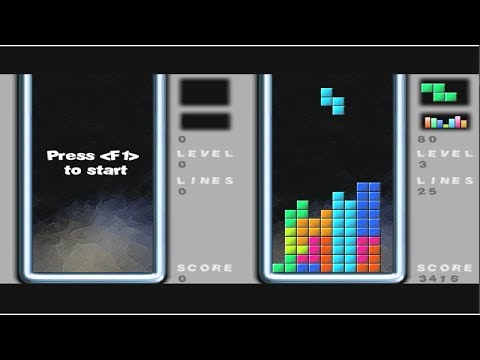
Ready to play now? Click the Play button above and jump straight into Tetra Blocks on minigamesville.com. Tetra Blocks is a fast, friendly online puzzle experience built for quick sessions and long score chases. This browser game blends classic falling-block action with modern polish, perfect for a coffee break or a deep run. If you enjoy clean controls, neon visuals, and satisfying line clears, start Tetra Blocks today and see how high you can climb.
About Tetra Blocks
Tetra Blocks is a casual arcade puzzle game that takes the timeless formula of falling shapes and adds crisp effects, smooth physics, and rewarding combos. Pieces drop, you rotate and place, lines clear, and the speed ramps up. It is accessible for beginners yet rich enough for experts hunting perfect stacks and back-to-back clears. Play it online in your browser with no downloads, and enjoy a fast, unblocked experience on most networks.
History of Tetra Blocks
Falling-block puzzlers have captivated players since the late 80s. Tetra Blocks follows that lineage with clean visuals, soft glow lighting, and a pace that feels great on both desktop and mobile browsers. It keeps the satisfying core loop intact while adding small quality-of-life touches that make every drop feel responsive and fair.
Style & Vibe
Expect a minimalist board, bold colors, and smooth animations that make every placement pop. Sound effects are crisp, and the game strikes a relaxing yet focused mood as speed increases.

Gameplay in Tetra Blocks
Pieces descend one by one. Your job is to rotate, position, and drop them to complete full horizontal lines. Clearing single lines keeps you alive, while doubles and triples push your score into overdrive. Smart stacking sets you up for bursts of line clears that trigger bonus points. The pace gradually accelerates, so clean foundations and quick decisions matter more the longer you survive. Miss a rotation, create a gap, and the board can snowball. Stay calm, keep the well tidy, and cash in those combos.
Game Modes
- Endless: The classic survival loop. Clear as many lines as you can before the stack reaches the top.
- Time Challenge: Race the clock for a target score. Fast clears and clean stacks win the day.
- Goals Mode: Hit specific objectives like multi-line clears or streaks for extra rewards.
How to Play
- Scan the preview to plan your next two or three placements.
- Rotate the falling piece into a shape that fits your current foundation.
- Prioritize flat surfaces and avoid deep wells unless you know how to convert them into combos.
- Chain line clears back to back for multipliers.
- As speed rises, switch to safer drops and bank points consistently.
Controls
- Desktop: Arrow keys to move, Up to rotate, Down for soft drop, Space for hard drop, P to pause.
- Mobile: Swipe left or right to move, tap to rotate, swipe down to soft drop, quick double tap near the bottom to hard drop.
Device Compatibility & Browser Support
Tetra Blocks runs in modern browsers on desktop and mobile. For the best performance, use the latest version of Chrome, Edge, Safari, or Firefox, and keep your device OS updated. The game is lightweight, so it loads quickly even on average connections.
Mobile vs. Desktop Gameplay
- Desktop: Precision controls, faster reaction time, and clearer board vision on larger screens.
- Mobile: Smooth touch input and portable play. Great for short sessions and daily score chases.
Can I Play Offline?
Tetra Blocks is a browser game, so you need an active internet connection to load the game and track progress during your session.
Can I Play Unblocked?
Yes, Tetra Blocks typically runs unblocked on personal networks since it is a clean HTTPS HTML5 game. Some school or work filters still block gaming by category. If that happens, try a home or mobile network.
Tips & Tricks
Beginner Tips
- Keep the center open and build from the sides to reduce panic placements.
- Avoid single-hole gaps that require perfect pieces to fix.
- Use soft drops to fine tune, hard drops only when certain.
- Clear a line early if your stack starts leaning. Control beats greed.
Advanced Strategies
- Think two pieces ahead. Your current placement should set up the next.
- Create flat shelves to enable multi-line clears in quick succession.
- Stagger edges to prevent tall spires that cause top-outs.
- Shift to a safe, low-risk rhythm when the speed spikes. Bank steady lines.
Features
- 🎮 Clean, responsive controls for desktop and mobile
- 💡 Bright neon aesthetic with satisfying effects
- ⚡ Endless score chase with escalating speed
- 🧠 Quick to learn, room to master
- 📈 Combo multipliers for smart stacking
- 🔊 Polished sound cues that support timing
- 🕹️ Play instantly in your browser
- 🏆 Local high score targets to beat and repeat
Unlockables & Secrets
Focus on clean chains and back-to-back clears to trigger bigger score spikes. Many players aim for a stable mid-height stack, then cash in with consecutive clears to surge their score. Keep your foundation tidy to unlock your best runs.
Cheats & Mods
There are no official cheats or mods for the browser version. Third party tools can harm performance or your device. The best path to higher scores is practice, smart stack habits, and consistent timing.
Walkthrough Summary
Open with low-risk single clears to stabilize, then build a two or three line setup on one side. Watch the next-piece preview, keep your tower centered, and switch to hard drops only when placement is guaranteed. When speed increases, favor safe clears over risky towers.
Scoring, Records & Progression
Single clears keep you alive. Doubles, triples, and back-to-back chains push your score higher. Survival time and streaks compound, so minimizing mistakes in the mid game unlocks record runs in the late game.
Why Play Tetra Blocks
Tight controls, clean look, and a flow that ramps from chill to thrilling. Whether you are chasing a personal best or just unwinding, Tetra Blocks delivers a smooth browser game session every time.
Pros & Cons of Tetra Blocks
- Pros: Snappy controls, polished visuals, quick loading, great for short or long sessions.
- Cons: Higher speeds can punish small mistakes, and perfectionists may restart often chasing optimal stacks.
- Use the latest browser version and close resource heavy tabs.
- Enable hardware acceleration in your browser settings for smoother animation.
- On mobile, switch to performance mode or lower power saving for steadier frame rates.
- If inputs feel delayed, clear cache and reload the page for a fresh session.
Similar games to Tetra Blocks
- SudoBlocks: Relaxing 9×9 block placement with sudoku flavor and calm pacing.
- Breakoid: Neon brick breaker where precise angles and power ups drive high scores.
- Castle Blocks: Stack and balance pieces to build sturdy towers without toppling.
- Robot Awake: Grid based logic puzzler that rewards planning and clean solutions.
- Green: Minimalist color puzzle where each level hides a clever rule to uncover.
- Mini Train: Physics puzzles where you place parts to safely guide a tiny train.
- Arrower: Move directional tiles to route a path through compact maze layouts.
FAQ
Is Tetra Blocks free to play?
Yes, you can play the browser version for free on minigamesville.com with no download.
Does Tetra Blocks work on school Chromebooks?
Yes, the HTML5 version runs in Chrome, although school filters may block game sites by policy.
How do I improve my score fast?
Keep a flat stack, clear small gaps early, and aim for back to back multi line clears when the board is stable.
What should I do when the speed ramps up?
Switch to safer placements, use soft drops for control, and avoid creating deep wells you cannot fill.
Is there a hard drop in Tetra Blocks?
Yes, use Space on desktop or a quick double tap near the bottom on mobile to commit a piece instantly.
Will the game save my high score?
Your best scores can persist in the same browser and device. Clearing cache or switching devices may reset local data.
Conclusion
Tetra Blocks nails the sweet spot between calm stacking and pulse raising speed. Clean visuals, responsive inputs, and that perfect line clear buzz make it a go to browser game when you want quick fun or a serious score chase.
Hit Play above and dive into Tetra Blocks on minigamesville.com. Keep the stack tidy, cash in those combos, and set a new personal best today.

 Loading...
 English
 Shqip
Shqip
 বাংলা
বাংলা
 Български
 简体中文
简体中文
 Hrvatski
 Čeština
 Dansk
Dansk
 Nederlands
 Suomi
Suomi
 Ελληνικά
 हिन्दी
 Magyar
 Bahasa Indonesia
 日本語
日本語
 한국어
한국어
 Lietuvių
 Bahasa Melayu
 Norsk
Norsk
 Polski
 Português do Brasil
 Română
 Slovenčina
 Slovenščina
 Svenska
 ไทย
ไทย
 Türkçe
 Українська
 اردو
اردو
 Tiếng Việt
 isiZulu
 Español
 Français
 Deutsch
 العربية
 Italiano
 فارسی
فارسی
 Русский