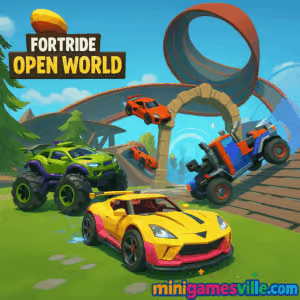
Jump in and play Fortride: Open World on MinigamesVille right now – tap the Start button above and dive into a massive stunt playground. Fortride: Open World is a free online browser game that blends sandbox building with open-world driving, letting you lay down instant roads, launch off wild ramps, and hunt for secrets across a huge 3D map. Tweak your approach, master the physics, and zip through portals as you chase challenges and stunt combos. Ready to cruise unblocked at school or work, no downloads required. Hit Play and experience Fortride: Open World on minigamesville.com.
About Fortride: Open World
Part driving sim, part stunt builder, part exploration adventure, Fortride: Open World gives you total freedom. Swap vehicles on the fly, build track segments in front of your car, and string together loops, rails, and sky bridges to create your own routes. Whether you are here for slick drifts, long nitro sprints, or chill free roam, this online open-world car game makes experimentation the main objective. The best part: it runs in the browser, so you can start within seconds.
History of Fortride: Open World
Originally launched as a WebGL sandbox driving experience, Fortride: Open World quickly earned a following for its blend of physics-based stunts and on-the-spot building. Over time it evolved into a go-to pick for players who love creative driving challenges without the grind, all playable directly in a modern browser.
Style & Vibe
The vibe is playful and experimental. Think towering ramps, glowing portals, and wide-open spaces perfect for testing speed and control. The art style keeps landmarks readable at high speeds while the physics engine makes every drift, bounce, and landing feel impactful.

Gameplay in Fortride: Open World
The core loop is simple and addictive: explore, build, stunt, repeat. Drive to a new area, place road modules, hit nitro, and clear massive gaps. Use portals to warp around the map and discover hidden challenges. Vehicles feel distinct, so a nimble sports car handles ramps differently than a monster truck. As you learn the physics, you will chain longer lines and uncover faster recharge tricks for your nitro.
Game Modes
- Free Roam: Cruise anywhere, experiment with builds, and scout portal routes.
- Challenge Runs: Tackle self-set goals like longest airtime, clean loop sequences, or quickest portal path.
- Time Attack Lines: Mark a start and finish for a route you built and try to beat your best time.
- Stunt Sessions: Practice drift entries, wall rides, and combo landings to polish control.
How to Play
- Press Play and wait for the world to load in your browser.
- Pick a vehicle, then roll out to scout ramps, rails, and portals.
- Tap Build mode, select a road piece, and place it to extend your route.
- Use nitro on straights, then feather throttle and steer for smooth landings.
- Chain stunts and portal jumps to discover shortcuts and hidden areas.
Controls
- Drive: WASD or Arrow keys
- Nitro: Space
- Change vehicle: Left Shift + Arrow keys or Ctrl
- Build mode: Q, then use WASD to select piece, Space to place
- Reset or recover: R if available
- Camera: C to cycle views
Device Compatibility & Browser Support
Fortride: Open World runs in modern browsers with WebGL support. For the smoothest ride, use the latest Chrome, Edge, Firefox, or Safari. A mid-range or better desktop GPU handles higher frame rates, while newer mobile devices can free-roam comfortably at medium settings.
Mobile vs. Desktop Gameplay
- Desktop: Best for high FPS, long draw distance, and precise steering on a keyboard or gamepad.
- Mobile: Great for quick free-roam sessions and casual stunts. Use landscape mode and close background apps for stability.
Can I Play Offline?
No, this is an online browser game. An active internet connection is required to load assets and play.
Can I Play Unblocked?
Most school and work networks allow HTTPS browser games like Fortride: Open World. Since there is no download or install, it often works unblocked. If your network restricts gaming, try a different browser or switch to a personal connection.
- Browser: Play on minigamesville.com, no install needed.
- Official mobile apps: There are no official App Store or Google Play versions of Fortride: Open World.
- Looking for a similar mobile experience with verified store links:
Tips & Tricks
Beginner Tips
- Scout first: do a slow lap to spot portals, rails, and clean landing zones.
- Short pieces, big control: place smaller road segments to fine-tune angles.
- Nitro timing: boost on flat run-ups, never mid-corner or right before a jump lip.
- Feather landings: let off throttle a moment before touchdown to prevent bounce.
- Swap vehicles: use heavier rides for stability and lighter cars for technical lines.
Advanced Strategies
- Recharge routes: learn loops that quickly refill nitro so you can chain long sprints.
- Layered builds: stack rails into ramps for multi-hit stunt lines with smooth exits.
- Portal sequencing: plot portal pairs to skip slow terrain and set faster PBs.
- Drift setup: enter drifts early and modulate steering to keep exit speed high.
- Performance pass: turn down effects if your FPS dips near complex builds.
Features
- 🚗 Free-roam sandbox driving with instant build tools
- 🌀 Portals, loops, rails, and mega ramps for creative routes
- ⚙️ Physics-based vehicles that feel distinct and responsive
- 💨 Nitro sprints with clever recharge opportunities
- 🗺️ Huge map filled with secrets and challenge spots
- 🎯 Self-set goals like time trials, longest airtime, and clean runs
- 💻 Browser-based, fast loading, no downloads
- 📱 Plays on desktop and mobile with modern browsers
Unlockables & Secrets
Explore to find hidden portals and better launch spots. Certain loops double as nitro recharge lines if you carry speed cleanly. Try switching vehicles in new zones, since some hidden paths suit compact cars while others want big grip and weight.
Cheats & Mods
There are no built-in cheats, and third-party mods can break saves or cause performance issues. For the best experience, play the vanilla browser version on minigamesville.com and focus on smarter builds and cleaner inputs.
Walkthrough Summary
- Start with Free Roam and map a simple loop using short road pieces.
- Add a gentle launch ramp and a safe landing flat. Practice clean takeoffs.
- Insert a portal after your landing to connect to a higher zone.
- Extend your line with rails or a second ramp to chain stunts.
- Time a nitro refill loop, then attempt a full, no-mistake run.
Scoring, Records & Progression
Progress is skill-driven. Track your personal records like longest air, fastest route between portals, and clean combo length. As your handling improves, rebuild lines to remove slow turns and add speed-friendly curves.
Why Play Fortride: Open World
It is pure creative driving fun. No grind walls, no long menus, just you, a set of building tools, and an open world ready for experimentation. Whether you have five minutes or an hour, Fortride: Open World is the kind of unblocked online browser game that always gives you something cool to try next.
Pros & Cons of Fortride: Open World
- Pros: Instant play in browser, inventive build-and-drive loop, responsive physics, great for stunts and exploration.
- Cons: No offline mode, performance depends on your device and browser, fewer formal objectives than traditional racers.
- Update your browser to the latest version for the best WebGL performance.
- Enable hardware acceleration in browser settings.
- Close heavy tabs and extensions, especially ad-blockers on first load.
- Try windowed mode or reduce resolution if your FPS dips in busy areas.
- On mobile, switch to landscape, lower system brightness a bit, and keep battery saver off.
Similar games to Fortride: Open World
FAQ
Is Fortride: Open World free to play?
Yes, it is free to play in your browser with no download required.
Does Fortride: Open World work on school Chromebooks?
In many cases yes, because it runs in the browser over HTTPS. If your network blocks games, you may need a different connection.
What browsers are recommended?
Current versions of Chrome, Edge, Firefox, or Safari deliver the best performance.
Can I use a controller?
Keyboard is standard, but some browsers support gamepads. If your controller is recognized, map basic inputs and test in Free Roam.
Why is my game lagging?
Close extra tabs and extensions, enable hardware acceleration, and lower resolution. On mobile, quit background apps before playing.
Is there a story or career mode?
No, this is a sandbox-style open world focused on creative builds, exploration, and personal challenges.
Are there official mobile apps for Fortride: Open World?
No official mobile apps exist. If you want a mobile racing alternative, try Real Racing 3 on Google Play or App Store.
Conclusion
Fortride: Open World is the perfect mash-up of building and high-speed driving. Stitch together ramps, surf rails, hit portals, and learn the physics until every landing feels silky smooth. It is quick to start, satisfying to master, and always tempting you to try one more stunt line.
Ready to roll unblocked in your browser? Smash that Play button above and experience Fortride: Open World on minigamesville.com. See how far your creativity and control can take you, then come back and set a new personal best.

 (1 votes, average: 4.00 out of 5)
 Loading...
 English
 Shqip
Shqip
 বাংলা
বাংলা
 Български
 简体中文
简体中文
 Hrvatski
 Čeština
 Dansk
Dansk
 Nederlands
 Suomi
Suomi
 Ελληνικά
 हिन्दी
 Magyar
 Bahasa Indonesia
 日本語
日本語
 한국어
한국어
 Lietuvių
 Bahasa Melayu
 Norsk
Norsk
 Polski
 Português do Brasil
 Română
 Slovenčina
 Slovenščina
 Svenska
 ไทย
ไทย
 Türkçe
 Українська
 اردو
اردو
 Tiếng Việt
 isiZulu
 Español
 Français
 Deutsch
 العربية
 Italiano
 فارسی
فارسی
 Русский