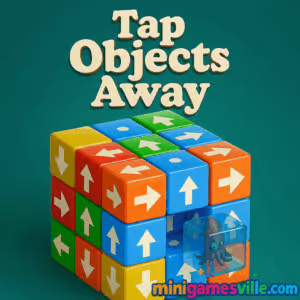
Tap Objects Away Review: Clear the board, satisfy your brain
Ready to play Tap Objects Away right now? Click the Play button above and dive in on MiniGamesVille. Tap Objects Away is a quick-hit puzzle browser game that feels great on both mouse and touch. It blends tap-to-clear logic with satisfying physics, making it perfect for a fast online break or a longer unblocked session. Rotate, plan, then tap to send objects flying off the board. If you love clever spatial puzzles that ramp up in complexity, load Tap Objects Away and start clearing those pieces.
About Tap Objects Away
Tap Objects Away is a minimalist, brain-teasing puzzle you can play in your browser without downloads. Each stage presents a cluster of pieces with directional behavior. Your job is to rotate the scene, read the paths, and remove objects in the correct order so nothing collides. It starts simple, then introduces layered stacks, tight gaps, and limited moves. Whether you call it a hypercasual puzzle or a logic-clearing challenge, Tap Objects Away nails that one-more-level vibe. Play online, track your rhythm, and chase cleaner clears.
History of Tap Objects Away
Tap-to-clear mechanics surged with mobile-era hypercasual puzzlers, then made a smooth jump to the web where instant-play shines. Tap Objects Away embraces that formula in a lightweight browser game format, focusing on crisp interactions and short, snackable levels that reward smart sequencing rather than frantic speed.
Style & Vibe
Clean shapes, clear arrows, and crisp animations keep your focus on strategy. Every successful tap feels tactile, while rotations reveal new solutions. The result is calm, satisfying, and surprisingly strategic.

Gameplay in Tap Objects Away
Each piece moves in the direction it points. Tap to eject it, but only if its path is clear. If a piece is blocked, rotate the cluster and free another one first. Mistimed taps can waste moves or create jams, so think a step ahead. Later levels add denser stacks, trickier angles, and limited-move challenges that reward precision. The loop is simple, the mastery is not, which is why Tap Objects Away keeps you coming back.
Game Modes
- Level-by-level clears: Finish compact puzzles with increasing complexity.
- Move-limited challenges: Beat the board using as few taps as possible.
- Timed runs: Race the clock for fast clears and personal bests.
- Daily practice: Quick warmups to sharpen reading and rotation skills.
How to Play
- Scan the board and identify pieces with clean exit paths.
- Rotate the shape to expose blocked exits and spot safe taps.
- Tap objects in a smart sequence to avoid collisions.
- Prioritize edge pieces and those that unlock multiple exits.
- If moves are limited, plan two or three taps ahead.
Controls
- Desktop: Left click to tap, click and drag to rotate.
- Mobile: Tap to clear, swipe to rotate, pinch if zoom is available.
- Accessibility: Reduce rapid rotations and favor steady angles to read paths clearly.
Device Compatibility & Browser Support
Tap Objects Away is a browser game that runs on modern desktop and mobile browsers. Chrome, Edge, Firefox, and Safari work well. If you experience input lag on older devices, close extra tabs and lower background activity for smoother play.
Mobile vs. Desktop Gameplay
On desktop, mouse control makes micro-rotations precise, which helps on dense stacks. On mobile, tap feedback is snappy and ideal for quick sessions, and swipe rotation feels natural. Both play great, so choose the screen you prefer.
Can I Play Offline?
This is an online browser game. You need an internet connection to load and play Tap Objects Away on MiniGamesVille.
Can I Play Unblocked?
Yes, Tap Objects Away is an unblocked browser game for most school and work networks. If your network restricts gaming, try using a personal device and a standard home or mobile connection.
- Browser: Play free on MiniGamesVille, no download required.
- Mobile stores: There is no official mobile app titled Tap Objects Away. Prefer a similar tap-to-clear puzzle on mobile? Try Tap Away by Popcore:
Tips & Tricks
Beginner Tips
- Start with outermost pieces. Clearing edges opens paths inside.
- Rotate slowly. New angles reveal exits you cannot see head on.
- Follow arrows. If two arrows face each other, clear one side first.
- Avoid random taps in move-limited stages. Plan a small sequence.
- Use corners as anchors. They are great for building safe openings.
Advanced Strategies
- Think in chains. One smart tap can free three more pieces in a row.
- Create lanes. Remove blockers in a straight line to eject deep pieces.
- Pre-rotate. Set your viewing angle before tapping so you can confirm a piece’s whole path.
- Break stalemates by tackling asymmetrical sides rather than the densest face.
- Count moves on tight levels. Reserve two or three taps to fix late jams.
Features
- Clean, logic-first puzzles that reward sequencing and foresight
- Smooth mouse and touch controls with satisfying tap feedback
- Free rotation to reveal hidden exits and smarter paths
- Quick levels for bite-size sessions and time-attack runs
- Gradual difficulty curve that teaches advanced clears naturally
- Move-limited challenges for perfection chasers
- Plays great on desktop and mobile browsers
- True pick-up-and-play puzzle design with no download
Unlockables & Secrets
Expect skins, color variations, and special challenge boards to unlock as you clear more levels. Watch for alternate routes created by smart rotations. A slight angle often turns a blocked piece into a clean exit.
Cheats & Mods
Tap Objects Away is built around fair logic. Third-party mods can hurt performance or risk your device. If a level feels tough, rotate more, zoom if available, and apply the chain-clearing strategy above instead of looking for shortcuts.
Walkthrough Summary
Open with a slow 360-degree scan, mark easy edge clears, then rotate and chain taps. When the board tightens, switch sides to keep lanes open. On move-limited stages, budget taps and avoid impulse clears. Consistency beats speed.
Scoring, Records & Progression
You progress by clearing boards and improving efficiency. Track personal bests by counting moves or time. Set micro-goals, such as zero wasted taps or a perfect outer-ring sweep, to keep improving.
Why Play Tap Objects Away
It is quick to learn, satisfying to master, and perfect for browser-based play. Tap Objects Away delivers that clean puzzle feel with no friction, making it a great choice for a focused logic break or a chill evening session.
Pros & Cons of Tap Objects Away
- Pros: Instant play in browser, intuitive taps, rewarding rotation strategy, short levels.
- Cons: Later stacks can feel tight on small screens, and perfection runs demand patience.
- Keep one game tab open and close heavy background apps for smoother input.
- Enable hardware acceleration in your browser settings if disabled.
- If taps feel delayed, refresh the page to clear memory and reinitialize input.
- On mobile, lock screen orientation to prevent accidental rotations.
Similar games to Tap Objects Away
- Puzzle Blocks Classic — slide and fit block shapes to clear rows and train spatial logic.
- Color Water Sort 3D — pour and reorder colors across tubes for a soothing logic workout.
- Ball Sort Soccer — sort by color with a sporty twist that rewards planning.
- Color Circles — rotate ring segments to align colors and clear the board.
- Thief Puzzle — stretch and sneak with precise timing to solve inventive scenarios.
- Turn Turn — simple one-touch timing puzzles that sharpen rhythm and focus.
FAQ
What is Tap Objects Away?
Tap Objects Away is a free online puzzle browser game where you rotate a cluster and tap objects to clear them in the correct order.
Where can I play Tap Objects Away online?
You can play it in your browser on MiniGamesVille with no download.
Is Tap Objects Away unblocked at school or work?
In most cases yes, since it is a lightweight browser game. If your network blocks gaming, try a personal connection.
Does Tap Objects Away have different modes?
Yes, you will find standard clears, move-limited challenges, and time-focused runs.
Can I play Tap Objects Away on mobile?
Yes, it runs in mobile browsers. For a native app alternative, try Tap Away on Google Play or Tap Away 3D on the App Store.
How do I get better at Tap Objects Away?
Rotate more, clear edges first, create straight lanes, and think in chain reactions.
Are there cheats for Tap Objects Away?
No official cheats exist. Mastering rotations and sequences is the best path to clean clears.
Conclusion
Tap Objects Away proves how addictive a simple idea can be. Rotate, read the arrows, and tap at the perfect moment to send each object flying. It is quick to start, hard to put down, and tuned for satisfying clears.
Hit Play above to jump into Tap Objects Away on MiniGamesVille. Warm up with a few easy boards, then chase your best clears. Your next perfect chain is one smart tap away.

 Loading...
 English
 Shqip
Shqip
 বাংলা
বাংলা
 Български
 简体中文
简体中文
 Hrvatski
 Čeština
 Dansk
Dansk
 Nederlands
 Suomi
Suomi
 Ελληνικά
 हिन्दी
 Magyar
 Bahasa Indonesia
 日本語
日本語
 한국어
한국어
 Lietuvių
 Bahasa Melayu
 Norsk
Norsk
 Polski
 Português do Brasil
 Română
 Slovenčina
 Slovenščina
 Svenska
 ไทย
ไทย
 Türkçe
 Українська
 اردو
اردو
 Tiếng Việt
 isiZulu
 Español
 Français
 Deutsch
 العربية
 Italiano
 فارسی
فارسی
 Русский