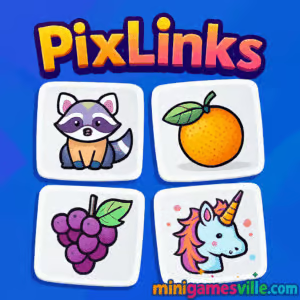
Ready to play PixLinks right now? Click the big Play button above to launch PixLinks on minigamesville.com and dive into a quick, brain teasing online puzzle session. This fast-loading browser game blends visual association with light strategy, perfect for a quick break or a focused challenge. Enjoy a clean, ad-light experience, smooth touch or mouse controls, and a format that’s friendly for school or work devices when allowed. If you’re searching for a fun unblocked puzzle you can play in your browser, you’re in the right place. Try PixLinks and see how many clever connections you can spot in one go.
About PixLinks
PixLinks is a picture-linking logic game where you scan a grid of tiles and connect images that share a common theme. Think faces, weather, time, food, travel, animals, and dozens of everyday categories. The joy is in the aha moment: when you suddenly recognize the theme that ties multiple tiles together, your chain clears and the board opens up for the next set. Designed for bite-size sessions and longer marathons alike, PixLinks rewards pattern recognition, deduction, and careful observation.
History of PixLinks
While PixLinks is a modern web title, it channels the classic idea of visual-association puzzles. Instead of matching identical icons, you’re linking tiles that belong together by concept. That shift from “same equals match” to “related equals match” gives the game a fresh, thoughtful feel that suits today’s casual, quick-to-play browser formats.
Style & Vibe
Minimalist UI, readable icons, and soft feedback sounds keep your focus on solving. The visual language is crisp and colorful, so even on a small phone screen you can spot relationships at a glance.

Gameplay in PixLinks
Your goal is to clear the board by linking tiles that fit a shared theme. Scan the grid, identify a concept that ties multiple pictures together, and select the correct set to remove them. New tiles and themes surface as you progress, and the challenge ramps up with trickier relationships or more subtle art. Smart players pace themselves, double check outliers that almost fit, and avoid misclicks that can burn time or break streaks.
Game Modes
- Level Progression: Tackle a growing sequence of themed puzzles that gradually increase in complexity.
- Challenge Variations: Some levels add light constraints like limited moves or a soft timer to keep you sharp.
- Practice Play: Warm up by focusing on recognition without worrying about speed.
How to Play
- Look over the grid and spot a theme, for example items related to time or parts of a face.
- Select all tiles that belong to that theme to create a valid link and clear them.
- Repeat, working from easy groupings to the trickier, less obvious connections.
- Use process of elimination. If a tile almost fits a theme but not quite, save it for later.
Controls
- Desktop: Left-click to select or deselect tiles, then confirm your link.
- Mobile/Tablet: Tap tiles to select, tap again to undo.
- Quality-of-life: Volume toggle and pause are available in-menu in most builds.
Device Compatibility & Browser Support
PixLinks is optimized for modern browsers like Chrome, Edge, Safari, and Firefox. It runs smoothly on Windows, macOS, iOS, Android, and Chromebooks. If you experience lag on older hardware, reduce background tabs, keep your browser updated, and enable hardware acceleration in settings.
Mobile vs. Desktop Gameplay
- Mobile: Great for quick levels with tap controls and one-handed play.
- Desktop: Larger view for scanning busy boards and faster tile selection with a mouse.
Can I Play Offline?
PixLinks is built for online play in your browser. While some assets may cache, you should plan to be connected to ensure levels and progress load correctly.
Can I Play Unblocked?
PixLinks is an unblocked-friendly browser game when your network allows gaming sites. If a school or workplace filters entertainment domains, access may vary by policy. For the best chance of smooth play, use a modern browser, https, and disable overly aggressive extensions that may block game assets.
- Browser: Play instantly on minigamesville.com.
- Mobile apps: There are no official iOS or Android apps for PixLinks at this time.
- Suggested similar mobile pick: If you want a high quality link-style puzzle on phone, try Flow Free:
Tips & Tricks
Beginner Tips
- Start with the most obvious sets, then let the remaining tiles suggest the next theme.
- Scan by category. Do a quick pass for animals, then foods, then tools, and so on.
- Use odd tiles as anchors. If one tile clearly fits a category, search for its companions.
- Avoid rushing early clicks. One wrong link can cost you time or break your streak.
Advanced Strategies
- Check overlap. Some tiles could belong to multiple loose ideas. Choose the theme with the strongest evidence.
- Work the perimeter first. Edge tiles are easier to evaluate and can reveal the board’s overall theme mix.
- Group by attributes, not just object type. Color palette, context, and function often signal the real connection.
- When stuck, reset your view. Look away for a second, then re-scan. Fresh eyes catch subtle relationships.
Features
- 🧩 Visual-association matching that rewards clever thinking
- ⚡ Quick-loading online play with zero installs
- 📱 Smooth touch and mouse controls for mobile and desktop
- 🎯 Levels that scale from laid-back to lightly competitive
- 🔊 Simple, satisfying feedback and clean UI
- 🌈 Variety of everyday themes that keep puzzles fresh
- 💾 Local save support in your browser for ongoing play
- 🧠 Great brain break that sharpens pattern recognition
Unlockables & Secrets
Expect steady difficulty ramps and occasional twists on how themes are presented. Replay earlier levels to sharpen recognition and set personal bests for speed and accuracy.
Cheats & Mods
There are no official cheats for PixLinks. Third-party mods or extensions can break the game or cause progress loss. For a fair challenge and stable performance, play the official browser version here on minigamesville.com.
Walkthrough Summary
Approach each board with a simple loop: scan, shortlist likely themes, confirm each set, then re-scan the updated grid. Prioritize clear groups first, then return for the subtle connections. If a tile doesn’t quite fit, park it until the next pass.
Scoring, Records & Progression
PixLinks emphasizes accuracy and steady progression. Many players track their personal records by how few mistakes they make or how quickly they identify themes. Clearing streaks without misses is a reliable way to improve your times over multiple sessions.
Why Play PixLinks
If you love quick-thinking puzzles that feel fresh every time, PixLinks is an easy yes. It is intuitive enough for casual play yet challenging enough to scratch that brain teaser itch. The concept-driven matching makes every board a mini riddle.
Pros & Cons of PixLinks
- Pros: Fast to learn, satisfying aha moments, works great on any device, no installs.
- Cons: Thematic ambiguity can stump new players, and perfectionists may replay levels to chase cleaner runs.
- Keep Chrome, Safari, Edge, or Firefox updated for the best WebGL and canvas performance.
- Close heavy tabs and streaming apps during play to reduce stutter on older devices.
- Disable ad or script blockers for this page if the game canvas fails to load.
- On mobile, switch to landscape when boards feel crowded.
Similar games to PixLinks
- Robot Awake — program a pathfinding robot through laser-lit logic grids.
- Green — a clever color-based puzzle where every level hides a new rule.
- Diff — minimalist brain teasers that test deduction and number sense.
- Sudoblocks — sudoku meets block fitting for a chill, strategic puzzle flow.
- Mini Train — draw and place pieces to guide a train safely to the station.
- Tap It Away — satisfyingly peel off 3D blocks to reveal what’s inside.
- Arrower — rotate arrows to route pieces into their goals with minimal moves.
FAQ
What kind of game is PixLinks?
PixLinks is a picture-linking browser puzzle where you match tiles by concept rather than identical art.
Is PixLinks free to play online?
Yes, you can play PixLinks free in your browser here on minigamesville.com with no downloads.
Does PixLinks work on phones and tablets?
Yes, it runs smoothly on modern mobile browsers with responsive tap controls.
Can I play PixLinks unblocked at school?
If your network allows gaming sites, PixLinks should load without extra steps. Access depends on local policies.
How do I save progress?
Progress is stored in your browser’s local storage. Using the same device and browser helps keep your data intact.
What if the game does not load?
Update your browser, disable blocking extensions on this page, refresh, or try another modern browser.
Conclusion
PixLinks turns quick breaks into satisfying wins. The concept-based matching keeps your brain engaged while the clean presentation gets out of the way. Whether you have two minutes or twenty, there is always one more clever set to discover.
Ready to think in pictures? Press Play above to jump into PixLinks on minigamesville.com, link those tiles, and rack up streaks. Have fun and share your best runs with friends who love smart, unblocked online puzzles.

 Loading...
 English
 Shqip
Shqip
 বাংলা
বাংলা
 Български
 简体中文
简体中文
 Hrvatski
 Čeština
 Dansk
Dansk
 Nederlands
 Suomi
Suomi
 Ελληνικά
 हिन्दी
 Magyar
 Bahasa Indonesia
 日本語
日本語
 한국어
한국어
 Lietuvių
 Bahasa Melayu
 Norsk
Norsk
 Polski
 Português do Brasil
 Română
 Slovenčina
 Slovenščina
 Svenska
 ไทย
ไทย
 Türkçe
 Українська
 اردو
اردو
 Tiếng Việt
 isiZulu
 Español
 Français
 Deutsch
 العربية
 Italiano
 فارسی
فارسی
 Русский