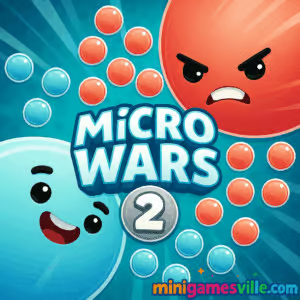
Ready to play right now? Click the big Play button above and launch MicroWars 2 on minigamesville.com. MicroWars 2 is a fast, bite-size real-time strategy browser game where you send tiny troops between cells to capture the map. It loads in your browser, works online on desktop and mobile, and is perfect if you want an unblocked strategy fix at school or work. Claim neutral nodes, outmaneuver rivals, and snowball your advantage. If you love streamlined RTS, tap Play and dive in.
About MicroWars 2
MicroWars 2 condenses classic territory control into quick matches that reward smart routing and timing. Your bases steadily spawn units, you drag to send them, and every capture widens your production lead. The loop is simple, yet the meta is all about angles, split attacks, multi-selects, and choosing when to defend or surge. It is an online strategy game at heart, built for instant play and zero downloads.
History of MicroWars 2
This sequel builds on the original MicroWars formula with cleaner visuals, snappier unit flow, and levels that teach advanced tactics over time. Expect more varied layouts, smarter AI pacing, and a smoother difficulty curve that invites new players while giving veterans plenty to optimize.
Style & Vibe
Clean, high-contrast cells, silky transitions, and tiny troop dots keep the screen readable even during hectic exchanges. The minimalist UI keeps your focus on lines, numbers, and timing, which is exactly where the strategy lives.

Gameplay in MicroWars 2
Each base generates units over time. Drag from one or multiple friendly cells to a target to send a percentage of troops. Capturing increases your total production, which lets you pressure more nodes, reinforce the frontline, and create pincer routes. The physics are snappy: units travel fast, captures flip instantly at zero defenders, and early mistakes can be salvaged with a sharp counterpush. Challenges scale from simple 1v1 skirmishes to layered maps with chokepoints, high-value hubs, and risky long routes that pay off if timed well.
Game Modes
- Level Campaign: Clear handcrafted puzzles that introduce new map shapes, distances, and split-attack scenarios.
- Quick Match: Pick a layout, press start, and sprint to control the board.
- Timed Challenge: Win before the clock runs out to earn higher medals or stars.
- Hardcore AI: Tougher opponents that punish greedy routes and slow reinforcements.
How to Play
- Wait a moment for your first base to produce a few units.
- Click and drag from your base to a neutral or enemy cell to send troops.
- Chain routes by dragging through multiple friendly cells to split attacks.
- Reinforce under-pressure hubs by sending from rear bases.
- Snowball: once you flip a key node, use it to capture adjacent targets fast.
Controls
- Mouse or touch: drag from source cell to target to send units.
- Multi-select: press, hold, and drag across several friendly cells, then release on the target.
- Double-tap or quick double-click a base to prioritize a rapid send from that cell.
Device Compatibility & Browser Support
MicroWars 2 runs in modern browsers on Windows, macOS, ChromeOS, Android, and iOS. Best experience: latest Chrome, Edge, Safari, or Firefox with hardware acceleration on. It is a true browser game, so no install is required.
Mobile vs. Desktop Gameplay
- Mobile: pinch-zoom if your browser supports it, then swipe to trace attacks with your thumb. Great for quick sessions.
- Desktop: precise mouse drags help with tight splits and faster multi-routes, which can shave seconds off your clear times.
Can I Play Offline?
MicroWars 2 requires an internet connection to load assets and save your progress locally in the browser. You can add the page to your home screen for quicker access, but a live connection is still recommended.
Can I Play Unblocked?
Yes, many players enjoy MicroWars 2 unblocked at school or work since it is an HTML5 browser game. If a network filter gets in the way, try a different modern browser, use HTTPS, or ask your admin to allow minigamesville.com.
- Browser: Play free on minigamesville.com in your desktop or mobile browser.
- Official mobile apps for MicroWars 2 are not available at this time.
- Looking for a similar mobile experience with official apps?
Try Mushroom Wars 2 on:
iOS App Store: Download on the App Store
Google Play: Get it on Google Play
Tips & Tricks
Beginner Tips
- Open neutral cells near your base first. Short routes flip faster and reduce losses in transit.
- Never leave a frontline cell empty. After a capture, send only part of the stack so it can defend counterattacks.
- Chain sends. Drag through two or three friendly nodes to arrive from multiple angles at once.
- Watch numbers. If your target shows a lower count than your incoming flow, commit. If not, redirect mid-drag to a softer node.
- Keep production rolling. The side with more cells usually wins, so favor fast, safe expansions.
Advanced Strategies
- Pressure and pull. Fake a long route to draw defenders, then snap your drag to a closer objective.
- Cycle reinforcements. Use rear cells as batteries feeding the frontline, so front cells stay combat-ready.
- Pinch choke points. Time two converging streams so the enemy cannot refill fast enough.
- Trade efficiently. Sacrifice a low-yield outpost if it lets you flip a high-yield hub.
- Tempo resets. If a push stalls, route everything to stabilize, then relaunch when your counts recover.
Features
- ⚡ Lightning-fast matches perfect for short breaks
- 🧠 Smart, minimalist RTS that rewards timing and pathing
- 🗺️ Dozens of handcrafted maps with unique chokepoints
- 🎯 Multi-select and split-attack support for clean executes
- 📈 Scaling challenges and optional hard mode
- 📱 Plays in your browser on desktop, Chromebook, and mobile
- 💾 Auto-saves progress locally in your browser
- 🔊 Crisp feedback with clear capture and combat cues
Unlockables & Secrets
Expect star or medal thresholds tied to time and capture efficiency. Hitting top ranks on early maps often reveals extra challenge layouts later in the set. Replay with tighter splits to uncover hidden objectives and bonus stages.
Cheats & Mods
There are no official cheats. Browser extensions or modified builds can break saves or performance, so stick to the standard game for stable play and fair routing practice.
Walkthrough Summary
Early worlds teach fundamentals: short captures, safe expansions, and basic defense. Mid worlds add long routes, multi-lane forks, and contested hubs that demand synchronized sends. Late worlds test speed and foresight, pushing you to pre-route reinforcements and clamp down on the map before the AI spikes.
Scoring, Records & Progression
Wins are earned by capturing every enemy cell. Faster clears and low unit loss can award higher ratings. Your progress saves locally, so keep using the same browser and device to preserve unlocks. Chasing personal best times is the best way to master tight split routes.
Why Play MicroWars 2
If you crave pure, readable strategy without clutter, MicroWars 2 is a gem. It is quick to learn, great on any device, and packed with clever map design that keeps each run fresh.
Pros & Cons of MicroWars 2
- Pros: Instant play in browser, satisfying territory snowball, strong map variety, smooth touch and mouse controls.
- Cons: Minimalist presentation may feel lean to players seeking deep story, late-game levels can spike if you do not practice split routes.
- Use the latest Chrome, Edge, Safari, or Firefox for smoother frame pacing.
- Enable hardware acceleration in browser settings.
- Close heavy tabs, streaming apps, or screen recorders during play.
- On mobile, switch to full-screen and lock orientation for steadier swipes.
- If input feels laggy, clear cache, then reload the page for a fresh session.
Similar games to MicroWars 2
- Base Defense 2 — build and upgrade defenses to hold waves while you manage resources and lanes.
- Base Defense — classic base-holding strategy with tight upgrade choices and smart placement.
- Stick Defenders — merge, fortify, and send units to push back relentless stick-figure attackers.
- Archer Castle — aim, upgrade, and protect your keep from advancing foes with precise shots.
- Blumgi Castle — physics-powered defenses where smart angles and timing win the day.
- Village Builder — slow-burn strategy about efficient expansion and smart building order.
- Plane Wars — route squadrons between nodes to capture the skies in fast tactical bouts.
FAQ
What type of game is MicroWars 2?
It is a real-time strategy browser game focused on capturing cells, expanding production, and out-routing opponents.
Is MicroWars 2 free to play?
Yes, you can play online for free in your browser on minigamesville.com with no download required.
Does MicroWars 2 work on a Chromebook?
Yes, it runs well on modern Chromebooks in Chrome with hardware acceleration enabled.
Can I play MicroWars 2 unblocked at school?
Many school networks allow it since it is an HTML5 game. If blocked, ask your administrator to allow minigamesville.com.
How do I get better at split attacks?
Drag across multiple friendly cells before releasing on the target to send from several sources at once, then practice on short routes to refine timing.
Does MicroWars 2 save my progress?
Progress usually saves locally in your browser. Use the same device and browser for consistent saves.
Are there mobile apps for MicroWars 2?
There are no official mobile apps for this exact title. For a similar mobile RTS, try Mushroom Wars 2 on iOS and Android using the links above.
What are the controls on touch screens?
Tap and drag from your base to a target. To multi-select, press and drag across several bases, then release on the target.
Conclusion
MicroWars 2 proves that small-scale battles can feel huge when every route and second matters. Clean visuals, crisp movement, and clever maps make each match a satisfying puzzle. Whether you have two minutes or twenty, it scratches that strategy itch fast.
Scroll up and hit Play to start conquering cells in MicroWars 2 right here on minigamesville.com. Capture, expand, and outsmart your rival. One smooth chain send at a time, the map is yours.

 Loading...
 English
 Shqip
Shqip
 বাংলা
বাংলা
 Български
 简体中文
简体中文
 Hrvatski
 Čeština
 Dansk
Dansk
 Nederlands
 Suomi
Suomi
 Ελληνικά
 हिन्दी
 Magyar
 Bahasa Indonesia
 日本語
日本語
 한국어
한국어
 Lietuvių
 Bahasa Melayu
 Norsk
Norsk
 Polski
 Português do Brasil
 Română
 Slovenčina
 Slovenščina
 Svenska
 ไทย
ไทย
 Türkçe
 Українська
 اردو
اردو
 Tiếng Việt
 isiZulu
 Español
 Français
 Deutsch
 العربية
 Italiano
 فارسی
فارسی
 Русский