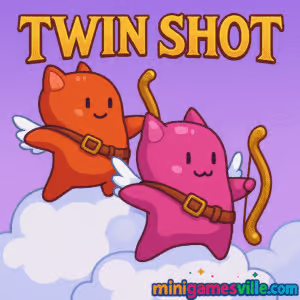
Play Twin Shot now on Minigamesville and jump straight into adorable, arrow-flinging chaos. Twin Shot is a retro-style archery platformer browser game where you and a friend tag-team waves of quirky monsters using precision shots and clever platforming. If you love fast, arcade action with tight physics and couch co-op, you are in the right place. Hit Play above to start Twin Shot online, then come back here for tips, controls, and strategies to sharpen your aim and climb those leaderboards on minigamesville.com.
About Twin Shot
Twin Shot is an action platformer that blends archery combat with smart level design. You control cute celestial heroes armed with bows, clearing each stage by popping enemies, collecting coins, and finding sneaky routes. The magic twist: arrows stick into walls, floors, and enemies, so you can use your own shots as temporary platforms to reach new heights. Whether you prefer solo runs or 2-player local co-op, Twin Shot delivers snappy controls, quick stages, and a satisfying loop perfect for bite-size browser sessions.
History of Twin Shot
Born in the late 2000s Flash era, Twin Shot captured players with its crisp pixel art, bouncy physics, and easy-to-learn controls. The game’s pick-up-and-play design helped it become a classroom and dorm favorite. Today, Twin Shot lives on as an online browser game, letting a new generation enjoy its co-op charm without downloads.
Style & Vibe
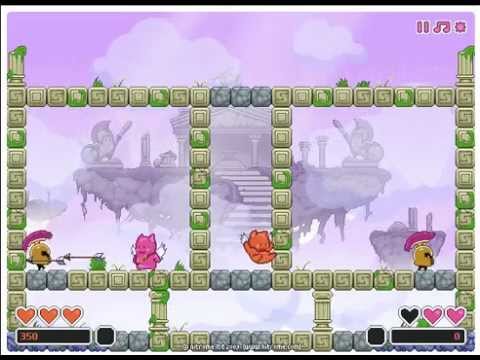
Expect bright, candy-coated pixel art, playful enemy designs, and cheerful chiptunes that keep the tempo high. The vibe is lighthearted, but the platforming is precise enough to reward skill.

Gameplay in Twin Shot
Each stage drops you into a compact arena filled with platforms, hazards, and baddies. Fire arrows to defeat enemies, but also to build makeshift ladders or step stones. Arrows pin to surfaces for a short time, which opens a ton of creative routes. Pop enemies from a safe perch, bounce up to hidden coins, and time your jumps so you never get clipped. The physics feel snappy, with short air time, responsive lateral movement, and arrows that travel fast and straight. As you progress, moving platforms, armored foes, and tricky hazards force you to mix precision shots with agile footwork.
Game Modes
- Solo Run: Clear stages at your pace, practice aim training, and push for high scores.
- Local Co-op: Two players on one keyboard. Cover angles, set up arrow-steps for each other, and keep both heroes alive.
- Score Chase: Replay stages to optimize routes, chain quick clears, and farm coins with minimal misses.
How to Play
- Press Play above and select 1 or 2 players.
- Survey the arena, then shoot early to plant arrow platforms.
- Prioritize high-threat enemies first, then mop up coins.
- Use arrows to bridge gaps, reach secrets, and avoid spikes.
- Finish the wave with clean movement to preserve lives and score.
Controls
- Player 1: Arrow keys to move and jump, Space to shoot.
- Player 2: A/D to move, W to jump, F to shoot.
- Tips: Fire into walls to create quick steps. Tap jump off your arrows as soon as they stick.
Device Compatibility & Browser Support
Twin Shot runs in modern desktop and mobile browsers. For the smoothest performance, use an up-to-date version of Chrome, Edge, Firefox, or Safari. Enable hardware acceleration in your browser settings, close heavy background tabs, and consider pausing resource-hungry extensions during play.
Mobile vs. Desktop Gameplay
- Desktop: Best for precise inputs and 2-player co-op on one keyboard.
- Mobile: Great for quick online sessions. If touch controls feel tight, rotate to landscape and reduce system animations for better responsiveness.
Can I Play Offline?
Twin Shot is an online browser game, so you need an internet connection to load the game and save your progress in-session.
Can I Play Unblocked?
Yes, Twin Shot is playable as an unblocked browser game on Minigamesville in most school and work networks. If your network restricts gaming, try switching browsers or using a personal connection.
- Browser: Play Twin Shot right here on minigamesville.com.
- Mobile apps: There are no official Twin Shot listings on the App Store or Google Play at this time.
- Want a similar mobile fix? Try Archero, a slick archery action game with bite-size stages:
Tips & Tricks
Beginner Tips
- Open with utility shots. Fire into walls to pre-build arrow steps before engaging enemies.
- Stay mid-height. It is easier to dodge and pivot when you are not stuck at the bottom or ceiling.
- Tag flying enemies first. Ground foes are easier to kite once the airspace is clear.
- Collect coins safely. Clear the last enemy near coin clusters to reduce risk.
Advanced Strategies
- Double-platform ladder. Stack two arrows vertically and chain short hops to reach secret ledges.
- Crossfire co-op. In 2-player, hold opposite sides so one player baits while the other lands precise shots.
- Pre-fire spawns. Learn spawn points and place arrows where enemies will enter to burst them instantly.
- Spike skip. Use an arrow step at spike height, then micro-hop to pass hazards without touching them.
Features
- 🏹 Snappy archery combat with platforming physics
- 👫 Local 2-player co-op on one keyboard
- 🧱 Arrow platforms that change how you move
- 🎯 Tight, room-based stages perfect for quick sessions
- 💎 Coin collecting and hidden routes for score chasers
- 🕹️ Pure browser game, no downloads
- 🎨 Charming pixel art with upbeat chiptunes
- ⚔️ Enemies that escalate in patterns and armor
Unlockables & Secrets
Keep an eye out for tucked-away coins behind destructible blocks and off-screen ledges. Some stages reward creative arrow placements with hidden pickups. Replay tough rooms to perfect routes that collect everything in a single cycle.
Cheats & Mods
Twin Shot is balanced around fair play. Avoid third-party cheat extensions or unauthorized mods that can harm performance or your device. Mastering arrow-step movement will outclass any cheat.
Walkthrough Summary
Learn enemy priorities, clear vertical threats first, then herd ground units into safe lines of fire. Use arrows to bridge gaps, secure high ground, and finish with clean coin routes. In co-op, communicate who handles which lane and when to place platforms.
Scoring, Records & Progression
Score comes from enemy clears, coin pickups, and speed. Preserve lives and minimize wasted movement. Try time-splitting your routes, then revisit stages to shave seconds by pre-placing arrow steps and eliminating backtracking.
Why Play Twin Shot
Twin Shot hits that sweet spot between arcade immediacy and inventive movement. It is easy to learn, satisfying to master, and perfect for a quick online session or a long co-op grind. If you love classic action platformers with a quirky twist, this one belongs in your favorites.
Pros & Cons of Twin Shot
- Pros: Responsive controls, clever arrow-platform mechanic, great for 2-player, fast load and play.
- Cons: Later rooms can spike in difficulty, touch controls feel tighter on small screens, no native online matchmaking.
- Keep your browser updated to the latest version for smoother frame pacing.
- Enable hardware acceleration in settings and close heavy tabs.
- On laptops, plug in power mode to avoid CPU throttling during intense rooms.
Similar games to Twin Shot
- Tiny Archer — first person arrow trials with precision aiming and timing challenges.
- Bad Ice Cream 2 — maze-like action with destructible paths and tasty fruit runs, perfect for duo play.
- Poor Bunny — cute, fast platforming where survival and coin routes demand quick reactions.
- Raft Wars — turn-based projectile battles with fun upgrades and cheeky humor.
- Shot Trigger — stylish run-and-gun sequences that reward sharp timing.
- Parkour Block 6 — tight first person jumping trials for platforming purists.
FAQ
Is Twin Shot free to play?
Yes, Twin Shot is a free online browser game you can play on Minigamesville without downloads.
Does Twin Shot support two players?
Yes, Twin Shot offers local 2-player co-op on one keyboard, perfect for friends sharing a screen.
What are the default controls in Twin Shot?
Player 1 uses Arrow keys and Space, Player 2 uses WASD and F. You can play solo or co-op.
Can I play Twin Shot unblocked at school?
In many cases yes, Twin Shot runs as an unblocked game. If your network blocks games, try another browser or a personal connection.
Is there an official Twin Shot app on mobile?
No, Twin Shot does not have official App Store or Google Play versions. For a similar mobile experience, try Archero on iOS and Android.
How do I get higher scores in Twin Shot?
Clear aerial threats first, use arrow platforms to optimize routes, and collect coins in one clean sweep to save time and lives.
Conclusion
If you crave a fast, feel-good action platformer, Twin Shot delivers. The arrow-as-platform mechanic is simple to grasp but endlessly creative, and co-op play turns every room into a mini puzzle with clutch moments and high fives.
Ready to jump in? Hit Play above to enjoy Twin Shot online on Minigamesville. Share the keyboard, chase new high scores, and master those arrow steps. See you in the clouds.

 Loading...
 English
 Shqip
Shqip
 বাংলা
বাংলা
 Български
 简体中文
简体中文
 Hrvatski
 Čeština
 Dansk
Dansk
 Nederlands
 Suomi
Suomi
 Ελληνικά
 हिन्दी
 Magyar
 Bahasa Indonesia
 日本語
日本語
 한국어
한국어
 Lietuvių
 Bahasa Melayu
 Norsk
Norsk
 Polski
 Português do Brasil
 Română
 Slovenčina
 Slovenščina
 Svenska
 ไทย
ไทย
 Türkçe
 Українська
 اردو
اردو
 Tiếng Việt
 isiZulu
 Español
 Français
 Deutsch
 العربية
 Italiano
 فارسی
فارسی
 Русский