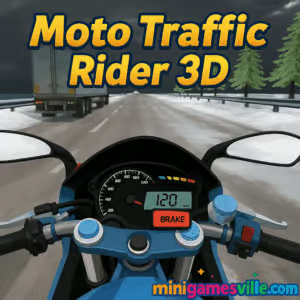
Play Moto Traffic Rider 3D now on MiniGamesVille.com and feel the rush. Hit the start button and jump straight into Moto Traffic Rider 3D, an online motorcycle racing browser game that lets you split lanes, thread through city traffic, and chase new top speeds in seconds. If you want quick, high-adrenaline action, this unblocked traffic rider delivers. Master near misses, nail wheelies, and push for cleaner lines as you level up your bikes. Ready to ride? Press play and take Moto Traffic Rider 3D for a spin right here on MiniGamesVille.
About Moto Traffic Rider 3D
Moto Traffic Rider 3D is a fast, pick‑up‑and‑play highway rider set in a 3D cityscape. You weave through cars, bank across lanes, and stack bonus points for risky overtakes and wheelies. The physics lean toward responsive arcade handling, so you get satisfying speed with tight control. It is perfect for short sessions or long leaderboard grinds, fully playable in the browser with no downloads. Whether you call it a traffic moto racer, a highway bike simulator, or a 3D motorcycle browser game, Moto Traffic Rider 3D keeps your heart rate high and your brake finger twitchy.
History of Moto Traffic Rider 3D
The game taps into the mid‑2010s wave of traffic‑dodging moto titles that exploded on web and mobile. Those games proved that first‑person speed, near‑miss scoring, and upgrade loops work brilliantly in short sessions. Moto Traffic Rider 3D brings that proven loop to the modern browser with smooth performance, crisp 3D visuals, and multiple modes so you can chase distance, time, or pure style runs.
Style & Vibe
Expect glossy bikes, dense city traffic, and a clean HUD that keeps you focused on the road. Lighting shifts from day to night, and weather options keep runs fresh. The soundtrack and engine notes lean toward punchy, with enough grit to sell the speed.

Gameplay in Moto Traffic Rider 3D
You start on a stock street bike and earn cash by riding fast, passing cars closely, and staying accident free. Cash unlocks better motorcycles, visual tweaks, and new routes. The core loop is simple: accelerate, commit to lines, slip through gaps, and manage risk. Ride closer to traffic for higher rewards, chain overtakes to build combos, and use wheelies on straights for extra points. Crashes reset your run, so precision matters. Moto Traffic Rider 3D rewards clean aggression.
Game Modes
- Endless One‑Way, forward traffic only, ideal for high‑speed flow runs.
- Endless Two‑Way, opposing lanes mean bigger multipliers and bigger risks.
- Time Attack, race the clock, extend time via clean overtakes and high speed.
- Challenges/Quests, complete set objectives like distance, near‑miss counts, or speed targets.
How to Play
- Click Play on MiniGamesVille to launch Moto Traffic Rider 3D in your browser.
- Choose a mode, set weather or time of day if available, and pick your bike.
- Accelerate hard, scan far ahead, and plan your lane changes early.
- Hug traffic for near‑miss bonuses, then string them together for combo cash.
- Bank earnings between runs to upgrade speed, handling, and brakes.
- Repeat, refine lines, and push for new personal records.
Controls
- W or Up Arrow, accelerate
- S or Down Arrow, brake
- A/D or Left/Right Arrows, steer
- Shift, wheelie on straights for bonus score
- Space, handbrake on tighter corrections
- Esc or P, pause
Device Compatibility & Browser Support
Moto Traffic Rider 3D runs in modern browsers with WebGL support. For the smoothest ride, use the latest versions of Chrome, Edge, Firefox, or Safari on desktop. It also runs on many Android and iOS devices with capable mobile browsers, though desktop gives the most stable frame rates and precise steering.
Mobile vs. Desktop Gameplay
- Desktop, higher FPS, tighter keyboard control, best for records and challenge runs.
- Mobile, quick sessions anywhere, touch steering, lower graphics settings recommended for older devices.
Can I Play Offline?
No. Moto Traffic Rider 3D is a browser game that requires an internet connection to load and run.
Can I Play Unblocked?
Moto Traffic Rider 3D on MiniGamesVille is designed to work on most networks. If your school or workplace restricts gaming sites, access can vary by local filters. Try a different browser window, clear cache, or switch networks when possible.
- Browser, play free on MiniGamesVille.com.
- Official mobile stores for this exact title, no verified Google Play or App Store listing exists for the exact name Moto Traffic Rider 3D at this time.
- Recommended mobile alternative, Traffic Rider by skgames
Tips & Tricks
Beginner Tips
- Stay centered in your lane to keep exits open when traffic shifts.
- Build speed gradually, then go for near‑misses once you are comfortable.
- Use wheelies only on straight segments, then settle the front before lane changes.
- Upgrade handling first, then engine, then brakes.
- Practice in One‑Way to learn traffic rhythms before Two‑Way multipliers.
Advanced Strategies
- Read clusters, not cars, and choose the line that avoids sudden lane blockers.
- Feather the throttle while threading gaps to avoid over‑steering.
- Chain near‑misses in groups of three or more to spike combo earnings.
- Use time‑of‑day and weather settings to your advantage, daylight often gives clearer sightlines.
- When traffic density increases, ride just off the lane center to slip past mirror‑to‑mirror.
Features
- 🏍️ Responsive arcade bike physics with punchy acceleration
- 🌆 Lively 3D city traffic and dynamic day or night runs
- 🌦️ Optional weather for replay variety
- 🎯 Four addictive modes for score, distance, and time goals
- 💰 Upgrades and unlockable motorcycles
- 📈 Near‑miss multipliers and wheelie bonuses
- 🖥️ Instant play in the browser, no download
- 🔊 Satisfying engine audio and clean UI
Unlockables & Secrets
- Unlock faster bikes by stacking combo cash in Time Attack and Two‑Way.
- Wheelies add bonus points, use them on empty straights to pad scores safely.
- Riding opposite lane in Two‑Way can boost earnings when the path is clear.
Cheats & Mods
There are no official cheats for Moto Traffic Rider 3D. Third‑party mods or scripts can break saves or harm device security. For a fair and stable experience, play the official browser version on MiniGamesVille.
Walkthrough Summary
Start in One‑Way, learn car spacing, then grab early upgrades in handling. Move to Time Attack to grow consistency under pressure. Switch to Two‑Way for bigger multipliers once your control is sharp. Bank cash, unlock a mid‑tier bike, and return to Time Attack for faster records. Keep iterating routes and traffic lines until you post a clean, high‑combo run.
Scoring, Records & Progression
- Distance, core score driver in Endless modes.
- Near‑Miss, pass close to traffic to add points and cash.
- Speed, maintaining high speed increases tick rate of score.
- Opposite Lane, ride in oncoming traffic in Two‑Way for multipliers.
- Wheelies, stack extra points on straightaways.
Why Play Moto Traffic Rider 3D
It is easy to start, hard to master, and perfect for short, thrilling browser sessions. The risk‑reward of near‑miss chains and the satisfying upgrade loop keep you coming back. If you love high‑speed lane splitting and score chasing, this online traffic rider scratches the itch without any download friction.
Pros & Cons of Moto Traffic Rider 3D
- Pros, instant browser play, crisp arcade handling, addictive scoring, multiple modes.
- Cons, no offline play, traffic RNG can spike difficulty, mobile devices may need reduced graphics.
- Use latest Chrome or Edge on desktop for the best FPS.
- Enable hardware acceleration in your browser settings.
- Close heavy tabs and background apps before long runs.
- On mobile, lower quality in settings and cap background refresh.
- If stutter appears, reload the page to reset memory usage.
Similar games to Moto Traffic Rider 3D
- Moto X3M Bike Race Game, iconic stunt biking with tight physics and hundreds of devilish tracks.
- Moto Maniac 2, trials‑style balance challenges across tricky urban obstacles.
- Superbike Hero, top‑down GP racing through international circuits and slipstream battles.
- Short Ride, a hilarious, hazardous bike obstacle course for ragdoll chaos fans.
- Stickman Biker, side‑scrolling motorcycle runs with physics‑based climbs and jumps.
FAQ
Is Moto Traffic Rider 3D free to play?
Yes, you can play free in your browser on MiniGamesVille, no download required.
Does Moto Traffic Rider 3D work on school Chromebooks?
Many Chromebooks run it well in Chrome. Access depends on local network rules.
What is the fastest way to earn cash in game?
Chain close overtakes in Two‑Way or Time Attack, then reinvest in handling and engine upgrades.
Are there different weather and time options?
Yes, you can mix day, night, and weather presets to change visibility and vibe.
Can I use a controller?
Keyboard is standard. Some browsers map controllers, but support varies by device.
Why did my frame rate dip mid‑run?
Background tabs or high graphics settings can cause stutter. Close other apps or lower quality and reload.
Conclusion
Moto Traffic Rider 3D nails the browser racer formula, quick to start and packed with risk‑reward moments that keep you grinning. The handling is snappy, traffic reads are always fresh, and the upgrade chase makes every ride meaningful.
Helmet on, throttle open. Click play above to ride Moto Traffic Rider 3D on MiniGamesVille and chase your next high‑score right now.

 Loading...
 English
 Shqip
Shqip
 বাংলা
বাংলা
 Български
 简体中文
简体中文
 Hrvatski
 Čeština
 Dansk
Dansk
 Nederlands
 Suomi
Suomi
 Ελληνικά
 हिन्दी
 Magyar
 Bahasa Indonesia
 日本語
日本語
 한국어
한국어
 Lietuvių
 Bahasa Melayu
 Norsk
Norsk
 Polski
 Português do Brasil
 Română
 Slovenčina
 Slovenščina
 Svenska
 ไทย
ไทย
 Türkçe
 Українська
 اردو
اردو
 Tiếng Việt
 isiZulu
 Español
 Français
 Deutsch
 العربية
 Italiano
 فارسی
فارسی
 Русский