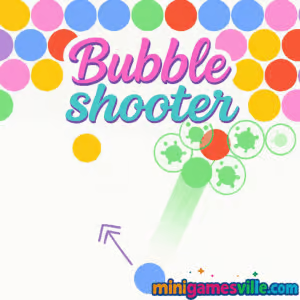
Play Bubbleshooter Online Right Now
Click to play Bubbleshooter on MiniGamesVille, then aim, pop, and clear the board. This colorful bubble shooter browser game loads fast, plays smoothly, and is totally free to start. Whether you are chasing a quick brain teaser or a longer pop-and-clear session, Bubbleshooter delivers arcade puzzle satisfaction with crisp physics and satisfying chains. Try it unblocked on most networks, no download required. Ready to relax and rack up combos? Press play and enjoy Bubbleshooter on minigamesville.com.
About Bubbleshooter
Bubbleshooter is a classic aim and pop arcade puzzler where you shoot colored bubbles to match three or more. The board slowly descends, the shot angles get tighter, and smart banking becomes your best friend. It is simple to learn, yet deep enough to keep score chasers, casual players, and puzzle fans coming back. If you love quick-hit online games that feel great in the browser, Bubbleshooter belongs in your rotation.
History of Bubbleshooter
The bubble shooter genre has charmed players for decades with easy tap or click controls, match-three logic, and smooth physics. Bubbleshooter follows that lineage with a modern HTML5 build that runs in your browser, offering instant access without plugins and a clean, mobile-friendly layout.
Style & Vibe
Bright candy colors, crisp pops, and clean UI make every match feel rewarding. Subtle animations and a gentle soundtrack keep the focus on aim precision and shot planning.

Gameplay in Bubbleshooter
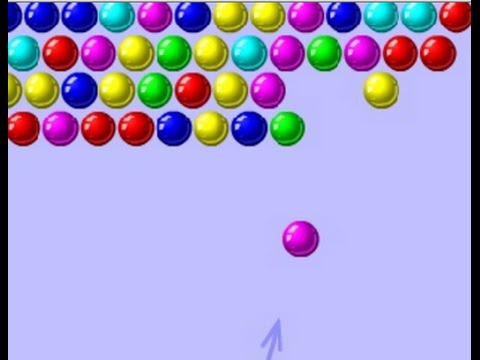
You control a bubble launcher at the bottom of the screen. Line up your shot, use the walls to bank tricky angles, and pop clusters of three or more matching bubbles. Dropping large hanging groups creates huge clears and bonus-worthy cascades. Difficulty scales with tighter formations, color mixes, and limited space for error. The physics feel snappy, so clutch rebounds and last-second clears are common, which keeps Bubbleshooter thrilling and replayable.
Game Modes
- Classic: Clear the board at your own pace, focus on accuracy and smart angles.
- Puzzle Levels: Prebuilt layouts that reward planning, color control, and efficient shots.
- Time Attack: Beat the clock with rapid-fire aim and quick decisions.
- Endless: Survive as long as you can while the board slowly pushes down.
How to Play
- Look at the next bubble in your launcher and scan for matching clusters.
- Drag your mouse or finger to aim. Use the guide to visualize the angle if available.
- Bank shots off walls to slip into tight pockets behind blockers.
- Prioritize high clusters that are holding large groups. Dropping them clears space fast.
- Manage colors. If a color is nearly gone, finish it to reduce future clutter.
Controls
- Desktop: Move mouse to aim, left click to shoot. Some versions let you press space or tap the launcher to swap the next bubble.
- Mobile: Tap and hold to aim, release to shoot. Tap the launcher area to swap when available.
Device Compatibility & Browser Support
This online version is built with HTML5, so it runs in modern browsers like Chrome, Edge, Firefox, and Safari. It works on desktops, laptops, Chromebooks, tablets, and phones. For the smoothest experience, keep your browser updated and enable hardware acceleration.
Mobile vs. Desktop Gameplay
On desktop, a mouse gives pixel-perfect aim for bank shots and tight lanes. On mobile, touch controls feel natural and convenient for quick sessions. Both play great, so choose your screen based on comfort and precision needs.
Can I Play Offline?
You need an internet connection to load the game. After assets are cached, some sessions may continue if you stay on the page, but a refresh requires a connection. For guaranteed offline play, consider the mobile apps listed below.
Can I Play Unblocked?
Yes, in many cases. Bubbleshooter is a lightweight browser game that runs over HTTPS with no downloads. Some school or workplace networks still block game sites. If you run into restrictions, try a different modern browser or switch networks when allowed.
- Browser: Play on MiniGamesVille in your web browser.
- Android: Official mobile version Bubble Shooter by Ilyon on Google Play.
- iOS: Official Bubble Shooter by Ilyon on the App Store.
Tips & Tricks
Beginner Tips
- Play for drops, not just pops. Target support bubbles to drop big clusters.
- Clear a color entirely to reduce future clutter and make matching easier.
- Bank shots are your best tool. Practice gentle angles before going for tight rebounds.
- Look two moves ahead. If your next bubble is awkward, set up a future match.
Advanced Strategies
- Color starving: Intentionally remove a color early to improve odds on incoming bubbles.
- Pressure relief: Carve vertical lanes, then slice to detach hanging sections for mega clears.
- Edge weaving: Use the sidewalls to thread behind blockers and free central mass.
- Shot economy: Minimize wasted shots by aligning two clears with one banked angle.
Features
- 🎯 Tight, responsive aim with satisfying physics
- 🧩 Classic board clears plus puzzly layouts
- ⏱️ Optional time-based challenges for speed runners
- 📶 Works right in your browser, no download
- 📱 Smooth on mobile and desktop
- 🌈 Colorblind-friendly design cues in many builds
- 🔊 Snappy audio pops and clean UI
- 💥 Big combo drops for high score chasers
Unlockables & Secrets
Watch for rare power bubbles and hidden lanes. Some boards reward early risk with massive late-game space. Clearing an entire color can quietly snowball your run by improving the bubble queue.
Cheats & Mods
There are no official cheats for the browser version. Avoid third-party hacks or extensions. They can break the game and pose security risks. Play fair, master your angles, and you will climb faster than any shortcut.
Walkthrough Summary
Start by trimming low-hanging supports. Open a side lane, bank behind the front row, then slice out anchors to drop the center. When the board tightens, slow down, stabilize one side, and set up a two-step bank to finish.
Scoring, Records & Progression
Scores scale with larger clears and fewer shots. Chain drops to build momentum, keep colors under control, preserve space up top. Track your personal bests, then revisit tricky layouts to shave shots and set a new high score.
Why Play Bubbleshooter
Bubbleshooter is snappy, colorful, and instantly relaxing. It delivers quick online fun in your browser, yet rewards skill with satisfying clears and clutch comebacks. Whether you have two minutes or twenty, it feels great to pop a clean banked shot.
Pros & Cons of Bubbleshooter
- Pros: Smooth physics, fast loads, clean UI, great on any device, replayable score chase.
- Cons: Later boards can feel tight, luck of bubble order can swing a run if you do not manage colors.
- Use an up-to-date browser for best input latency and visuals.
- Enable hardware acceleration in settings for smoother frames.
- Close heavy background tabs if you notice stutter, then reload the game.
- On mobile, switch to landscape for a wider aim arc when available.
Similar Games to Bubbleshooter
- Bubbles 2 — another bubbly match-and-pop challenge with fresh board shapes.
- Breakoid — brick breaker vibes with sharp physics and power-ups.
- Sudoblocks — a relaxing grid puzzler that tests your placement strategy.
- Color Ball Chaos — quick reflex color matches with lively pacing.
- Tap It Away — clear the clutter by tapping blocks in the right order.
- Emoji Quest — lighthearted matching with cheerful icons and goals.
- Green — minimalist logic puzzles that reward observation and patience.
FAQ
Is Bubbleshooter free to play?
Yes, you can play the browser game for free on MiniGamesVille.
Does Bubbleshooter work on Chromebook?
Yes, it runs in the Chrome browser and plays smoothly on most Chromebooks.
How do I swap the next bubble?
In many versions you can tap the launcher or press space to swap when that feature is active.
What is the best way to score high?
Target anchors to drop large hanging groups, remove a color early, and avoid wasted shots.
Is the game unblocked at school or work?
Often yes, though some networks block gaming. If blocked, try a different approved browser or play at home.
Can I pause mid-level?
Switching tabs or opening the menu usually pauses the action, then you can resume when ready.
Are there mobile versions?
Yes, you can play official mobile versions on Google Play and the App Store.
Does Bubbleshooter need a powerful device?
No, it is lightweight. Any modern phone, tablet, or computer with an updated browser should run it well.
Conclusion
Bubbleshooter shines as a classic bubble shooter with clean visuals, snappy controls, and endless room for clever shots. It is the kind of online puzzle you can dip into anytime, feel your stress drop, and leave satisfied after a single perfect bank.
Ready to relax and pop? Fire up Bubbleshooter on minigamesville.com, aim for big drops, and chase your next high score. Bring friends, compare clears, and keep those combos rolling.

 Loading...
 English
 Shqip
Shqip
 বাংলা
বাংলা
 Български
 简体中文
简体中文
 Hrvatski
 Čeština
 Dansk
Dansk
 Nederlands
 Suomi
Suomi
 Ελληνικά
 हिन्दी
 Magyar
 Bahasa Indonesia
 日本語
日本語
 한국어
한국어
 Lietuvių
 Bahasa Melayu
 Norsk
Norsk
 Polski
 Português do Brasil
 Română
 Slovenčina
 Slovenščina
 Svenska
 ไทย
ไทย
 Türkçe
 Українська
 اردو
اردو
 Tiếng Việt
 isiZulu
 Español
 Français
 Deutsch
 العربية
 Italiano
 فارسی
فارسی
 Русский