Play Freecell Solitaire online on Minigamesville
Jump in and play Freecell Solitaire right now on Minigamesville! This classic single-player card puzzle is a relaxing, brain-boosting browser game you can launch instantly in your tab. If you enjoy strategy card games and patience-style challenges, Freecell Solitaire is your perfect quick break. Tap or click to start stacking suits, clear the tableau, and see how fast you can win. Ready to shuffle up a win streak in our online, unblocked version of Freecell Solitaire on minigamesville.com? Hit Play and deal a fresh round.
About Freecell Solitaire
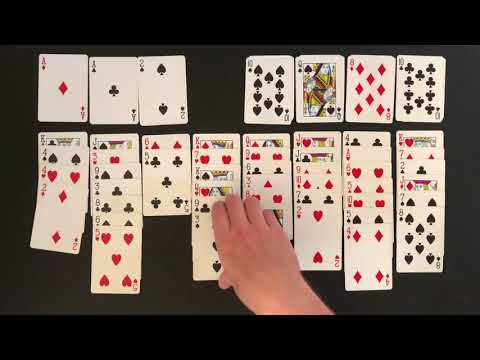
Freecell Solitaire is a thinking person's solitaire. Every board is laid out with all cards face up, which means success comes from planning, not luck. Use the four free cells to stage clever moves, unblock columns, and build Aces up to Kings in the foundations. Whether you are winding down after work or chasing personal bests, this online Freecell Solitaire experience keeps the focus on crisp card movement, clean visuals, and smooth browser performance.
History of Freecell Solitaire
Freecell traces its roots to classic patience games like Eight Off and Baker's Game. It became a worldwide favorite in the 1990s when it shipped with consumer PCs, teaching millions how to think several moves ahead while solving elegant card layouts. Today, Freecell Solitaire remains one of the most played strategy card games on the web and mobile, thanks to its simple rules, high skill ceiling, and satisfying win animations.
Style & Vibe
The presentation is clean and distraction-free so you can get in the zone. Cards are readable at a glance, animations feel snappy, and the board layout adapts well to different screen sizes. Expect a modern, minimal look that respects the timeless feel of this strategy classic.

Gameplay in Freecell Solitaire
Each deal uses a standard 52-card deck, all face up. Your goal is to move cards to the four foundation piles by suit, from Ace to King. You can move descending, alternating-color sequences across the tableau, but larger sequences require enough empty columns and free cells to carry them. The heart of Freecell Solitaire is resource management: free cells act like temporary shelves, letting you reposition key cards, set up cascades, and free buried Aces. Win by clearing the tableau and filling all foundations. The challenge builds as you weigh short moves against long-term setups, balance time vs. moves, and decide when to open a column for a decisive swing.
Game Modes
- Classic Freecell: Standard rules with move counter and timer for friendly competition against yourself.
- Numbered Deals: Replay memorable deals by entering a seed, then try to beat your best time or fewest moves.
- Timed Runs: Go for speed, practice fast setups, and refine your opening moves.
- Relaxed Play: Take your time, use hints or undo, and learn optimal patterns at your own pace.
How to Play
- Scan the tableau for Aces, low cards, and open lanes you can create quickly.
- Move Aces to the foundations as soon as they are free.
- Build descending, alternating-color sequences to uncover key low cards.
- Use the four free cells to stage temporary cards and transport sequences.
- Open an empty column early, then use it to shuttle longer sequences.
- Keep foundations growing evenly so more cards become playable.
- Finish by cascading remaining sequences into the foundations.
Controls
- Desktop: Click and drag cards or stacks, or single-click to auto-move where legal.
- Mobile: Tap to select, then tap a destination. Long-press and drag for manual placement.
- Quality of life: Undo, hint, and quick-send to foundations when a move is obvious.
Device Compatibility & Browser Support
This is a lightweight browser game that runs smoothly on modern Chromium-based browsers, Firefox, Safari, and Microsoft Edge. No download required, just play online.
Mobile vs. Desktop Gameplay
- Desktop: Precision dragging and multi-card moves feel extra snappy with a mouse or trackpad.
- Mobile: Tap-to-move streamlines play and makes quick sessions perfect for on-the-go wins.
Can I Play Offline?
In-browser play requires an internet connection. Load the page on minigamesville.com and keep the tab open to continue playing. For true offline play, consider a mobile app version listed below.
Can I Play Unblocked?
Freecell Solitaire on Minigamesville is designed as an unblocked browser game for most networks that allow gaming sites. If your school or office filters games, access depends on local rules. Try using HTTPS, updating your browser, or playing on a personal connection that permits gaming sites.
- Browser: Play Freecell Solitaire directly on minigamesville.com.
- Android: FreeCell Solitaire by MobilityWare on Google Play
Get it
- iOS: FreeCell Solitaire Card Game by MobilityWare on the App Store
Download
If you prefer a suite that also includes Klondike, Spider, Pyramid, and TriPeaks, search your app store for a solitaire collection that includes Freecell Solitaire.
Tips & Tricks
Beginner Tips
- Move Aces and Twos to foundations as soon as they are free.
- Open an empty column early, then protect it. It is your most powerful resource.
- Keep foundations balanced so fresh moves appear across suits.
- Prefer moving sequences over single cards if it does not block future plays.
- Use undo to explore lines, then commit to the cleanest path.
Advanced Strategies
- Count free cells and open columns before attempting long transports.
- Stage key cards in free cells that unlock multiple moves, not just one.
- Prioritize unburying low ranks that feed the foundations.
- When possible, break and rebuild sequences to swap colors and free deeper cards.
- Delay moving high cards to foundations if they support more tableau movement.
Features
- 🃏 Classic Freecell Solitaire rules with smooth animations
- ⚡ Fast drag, tap-to-move, and smart auto-send
- 🧠 Skill-based puzzles where every card is face up
- 📊 Timer and move counter for self competition
- ↩️ Unlimited undo and helpful hints
- 📱 Responsive layout for desktop, tablet, and phone
- 🎯 Numbered deals to practice and master specific boards
- 🌙 Clean visual theme that reduces eye strain
Unlockables & Secrets
Freecell Solitaire keeps things pure and strategic. You will not find heavy unlock trees here. Your rewards are faster clears, lower move counts, and that satisfying flow when everything clicks. Revisit numbered deals to chase new personal records.
Cheats & Mods
There are no built-in cheats or mods for the browser version. Use hint and undo to learn lines and improve consistency. The best advantage is thoughtful planning and opening lanes at the right time.
Walkthrough Summary
Start by freeing Aces and Twos, then create an empty column. Use free cells to shuttle blockers, open new cascades, and keep building alternating colors downward. Grow foundations evenly, refill your empty column only when it opens a stronger chain, and finish with smooth cascades into the foundations. With practice, most Freecell Solitaire deals become satisfyingly winnable.
Scoring, Records & Progression
Track best time, fewest moves, and win streaks. Aim to reduce setup moves, keep fewer cards in free cells, and finish with cleaner cascades. Numbered deals make great practice targets for measurable improvement.
Why Play Freecell Solitaire
It is the perfect blend of calm and challenge. Because the cards are visible from the start, wins come from smart planning, not lucky flips. That makes Freecell Solitaire endlessly replayable and a great daily brain boost you can enjoy online in your browser.
Pros & Cons of Freecell Solitaire
- Pros: Pure strategy, fast sessions, intuitive controls, great on any device.
- Cons: Requires steady focus, no heavy progression systems, in-browser play needs internet.
- Keep your browser updated for smoother animations and input latency.
- Enable hardware acceleration in settings for crisp rendering.
- Close heavy tabs, pause streaming, and disable battery saver during play.
- On mobile, switch to full-screen and lock orientation for better accuracy.
Similar games to Freecell Solitaire
- Tri Peaks — a relaxing solitaire variant where you clear cards in sequence for combo chains.
- Solitaire Reverse — a clever twist on classic solitaire rules that flips your usual approach.
- Checkers Multiplayer — timeless board strategy to sharpen tactical thinking between card sessions.
- Word City Uncrossed — soothing word connections that scratch the same puzzle-solving itch.
- Wordsmith — classic letter crafting with satisfying aha moments.
- Sudoblocks — a minimal logic puzzler that rewards foresight and tidy boards.
FAQ
Is Freecell Solitaire always winnable?
Most deals are solvable with optimal play, but your success depends on planning and resource management.
What is the objective in Freecell Solitaire?
Move all cards to the foundations by suit from Ace to King while using free cells and empty columns to reorganize the tableau.
How many free cells are there?
There are four, and each can temporarily hold one card, which helps you transport sequences.
What counts as a good score?
Lower move counts and faster times indicate cleaner routes. Track personal bests and try to beat them.
Does the browser version save progress?
Your current run persists while the tab stays open. For longer-term stats, consider a mobile app that tracks history.
Can I undo moves?
Yes, use undo freely to explore lines and perfect your path to the foundations.
Is Freecell Solitaire free to play?
Yes, you can play online in your browser at no cost. Optional mobile apps may include ads or in-app purchases.
Which browsers work best?
Current versions of Chrome, Edge, Safari, and Firefox provide smooth, reliable play.
Conclusion
If you love smart, satisfying card puzzles, Freecell Solitaire delivers. The mix of open information, tidy sequences, and clever resource management makes every win feel earned. It is a strategy-first solitaire that rewards calm focus and crisp planning.
Ready to put your skills to the test? Play Freecell Solitaire online on minigamesville.com now, chase a new personal record, and enjoy a quick, clean brain break in your browser.

 Loading...
 English
 Shqip
Shqip
 বাংলা
বাংলা
 Български
 简体中文
简体中文
 Hrvatski
 Čeština
 Dansk
Dansk
 Nederlands
 Suomi
Suomi
 Ελληνικά
 हिन्दी
 Magyar
 Bahasa Indonesia
 日本語
日本語
 한국어
한국어
 Lietuvių
 Bahasa Melayu
 Norsk
Norsk
 Polski
 Português do Brasil
 Română
 Slovenčina
 Slovenščina
 Svenska
 ไทย
ไทย
 Türkçe
 Українська
 اردو
اردو
 Tiếng Việt
 isiZulu
 Español
 Français
 Deutsch
 العربية
 Italiano
 فارسی
فارسی
 Русский