Introduction to ZOOM-BE 2
Ready for a clever co-op puzzle platformer you can play right in your browser? ZOOM-BE 2 drops you into a wild escape story starring two quirky zombie pals who must work together to reach each level’s exit. This online zombie adventure blends tight platforming, light physics puzzles, and charming slapstick. Whether you team up in local 2 player mode or control both characters solo, ZOOM-BE 2 delivers bite-size challenges that feel great on desktop or mobile. Hit Play, test your timing, and see how many stars you can grab in this unblocked HTML5 browser game.
About ZOOM-BE 2
ZOOM-BE 2 is a cooperative puzzle platformer where two undead friends navigate traps, locked doors, and environmental hazards. Each character offers complementary strengths, so you will swap between them to push crates, activate switches, and outsmart lasers and saws. Level goals are simple, the route rarely is, which makes this sequel a perfect quick-play experience for lunch breaks and study sessions.
History of ZOOM-BE 2
The original ZOOM-BE built a following on arcade portals thanks to its co-op design and snackable levels. ZOOM-BE 2 refines that formula with sharper puzzles, tighter controls, and more varied obstacles. It stays true to the spirit of classic buddy-platformers, while embracing modern HTML5 performance for smooth browser play.
Style & Vibe in ZOOM-BE 2
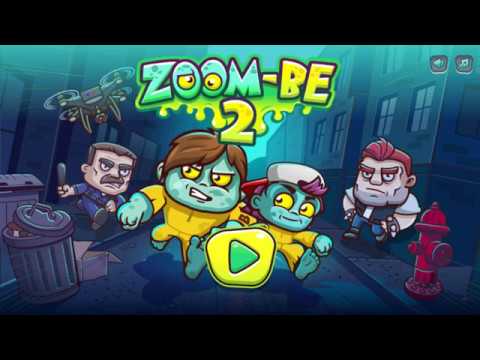
The art leans cute rather than gory, with colorful labs, back alleys, and rooftops. Characters emote with silly animations, traps pop with readable effects, and the UI keeps focus on the action. The vibe is playful and slightly spooky, closer to Saturday-morning mischief than horror, which fits short-session browser gaming.
Gameplay in ZOOM-BE 2
Your objective: guide both zombies to the exit door, often after collecting optional stars. Levels mix platform jumps with light physics, like pushing boxes to raise an elevator or weighting pressure plates to open gates. The joy comes from character synergy, clever switch placement, and the satisfying rhythm of solve, move, and sprint past hazards.
Game Modes
- Solo play: control both zombies, swapping on the fly to solve tandem puzzles.
- Local 2 player: share a keyboard, coordinate roles, and speed through levels together.
- Level select: revisit cleared stages to improve times and star counts.
ZOOM-BE 2 focuses on structured levels rather than endless or time-attack modes, which keeps the learning curve friendly and progress clear.
How to Play
- Start a level and scan for hazards, switches, crates, and stars.
- Move Zombie A to scout and trigger the first mechanism.
- Swap to Zombie B to hold plates, push boxes, or take a different route.
- Reunite at the exit once both paths are safe.
- Replay for a faster time or a perfect star run.
ZOOM-BE 2 Controls
- Movement: Arrow keys for one zombie, WASD for the other.
- Swap character: Spacebar if playing solo.
- Interact or use: E or Down arrow when near switches and doors.
- Restart level: R to reset instantly.
- Pause: P to pause and review options.
- Mobile: on-screen buttons for movement, jump, swap, and interact.
ZOOM-BE 2 Device Compatibility & Browser Support
This HTML5 title runs smoothly in modern browsers like Chrome, Edge, Firefox, and Safari. No downloads are needed, so you can launch ZOOM-BE 2 online on Windows, macOS, Chromebooks, Android phones, and iPhones or iPads.
Mobile vs. Desktop Gameplay
- Desktop: best for 2 player sessions, precise jumps, and quick restarts.
- Mobile: great for casual runs with touch controls, ideal for replaying a few levels.
Can I Play Offline?
ZOOM-BE 2 is a browser game that typically requires an internet connection to load. After it loads, some browsers may cache assets, but a stable connection is still recommended for consistent play.
Can I Play Unblocked?
Unblocked availability depends on your network policy. ZOOM-BE 2 is an HTML5 game, so it often works on education-friendly arcade sites. If your network restricts games, play on a permitted connection or check with your administrator.
ZOOM-BE 2 Tips & Tricks
Beginner Tips
- Always look for the exit first, then trace backward to identify key switches and routes.
- Keep the zombies close, repositioning after every switch so you are never stranded.
- Use crates to shield from hazards, not just as stepping stones.
- Tap jumps rather than holding for precision on small platforms.
- When in doubt, reset fast with R to save time on a messy run.
Advanced Strategies
- Chain actions: trigger a plate, swap instantly, and dash with the second zombie while doors stay open.
- Bait hazards: time moving saws by stepping close, then retreating to create a safe window.
- Optimize routes for stars first, then re-run for a speed PB without collectibles.
- In co-op, assign roles, one player scouts and times hazards, the other handles switches and crates.
- Practice jump buffering so you land, swap, and leap again with minimal downtime.
ZOOM-BE 2 Features
- 🧟 Duo-based puzzle platforming with character synergy.
- 🧠 Short, brainy levels perfect for quick sessions.
- 🎮 Local 2 player co-op on one keyboard.
- 🌐 Runs online in your browser, no download required.
- 📱 Smooth on desktop, Chromebook, and mobile.
- ⭐ Optional star challenges for completionists.
- ⚙️ Snappy restarts for fast learning and speed attempts.
- 🔊 Clean UI and playful effects that keep focus on the puzzle.
ZOOM-BE 2 Rules
- Both zombies must reach the exit to complete a level.
- Hazards like saws, lasers, and pits cause a restart.
- Pressure plates, switches, and crates are fair game for puzzle solving.
- Stars are optional, but they improve your completion rating.
- Levels can be replayed to improve time and star count.
ZOOM-BE 2 Unlockables & Secrets
- Hidden stars tucked behind off-path platforms.
- Secret alcoves that let you bypass a tricky hazard at the cost of a longer route.
- Occasional split routes, one faster for speed, one safer for full-star runs.
ZOOM-BE 2 Cheats & Mods
There are no official cheat codes for ZOOM-BE 2. Community-made scripts or hacked versions can harm performance or compromise your device, so they are not recommended. If you want an easier time, replay levels to learn timings, or practice sections to build muscle memory.
ZOOM-BE 2 Walkthrough Summary
Scan each stage, identify the switch order, then chart a safe path for both zombies. Use crates to bridge gaps or hold plates, and stagger movements so one zombie creates openings while the other advances. When a level includes optional stars, clear the exit first to learn timings, then attempt a perfect collectible run. Clean execution beats risky shortcuts in most stages.
ZOOM-BE 2 Scoring, Records & Progression
Progress is tracked per level with completion and star pickups. Aim for clean routes and minimal swaps to improve times. Many players set personal bests by splitting runs into two passes, one for stars and one for speed. Keep a simple log of best times if you enjoy friendly competition.
Why Play ZOOM-BE 2
ZOOM-BE 2 shines as a quick, clever browser game that respects your time. It teaches mechanics fast, delivers satisfying eureka moments, and offers genuine teamwork whether you are solo-swapping or playing couch co-op. The bite-size levels are perfect for short breaks, yet the star hunts keep you coming back.
Pros & Cons of ZOOM-BE 2
- Pros: tight controls, accessible puzzles, instant restarts, great for Chromebooks and shared keyboards.
- Pros: playful visuals and short levels that fit busy schedules.
- Cons: no online multiplayer, and difficulty spikes can appear on late-game stages.
- Use the latest version of Chrome, Edge, Firefox, or Safari for smoother frame rates.
- Enable hardware acceleration in browser settings.
- Close heavy tabs and disable resource-hungry extensions during play.
- If input feels laggy, set your display to 60 Hz or higher and plug in your device.
- Clear cache if assets fail to load after a long session.
Similar Games to ZOOM-BE 2
- Fireboy and Watergirl: Forest Temple: iconic 2 player puzzle platformer with mirrored abilities and crystal collecting for quick co-op sessions.
- Money Movers 1: coordinate two thieves with unique skills to dodge guards and solve door-and-switch puzzles in a slick browser game.
- Duo Vikings 3: tag-team platforming with shield bounces and lever puzzles, perfect for short co-op runs online.
- Bad Ice Cream 2: carve ice mazes, trap enemies, and collect fruit, a fast-paced arcade puzzler great for local two player fun.
- Bob the Robber: stealth-focused platforming that rewards timing, gadget use, and clever route planning in bite-size levels.
- Snail Bob 2: tap-to-tweak mechanisms and guide Bob to the exit, a relaxing physics puzzle classic for all ages.
- Vex 6: precision platforming with traps and speed challenges, ideal for players who love clean controls and checkpoint racing.
- Red Ball 4: roll, jump, and push boxes through vibrant stages with simple physics and collectible stars.
- G-Switch 3: gravity-flipping runner that shines in local multiplayer races with tight, responsive inputs.
- Wheely 5: point-and-click puzzle journey where each scene hides timing tricks and environmental switches.
- Adam and Eve: Go: lighthearted puzzle platforming with simple interactions and cartoon charm for quick browser breaks.
- Zombotron 2: action platformer with physics-driven combat and exploration for players who want a deeper zombie-themed experience.
- Stickman Hook: tap-timing swing physics and level speedrunning for arcade fans who love instant restarts.
FAQ
What is ZOOM-BE 2?
ZOOM-BE 2 is a cooperative puzzle platformer browser game where two zombies work together to beat trap-filled levels and reach the exit.
Is ZOOM-BE 2 free to play?
Yes, it is a free HTML5 game you can play online in a modern web browser.
Does ZOOM-BE 2 have online multiplayer?
The game supports local 2 player on one keyboard, and online multiplayer is not included.
Can I play ZOOM-BE 2 unblocked at school?
Availability depends on your network rules, so if games are blocked, play on a permitted connection or ask your administrator.
How long is ZOOM-BE 2?
Length varies by skill, since you can replay to chase stars and faster times, most players enjoy several sessions of steady progress.
What devices run ZOOM-BE 2 best?
Desktop and Chromebook offer the most precise controls, while phones and tablets are great for casual runs.
Are there cheat codes for ZOOM-BE 2?
There are no official cheats, and using hacked versions can hurt performance or safety.
Why does the game feel laggy?
Update your browser, enable hardware acceleration, and close heavy tabs or extensions to improve frame rate.
Can I play ZOOM-BE 2 offline?
You need an internet connection to load the game, and cached assets may let you replay briefly, but a connection is recommended.
ZOOM-BE 2 Conclusion
ZOOM-BE 2 nails that sweet spot between clever and approachable, mixing cooperative puzzles with crisp platforming that works beautifully in a browser. The two-zombie teamwork keeps every level fresh, whether you are solo-swapping or sharing a keyboard with a friend.
Fire it up, grab a partner, and chase those stars. If you enjoy fast restarts, playful presentation, and brainy obstacles, ZOOM-BE 2 is the next online puzzle platformer you will keep coming back to for one more run.

 Loading...
 English
 Shqip
Shqip
 বাংলা
বাংলা
 Български
 简体中文
简体中文
 Hrvatski
 Čeština
 Dansk
Dansk
 Nederlands
 Suomi
Suomi
 Ελληνικά
 हिन्दी
 Magyar
 Bahasa Indonesia
 日本語
日本語
 한국어
한국어
 Lietuvių
 Bahasa Melayu
 Norsk
Norsk
 Polski
 Português do Brasil
 Română
 Slovenčina
 Slovenščina
 Svenska
 ไทย
ไทย
 Türkçe
 Українська
 اردو
اردو
 Tiếng Việt
 isiZulu
 Español
 Français
 Deutsch
 العربية
 Italiano
 فارسی
فارسی
 Русский