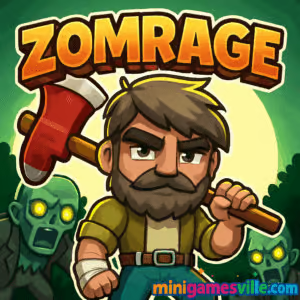
Play Zomrage on Minigamesville right now. Click the Start button above and jump into Zomrage, a fast, zombie survival browser game that loads instantly in your tab. This online action title blends quick movement, scavenging, and crowd control into bite-sized runs that beg for just one more try. Whether you want a quick unblocked break at lunch or a focused session at home, Zomrage is built for smooth play on modern browsers. Ready to outpace the horde and rack up a new personal best? Hit Play and prove it.
About Zomrage
Zomrage is a compact zombie survival shooter where every second counts. You will dash between supply crates, swap weapons on the fly, and kite swarms through tight arenas while managing health pickups and temporary boosts. Designed for instant fun as a browser game, it rewards smart pathing, precision movement, and risk-reward looting. If you love arcade-style action with modern polish, Zomrage delivers a clean loop that feels great on desktop and mobile browsers alike.
History of Zomrage
Built by a studio known for snappy, accessible web titles, Zomrage slots neatly into today’s wave of pick-up-and-play zombie games that emphasize tight controls and swift restarts. The browser version focuses on frictionless access and stable performance, so you can hop in, survive as long as possible, and instantly try again to push your run further.
Style & Vibe
The aesthetic leans into warm, readable colors and clean silhouettes, so enemies and pickups pop even when screens get busy. Expect crunchy hit feedback, punchy UI, and a soundtrack that ramps up as the undead close in.

Gameplay in Zomrage
Each run starts light, then escalates quickly. You will circle the map to gather ammo, health, and stronger weapons, luring zombies into safe lanes to avoid getting boxed in. Movement physics feel responsive, so tight jukes and last-second dashes are not only possible, they are the difference between clutch escapes and getting swarmed. The core rhythm is simple: survive, upgrade, adapt. Elite zombies and minibosses inject variety, forcing you to pivot loadouts and routes to stay alive.
Game Modes
- Level runs: Progress through bite-sized stages with clear survive-to-escape goals.
- Survival waves: Hold out as long as you can while enemy density ramps up.
- Challenge variations: Limited-ammo or time-pressure twists to test your mastery.
How to Play
- Press Play to start your run and scan the arena for your first weapon upgrade.
- Kite the first wave in wide circles while looting crates for ammo and health.
- Prioritize mobility upgrades and crowd-control weapons to keep escape lanes open.
- Use corners and obstacles to split packs, then clean up stragglers for drops.
- Extract or continue, depending on your health, ammo economy, and confidence.
Controls
- Move: WASD or Arrow Keys
- Aim and Attack: Mouse move and Left-click, or tap on mobile
- Switch weapon or interact: On-screen prompts or number keys where available
- Pause/Menu: Esc or on-screen icon
Device Compatibility & Browser Support
Zomrage is optimized for Chromium-based browsers and current Firefox on desktop, and modern mobile browsers on iOS and Android. For the smoothest experience, keep one tab active, disable heavy extensions during play, and ensure hardware acceleration is on in your browser settings.
Mobile vs. Desktop Gameplay
- Desktop: Higher frame stability, precise mouse control, and easier kiting at speed.
- Mobile: Tap-friendly controls and quick sessions, perfect for short survival runs.
Can I Play Offline?
In the browser, Zomrage requires an active internet connection. If you want a portable option for spotty connections, try the official Android app below.
Can I Play Unblocked?
Many schools and workplaces restrict gaming sites. Minigamesville delivers Zomrage over secure HTTPS with lightweight assets, which helps in many environments, but access policies differ by network. If you see a block page, try a personal device on a non-restricted connection.
- Browser: Play Zomrage here on Minigamesville, no download required.
- Android: Get Zomrage on Google Play.
- iOS: There is no official iPhone or iPad version at this time. Want a mobile fix on both platforms? Try Z Escape, a fast zombie crowd-shooter available on Google Play and the App Store.
Tips & Tricks
Beginner Tips
- Open the map by circling the edges first, then sweep inward to avoid early traps.
- Always keep one emergency lane in mind so you can break line-of-sight and heal.
- Pick up economy weapons early, then trade up to burst-damage options mid-run.
- Do not chase every drop. If the path is unsafe, reset the horde and return later.
- Health over greed. Surviving an extra minute beats a risky ammo box.
Advanced Strategies
- Route planning: Chain safe corners, choke points, and crate spawns into a loop.
- Target priority: Cull fast movers first so your kiting rhythm stays predictable.
- Ammo discipline: Swap to area damage for clusters and single-shot for elites.
- Economy management: Bank heals when healthy and spend during density spikes.
- Boss baiting: Pull bosses through narrow lanes to neutralize side adds.
Features
- 🧟 Tight zombie survival loop with fast restarts
- 🎯 Crisp movement, responsive aiming, satisfying hit feedback
- 🧰 On-the-fly gear swaps and meaningful loot drops
- 🗺️ Compact arenas with smart pathing and kiting lines
- 📈 Difficulty that scales smoothly from warm-up to white-knuckle
- 📱 Seamless browser play on desktop and mobile
- 🔁 Short sessions that stack into long-term mastery
- 🏆 Score chasing with personal best runs
Unlockables & Secrets
Expect new weapons, temporary boosts, and hidden supply caches tucked behind breakable objects or risk-heavy lanes. Keep an eye out for elite enemies that drop higher-value loot when defeated cleanly.
Cheats & Mods
Zomrage runs in the browser and does not support official mods or cheats. Third-party scripts can harm performance or jeopardize your save. Play fair to keep your runs stable and your progress intact.
Walkthrough Summary
Start wide, scoop early upgrades, and learn a two-corner loop you can reset to when density spikes. Swap loadouts for crowd control before elites spawn, then rotate back to precision damage for clean finishes. When resources dip, disengage, reset the horde, and rebuild momentum.
Scoring, Records & Progression
Zomrage tracks your survival performance across runs, encouraging you to refine routes and timings. Treat each attempt like a speed-survival puzzle, and celebrate those incremental improvements in time survived, enemies cleared, and stages reached.
Why Play Zomrage
If you want an online zombie game that loads instantly, feels great from the first step, and keeps you saying one more run, Zomrage is it. Smart difficulty curves and crisp controls make it an ideal unblocked pastime on break or a deep evening time sink.
Pros & Cons of Zomrage
- Pros: Instant browser play, smooth controls, satisfying escalation, short sessions.
- Pros: Works on desktop and mobile, great for score chasing and practice loops.
- Cons: Survival focus can feel intense for casual players, no official mod support.
- Developers continue polishing balance and stability across platforms.
- Close unused tabs or heavy extensions to free up memory during longer runs.
- Enable hardware acceleration in your browser for steadier frame pacing.
- On laptops, plug in for consistent CPU and GPU performance.
Similar games to Zomrage
- Base Defense 2 — Build turrets and hold the line against relentless waves.
- Base Defense — Classic defend-your-core action with upgrade paths.
- Stick Defenders — Merge, upgrade, and blast through hordes with stick-figure mayhem.
- Horror Dungeon 3D — Explore eerie halls and survive creature encounters in 3D.
- Neon War — Slick arcade shooting with glowing projectiles and powerups.
- Archer Castle — Defend your keep with precise arrows and smart timing.
- Plane Wars — Guide squadrons and capture nodes in fast tactical battles.
FAQ
Is Zomrage free to play online?
Yes, Zomrage is free to play in your browser here on Minigamesville.
Does Zomrage have an Android app?
Yes, you can install the official Android version from Google Play using the link above.
Is there an iOS or iPad version of Zomrage?
There is no official iOS build yet. For a mobile alternative on both platforms, try Z Escape using the Google Play and App Store links above.
Can I play Zomrage unblocked at school?
Unblocking depends on local network rules. The game is lightweight and delivered over HTTPS, but access policies vary by school or workplace.
Does Zomrage support controllers?
Zomrage is tuned for keyboard and mouse on desktop and touch on mobile. If your browser maps a controller, results may vary.
How do I save progress?
Progress and best runs are stored in your browser or app instance. Clearing cookies or using incognito can reset local data.
Is Zomrage multiplayer?
Zomrage focuses on single-player survival runs. The challenge is pushing your personal best.
What are the best early upgrades?
Mobility and crowd control tools help you survive spikes, then add burst damage for elites.
Conclusion
Zomrage nails the feel of a great online zombie survival game, with tight controls, instant access, and a satisfying loop that rewards smart decision making. It is the kind of browser game you can learn in a minute and spend hours mastering.
Ready to try your luck against the horde? Scroll up and press Play to jump into Zomrage on Minigamesville. Set a new record, share your best run, and come back tomorrow to push it even further.

 (1 votes, average: 4.00 out of 5)
 Loading...
 English
 Shqip
Shqip
 বাংলা
বাংলা
 Български
 简体中文
简体中文
 Hrvatski
 Čeština
 Dansk
Dansk
 Nederlands
 Suomi
Suomi
 Ελληνικά
 हिन्दी
 Magyar
 Bahasa Indonesia
 日本語
日本語
 한국어
한국어
 Lietuvių
 Bahasa Melayu
 Norsk
Norsk
 Polski
 Português do Brasil
 Română
 Slovenčina
 Slovenščina
 Svenska
 ไทย
ไทย
 Türkçe
 Українська
 اردو
اردو
 Tiếng Việt
 isiZulu
 Español
 Français
 Deutsch
 العربية
 Italiano
 فارسی
فارسی
 Русский