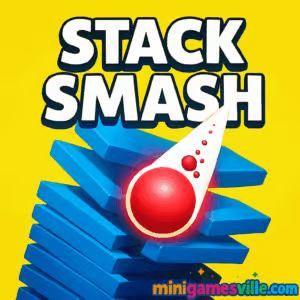
About Stack Smash
Stack Smash takes the hyper‑casual smash‑and‑drop formula and makes it instantly playable on desktop or mobile browsers. Your goal is simple, break through as many layers as possible without crashing into the danger zones. Crisp visuals, satisfying impacts, and quick restarts keep the loop tight, which makes Stack Smash perfect for short sessions or score‑grinding marathons.
History of Stack Smash
The smash‑tower genre found massive popularity on mobile in the late 2010s, and Stack Smash brings that pick‑up‑and‑play energy to the web. The browser version emphasizes smooth performance, minimal load times, and clean tap or click controls, so you can jump straight into the action without a download.
Style & Vibe
Bright color palettes, punchy break effects, and a clean UI set an upbeat mood. Each crash through a layer feels weighty, and the screen shake when you chain a long combo makes every perfect drop feel earned.

Gameplay in Stack Smash
Each level is a vertical tower made of rotating rings. Press and hold to accelerate downward, release to pause above hazards, and look for safe color segments. Build momentum to enter a powered state that lets you tear through multiple layers in one go. Hazards interrupt your flow, so timing matters. The deeper you go in a single drop, the bigger your combo multiplier and the hotter the visuals get. Fast restarts keep you in the zone, which is why Stack Smash unblocked in the browser is such a satisfying coffee‑break choice.
Game Modes
- Endless: Survive as long as you can and push your high score higher with clean, extended drops.
- Level Challenge: Clear a set number of layers to complete a stage and unlock new color themes.
- Time Attack: Beat the clock by chaining safe segments for speed boosts and fast clears.
- Hardcore: Smaller safe zones and quicker rotations that reward razor‑sharp timing.
How to Play
- Press Play above to load the game on minigamesville.com.
- Hold to smash through safe segments, release to stop above hazards.
- Chain multiple safe breaks to trigger a powered smash and burst through tougher layers.
- Ride the momentum, avoid danger colors, and aim for the deepest drop you can.
- Missed a read? Restart instantly and chase a cleaner run.
Controls
- Mouse: Left‑click and hold to descend, release to stop.
- Touch: Tap and hold to descend, lift your finger to stop.
- Keyboard: Not required, the game is designed for one‑button play.
Device Compatibility & Browser Support
Runs great on modern browsers like Chrome, Edge, Firefox, and Safari. No download needed. For the smoothest experience, keep your browser updated and close heavy background tabs during long sessions.
Mobile vs. Desktop Gameplay
- Mobile: One‑finger control, haptic‑friendly feel, perfect for quick runs.
- Desktop: Click precision, larger play area, easy for long score grinds.
Can I Play Offline?
Stack Smash is a browser game. You need an internet connection to load it. Some browsers may cache assets after a load, but a fresh session requires connectivity.
Can I Play Unblocked?
Many school and office networks allow access to minigamesville.com since it runs in the browser with no installs. If your network uses strict filters, try again on a personal or home connection, or ask your administrator to allow the site.
- Browser: Play free on minigamesville.com, no download.
- Mobile apps: There is no official Stack Smash mobile app at this time.
- Want a similar mobile feel?
Tips & Tricks
Beginner Tips
- Count segments. Scan two rings ahead and plan your press and release.
- Feather the hold. Short taps help inch past awkward gaps without overcommitting.
- Reset fast. Early mistake? Quick restarts build rhythm and confidence.
- Play zoomed in on mobile for better color separation.
Advanced Strategies
- Combo routing: Learn safe color patterns that often chain into long smashes.
- Patience windows: When rotations desync, hover for a half‑cycle to open a clean line.
- Momentum management: Trigger the powered smash only when you see three or more layers aligned.
- Score pacing: Alternate short safe taps with long burns to keep multipliers high and risk controlled.
Features
- 💥 One‑tap smash physics with crunchy impact feedback
- 🎯 Skill‑based timing that rewards clean, extended drops
- 🌈 Unlockable color themes and satisfying visual bursts
- ⚡ Powered smash state for multi‑layer breakaways
- 📈 Endless score chase with instant restarts
- 🖱️ Touch and mouse friendly, zero learning curve
- 🚀 Lightweight, quick loads, no install
- 🔊 Optional sound effects that accent every perfect hit
Unlockables & Secrets
Hit score milestones to unlock fresh colorways and trail effects. Keep an eye out for special patterns that frequently align into long smash chains. Long combos may reveal bonus particles or rare palette swaps.
Cheats & Mods
There are no built‑in cheats, and third‑party mods are not recommended for browser play. To keep runs fair and your device safe, stick to the official game on minigamesville.com.
Walkthrough Summary
Start with short controlled drops while you learn the rotation speed. Once you spot a three‑layer line, hold to trigger your powered smash and burst through. Release above danger colors, repeat the cycle, and ramp up your score. That balance of patience and aggression is the heart of Stack Smash.
Scoring, Records & Progression
Every safe layer cleared adds to your score. Back‑to‑back clears raise your multiplier and add extra juice to the visuals. Use that momentum to reach new personal records, then try to beat them with cleaner routes and fewer hesitations.
Why Play Stack Smash
It is fast to learn, incredibly replayable, and perfect when you only have a couple minutes. The physics feel great, and the browser build runs smoothly on most devices. Stack Smash online delivers that just‑one‑more‑run magic that keeps you coming back.
Pros & Cons of Stack Smash
- Pros: snappy controls, instant restarts, satisfying feedback, low system load.
- Cons: luck can affect early layouts, powered smash timing has a learning curve.
- Enable hardware acceleration in your browser settings for smoother frames.
- Close heavy tabs and background streams before long sessions.
- On mobile, switch to full‑screen and Do Not Disturb for uninterrupted runs.
- If inputs feel delayed, clear cache and relaunch the tab.
Similar games to Stack Smash
- Candy Jump — one‑tap jumping across moving platforms with sweet timing challenges.
- Knife Jump — flip blades with precision and land perfect sticks for score streaks.
- Books Tower — stack wobbling books as high as you can without toppling.
- Color Tunnel — dodge through a neon tunnel while the speed keeps rising.
- Color Tunnel 2 — fresh tracks and tighter gaps for reflex‑driven runs.
- Drift Boss — hold and release to drift around edges in a simple but addictive loop.
FAQ
Is Stack Smash free to play?
Yes, you can play free in your browser with no download or install.
Does Stack Smash work on phones and tablets?
Yes, it runs in mobile browsers with responsive one‑touch controls.
Is there an official Stack Smash app?
No, there is no official native app. For a similar mobile experience, try Helix Jump on iOS and Android using the store links above.
Can I mute the game?
Yes, use the in‑game sound toggle or your device’s volume controls.
How do I save my progress?
High scores are saved locally in your browser storage. Clearing cache may reset them.
Why did the game suddenly feel faster?
Later sections rotate quicker and add riskier gaps to challenge your timing.
Is Stack Smash unblocked at school?
Many networks allow it, but access depends on local policies. If blocked, play on a personal network.
Conclusion
Quick, colorful, and responsive, Stack Smash nails the one‑tap arcade feel. Whether you are warming up your reflexes or chasing a late‑night high score, the loop stays crisp and rewarding.
Ready to drop in? Hit Play and enjoy Stack Smash on minigamesville.com. Smash those stacks, post a new personal best, and come back anytime for another run.

 Loading...
 English
 Shqip
Shqip
 বাংলা
বাংলা
 Български
 简体中文
简体中文
 Hrvatski
 Čeština
 Dansk
Dansk
 Nederlands
 Suomi
Suomi
 Ελληνικά
 हिन्दी
 Magyar
 Bahasa Indonesia
 日本語
日本語
 한국어
한국어
 Lietuvių
 Bahasa Melayu
 Norsk
Norsk
 Polski
 Português do Brasil
 Română
 Slovenčina
 Slovenščina
 Svenska
 ไทย
ไทย
 Türkçe
 Українська
 اردو
اردو
 Tiếng Việt
 isiZulu
 Español
 Français
 Deutsch
 العربية
 Italiano
 فارسی
فارسی
 Русский