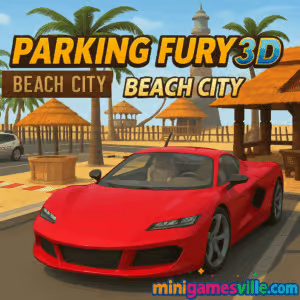
Play Parking Fury 3D: Beach City right now on Minigamesville and put your precision driving to the test. This free online browser game drops you into a sunny seaside map packed with tight spaces, traffic, and sneaky police patrols. If you love realistic parking physics, slick 3D visuals, and quick, level-based challenges, Parking Fury 3D: Beach City belongs on your playlist. Click the Start button above and dive in, unblocked and hassle free.
About Parking Fury 3D: Beach City
Parking Fury 3D: Beach City is a 3D car parking and driving game set across a coastal metropolis filled with alleys, boardwalk lanes, and multi-bay lots. Your goal is simple, park clean and fast, avoid collisions, and keep police heat low. Finish missions to unlock new routes and explore the map. Whether you want quick coffee-break runs or long free-roam sessions, this parking game delivers responsive handling and satisfying mastery loops.
History of Parking Fury 3D: Beach City
Beach City is part of the long-running Parking Fury series that popularized realistic, mission-based parking challenges in the browser. This entry expands the formula with a larger sandbox feel, smarter patrol behavior, and multiple cars to try once you progress.
Style & Vibe
Expect crisp 3D visuals, reflective car materials, and a golden-hour beach palette that makes every turn feel cinematic. Soft tire audio, sirens in the distance, and ambient seagulls round out the vibe for a grounded, summer-in-the-city mood.

Gameplay in Parking Fury 3D: Beach City
Each mission drops a waypoint on your mini-map. Navigate traffic, slide into a marked bay, and hold steady to complete the park. Light taps are fine, but repeated bumps raise your wanted level and invite a police chase. Advanced routes funnel you through narrow gaps, tight U-turns, and blind corners where camera control matters. Master the handbrake for micro-adjustments, switch cars when you can, and chain flawless parks for faster progress.
Game Modes
- Level Missions: Structured objectives with star rankings for speed and accuracy.
- Free Roam: Explore Beach City at your pace once you unlock it, perfect for practicing tricky maneuvers.
- Police Evasion: Triggered when you bump cars or steal rides, adding a risk-reward layer to your route.
- Time Challenges: Beat the countdown by planning tight lines and clean entries.
How to Play
- Press Play and select your mission.
- Follow the on-screen arrow or mini-map to the marked bay.
- Feather the throttle, straighten wheels, and align your bumper.
- Use short handbrake taps to correct angle and depth.
- Stop within the highlighted area and hold until the park confirms.
- Avoid traffic and obstacles to keep police heat low and your stars high.
Controls
- WASD or Arrow Keys: Drive and steer
- Space: Handbrake for tight pivots
- C: Change camera view for better angles
- Ctrl: Enter or switch cars when available
- Mouse: Menu navigation and sensitivity tweaks
Device Compatibility & Browser Support
Parking Fury 3D: Beach City runs in modern browsers with WebGL support. For best performance, use the latest Chrome, Edge, Firefox, or Safari on a desktop or laptop with hardware acceleration enabled. The game may load on some mobile browsers, but keyboard control and camera finesse make desktop the top pick.
Mobile vs. Desktop Gameplay
- Desktop: Smooth physics, precise inputs, easier camera control, highest frame rates.
- Mobile: Convenient on the go, but complex parks are tougher with touch controls.
Can I Play Offline?
No. Parking Fury 3D: Beach City is an online browser game that streams assets, so an active internet connection is required.
Can I Play Unblocked?
Yes. Minigamesville serves Parking Fury 3D: Beach City over secure HTTPS and it runs directly in the browser, which helps it work on many networks that allow game sites. If you are on a restricted connection, check local rules before playing.
- Browser: Play on minigamesville.com with no download.
- Mobile stores: There are no official Google Play or App Store releases for Parking Fury 3D: Beach City at this time.
- Want something similar on mobile? Try Car Parking Multiplayer:
Tips & Tricks
Beginner Tips
- Toggle the camera with C before your final approach to line up the bay.
- Brake early, then creep into place using short throttle taps.
- Use handbrake nudges to correct your angle without losing position.
- Watch the mini-map to anticipate turns and avoid last-second swings.
- When cops appear, stay calm, turn out of their cone, and use alleys to break sight.
Advanced Strategies
- Plan racing lines for fewer steering inputs, which keeps the car stable.
- Parallel parks: pull slightly past the bay, cut hard in, straighten, then micro-tap the handbrake.
- Use parked cars as guides. Mirror their angle and wheel alignment.
- Switch cars when available to fit tricky spots or improve acceleration.
- Learn choke points in Beach City to shake police without long detours.
Features
- 🚗 Realistic 3D parking physics that reward clean inputs
- 🌴 Sun-drenched beach city map with varied districts
- 🛰️ Mini-map guidance and camera cycling for perfect angles
- 🚨 Dynamic police chases when you get careless
- 🧭 Mission routes, time goals, and star ratings to chase
- 🔓 Free roam practice once you progress
- 🎮 Keyboard-first controls with tight handbrake tuning
- ⚡ Quick loading, no download, instant play
Unlockables & Secrets
Complete early missions to open new areas and vehicles. Nail all standard parks to unlock a relaxed free-roam session, great for mastering corner entries and reverse parks without the clock.
Cheats & Mods
There are no built-in cheats. Third-party mods are not recommended, as they can break performance or trigger security issues. Play the original version on Minigamesville for smooth, safe fun.
Walkthrough Summary
Work through missions methodically. Treat every bay like a real driving test: slow in, wheels straight, minor corrections, then hold. If police get involved, cut through side streets, break line of sight, and re-engage the route once the heat drops.
Scoring, Records & Progression
Your stars depend on speed, accuracy, and damage. Perfect runs reduce total time, which helps push personal records. Track your own bests by aiming for zero collisions and clean single-motion parks.
Why Play Parking Fury 3D: Beach City
It blends realistic handling with quick missions, giving you the satisfaction of a flawless park in just a couple of minutes. If you love driving games and want a true parking simulator you can play online, Parking Fury 3D: Beach City is the perfect pick.
Pros & Cons of Parking Fury 3D: Beach City
- Pros: Tight physics, great camera control, varied bays, pick-up-and-play mission flow.
- Cons: Best with keyboard, police can feel punishing if you rush, mobile play may feel cramped.
- Keep your browser updated and enable hardware acceleration in settings.
- Close heavy tabs and background apps for steadier frame rates.
- On laptops, plug in for full performance and switch to a high-performance GPU mode if available.
- If input feels floaty, reduce mouse sensitivity and try a closer camera angle for depth perception.
Similar games to Parking Fury 3D: Beach City
- Parking Fury 3D: Night Thief — Stealthy nighttime parking with higher stakes and tighter visibility.
- Midnight Drive — Glide through neon streets and perfect smooth, flowing lines.
- Drive Mad — Physics-heavy obstacle runs where throttle control is everything.
- Stock Car Hero — Arcade oval racing that rewards drafting and clean exits.
- Speed King — Fast, streamlined racing with responsive handling and snappy tracks.
FAQ
Is Parking Fury 3D: Beach City free to play?
Yes, it is a free online browser game you can play on Minigamesville without downloading.
Does Parking Fury 3D: Beach City work on school Wi-Fi?
It often does, since it runs in the browser, but access depends on local network rules.
How many times should I mention the handbrake?
Use it in short taps for angle corrections and tight pivots, not full locks that slide you past the bay.
What if my frame rate drops?
Update your browser, close other tabs, enable hardware acceleration, and lower any unnecessary background apps.
Can I use a controller?
Some controllers may work through browser mapping tools, but keyboard is the most reliable way to play.
Is there a free-roam mode?
Yes, once you progress, you can explore Beach City to practice complex parks without time pressure.
Conclusion
Parking Fury 3D: Beach City nails the sweet spot between realism and fun, giving you a clean parking simulator that plays great in the browser. Tight physics, clever routes, and that sunny coastal vibe keep the challenge fresh level after level.
Ready to prove your skills? Scroll up and hit Play to start Parking Fury 3D: Beach City on Minigamesville. Keep it clean, keep it fast, and claim those perfect parks today.

 Loading...
 English
 Shqip
Shqip
 বাংলা
বাংলা
 Български
 简体中文
简体中文
 Hrvatski
 Čeština
 Dansk
Dansk
 Nederlands
 Suomi
Suomi
 Ελληνικά
 हिन्दी
 Magyar
 Bahasa Indonesia
 日本語
日本語
 한국어
한국어
 Lietuvių
 Bahasa Melayu
 Norsk
Norsk
 Polski
 Português do Brasil
 Română
 Slovenčina
 Slovenščina
 Svenska
 ไทย
ไทย
 Türkçe
 Українська
 اردو
اردو
 Tiếng Việt
 isiZulu
 Español
 Français
 Deutsch
 العربية
 Italiano
 فارسی
فارسی
 Русский