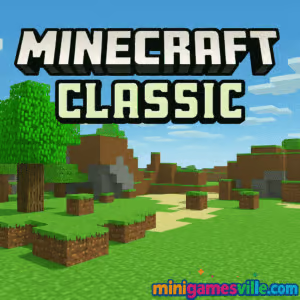
Ready to build right now? Click Play above to jump into Minecraft Classic on MiniGamesVille and start crafting instantly. Minecraft Classic is the original sandbox browser game that kicked off a global phenomenon. In this free online version, you get a nostalgic creative mode with a simple block palette and pure building fun, all unblocked in your browser with no download. Whether you are reliving the early days or introducing a new player to the basics, press start and let your imagination stack sky high.
About Minecraft Classic
Minecraft Classic is a lightweight creative sandbox where you place, remove, and shape blocks into anything you can dream up. No survival pressure, no hunger bar, just pure building focus. It runs right in Chrome, Edge, Firefox, or Safari, making it ideal for quick play sessions at home, school, or work breaks. The charm of Minecraft Classic lies in its simplicity, which makes it a perfect warmup before a full Minecraft session or a bite-size builder for casual players.
History of Minecraft Classic
The Classic edition dates back to 2009 when Markus “Notch” Persson released the earliest public builds of Minecraft. Those prototypes introduced infinite worlds, block placement, and creative building. To celebrate the game’s 10th anniversary, Mojang reintroduced Minecraft Classic as a free browser game, letting fans experience the retro look, the 32-block palette, and that iconic, minimalist vibe again.
Style & Vibe
Build, sculpt, and relax in Minecraft Classic on MiniGamesVille.
Expect chunky textures, bright colors, and a cozy lo-fi atmosphere. Minecraft Classic keeps the UI minimal and the pace relaxed, so every session feels like a creative break. You can sketch ideas for grand bases, practice patterns, or freestyle monuments without worrying about mobs or crafting recipes.
Gameplay in Minecraft Classic
Gameplay is straightforward. Choose blocks, look around with your mouse or finger, and place or remove pieces to form structures. Physics are simple and predictable, which helps when testing arches, pixel art, or redstone-free contraptions. The challenge comes from self-set goals: finish a cottage within five minutes, recreate a famous landmark, or fill a plot with symmetrical designs. It is a great environment for beginners to learn spatial planning and for veterans to prototype quickly.
Game Modes
Creative Free Build: Unlimited blocks, no enemies, no crafting grind.
Solo Sandbox: Focused building without distractions, perfect for practicing designs.
Casual Time Trials: Set your own timer and attempt speed builds or themed challenges.
How to Play
Press Play in the iframe above to load Minecraft Classic on MiniGamesVille.
Select a block type from the palette, then move to your build spot.
Place blocks to sketch the footprint, then stack and shape your walls and roof.
Add details like windows, trim, and patterns for depth and contrast.
Screenshot or save your favorite angles and share with friends.
Controls
Move: W A S D
Look: Mouse move or swipe
Jump: Space
Place block: Right click or tap
Remove block: Left click or long press
Select block: Number keys 1–9 or on-screen palette
Toggle build menu or palette: B or on-screen button
Reset position or respawn: R
Note: Some keys can vary by implementation. Check the in-game help panel for the current mapping.
Device Compatibility & Browser Support
Play Minecraft Classic online on modern desktop and mobile browsers. For best performance, use an up-to-date version of Chrome, Edge, Firefox, or Safari with hardware acceleration enabled. Close extra tabs, pause heavy downloads, and keep your GPU drivers current on desktop for smoother frame rates.
Mobile vs. Desktop Gameplay
Desktop: Precise mouse aiming and quick hotkeys make large builds faster.
Mobile: Tap-to-place is comfy for casual sketching and small decorative work.
Can I Play Offline?
Minecraft Classic is a browser experience, so you need an internet connection to load the game and assets. Keep the tab open if you plan a long session to avoid reloading on unstable networks.
Can I Play Unblocked?
On many networks, yes. MiniGamesVille serves the game over secure HTTPS, which helps it run on typical school or office connections. If your network blocks gaming sites, try a personal device and a non-restricted connection. Clearing your browser cache or switching browsers can also help when pages fail to load.
Platforms
Browser: Play right here on MiniGamesVille with no download.
Mobile apps: There is no official Minecraft Classic app for iOS or Android. If you want the full mobile experience, try the official Minecraft mobile version:
Start small: Build a 9×9 or 11×11 base to learn proportions before scaling up.
Layer your palette: Alternate stone and wood for color contrast and easy depth.
Use pillars: Vertical posts at corners make boxes feel like designed buildings.
Practice roofs: Gable or hip roofs add instant character to simple shapes.
Mirror check: Step back often and compare left and right sides for symmetry.
Advanced Strategies
Plan with grids: Mark floors in a checker pattern to keep measurements tidy.
Silhouette first: Outline the structure’s profile, then fill in details.
Add negative space: Courtyards and arches break up large walls elegantly.
Texture mixing: Combine smooth and rough blocks to highlight features.
Theme builds: Limit yourself to 5 or fewer blocks for cohesive designs.
Features
🧱 Classic creative mode with an easy block palette
🌐 Plays in your browser, no download required
🎨 Perfect for prototyping builds and pixel art
🧭 Simple controls that are friendly for new players
💡 Great for design practice, speed builds, and warmups
📸 Ideal for screenshots and sharing your concepts
🕹️ Works on desktop and mobile browsers
🔁 Quick sessions, instant restarts, zero grind
Unlockables & Secrets
Minecraft Classic keeps it minimal, so there are no formal unlocks. Try fog or render-distance toggles if available, experiment with height variation, and use symmetry to reveal striking patterns. Many creators set personal challenges, like “finish a two-floor house with window trim in under 10 minutes.”
Cheats & Mods
The browser version is meant to be lightweight and stable, so third‑party mods are uncommon here. For fair play and security, avoid unauthorized scripts or cheats. If you want deep modding, the full Minecraft editions and community tools are better suited.
Walkthrough Summary
Lay a rectangle foundation and mark door and window gaps.
Raise walls in layers of alternating materials for texture.
Add beams and posts at corners and midpoints.
Top with a gable or hip roof, then add overhangs.
Finish with paths, fences, and greenery for curb appeal.
Scoring, Records & Progression
There is no score in Minecraft Classic. Create your own progress system with timed builds, blueprint checklists, or weekly themes. Track personal bests for speed builds and share screenshots to compare iterations over time.
Why Play Minecraft Classic
It is fast to load, relaxing to play, and surprisingly inspiring. Whether you are testing rooflines for a survival base or showing a friend how block placement works, Minecraft Classic keeps the focus on creativity. It is the purest way to scratch that builder itch right inside your browser.
Pros & Cons of Minecraft Classic
Pros: Instant browser play, no grind, perfect for learning and prototyping, low system demands.
Cons: Limited block set, no survival mechanics, fewer settings than full Minecraft.
Latest Updates & Browser Performance Tips
Keep your browser up to date for smoother WebGL rendering.
Enable hardware acceleration and close heavy tabs or background streams.
On laptops, plug in for better CPU and GPU boost behavior.
If the game stutters, reduce display scaling or window size to lower the render load.
Similar games to Minecraft Classic
Minecraft Builder — Freeform block building with a bigger palette for ambitious structures.
Block Craft 3D — Craft a voxel city with quests and guided projects for inspiration.
Parkour Block 6 — First‑person jumping challenges that sharpen movement skills.
Parkour Block 7 — New levels and tighter jumps for seasoned parkour fans.
Obby Parkour Ultimate — Obstacle‑course platforming with colorful stages and quick retries.
Mr Mine — Go deep underground, upgrade drills, and manage a growing mining empire.
Puzzle Blocks Classic — Zen block‑fitting puzzles that scratch the spatial design itch.
FAQ
What is Minecraft Classic? Minecraft Classic is the original creative-only browser game that lets you place and remove blocks freely without survival elements.
Is Minecraft Classic free to play? Yes, it is free to play online in your browser on MiniGamesVille with no download required.
Does Minecraft Classic have survival mode? No, this version focuses on creative building only, which makes it perfect for practice and quick design sessions.
Can I play Minecraft Classic on my phone? You can play in a mobile browser, but the best mobile experience is the official Minecraft app on iOS or Android linked above.
Why are there fewer blocks in Minecraft Classic? Classic recreates the early-era feature set, which includes a smaller 32-block palette for a retro, simplified build flow.
How do I fix lag in the browser? Update your browser, enable hardware acceleration, close extra tabs, and try a smaller window size to reduce GPU load.
Conclusion
Sometimes you just want to build, no strings attached. Minecraft Classic delivers that creative spark in seconds, right in your browser, with the timeless look that made the series famous. It is the perfect canvas for warmups, quick ideas, and chill sessions.
Press Play above and start crafting in Minecraft Classic on MiniGamesVille. Sketch a cottage, raise a tower, or whip up pixel art. Your next great build is a few clicks away, and the blocks are already waiting.

 (45 votes, average: 4.38 out of 5)
 Loading...
 English
 Shqip
Shqip
 বাংলা
বাংলা
 Български
 简体中文
简体中文
 Hrvatski
 Čeština
 Dansk
Dansk
 Nederlands
 Suomi
Suomi
 Ελληνικά
 हिन्दी
 Magyar
 Bahasa Indonesia
 日本語
日本語
 한국어
한국어
 Lietuvių
 Bahasa Melayu
 Norsk
Norsk
 Polski
 Português do Brasil
 Română
 Slovenčina
 Slovenščina
 Svenska
 ไทย
ไทย
 Türkçe
 Українська
 اردو
اردو
 Tiếng Việt
 isiZulu
 Español
 Français
 Deutsch
 العربية
 Italiano
 فارسی
فارسی
 Русский