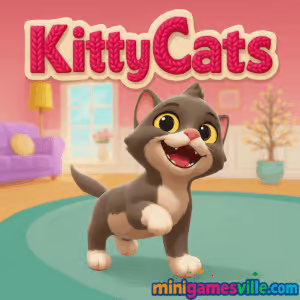
Ready to pounce into something adorable? Click play and enjoy Kitty Cats right here on minigamesville.com. Kitty Cats is a cozy online pet simulator and dress-up browser game where you feed, pet, and style a house full of fluffy felines. It loads quickly, plays smoothly in your browser, and is perfect when you want a stress-free break. If you’re hunting for a cute, unblocked cat game you can play anywhere, Kitty Cats delivers with simple controls, charming animations, and plenty of toys to keep tails twitching. Tap play now, give your favorite kitten some love, and start building the cutest photo album of kitty moments.
About Kitty Cats
Kitty Cats is a laid-back virtual pet experience that focuses on caring, play, and creativity. Pick a kitten, watch its thought bubbles to see what it wants, then respond with toys, treats, and cuddles. Switch to the dressing room to try on collars, hats, and outfits, then snap a picture to save your look. The loop is short and satisfying, which makes Kitty Cats ideal as a casual browser game for all ages.
History of Kitty Cats
Kitty Cats began life as a mobile-friendly pet game and later arrived as a modern WebGL browser version so more players could enjoy quick, click-to-play kitten care without downloads. That lightweight approach makes it easy to run on school or work devices that limit installs.
Style & Vibe
Bright rooms, soft color palettes, and playful toy physics give Kitty Cats a warm, relaxing feel. Animations are expressive, from curious head tilts to excited hops when you wiggle a toy mouse. The dressing room adds creative flair, turning each kitty into a tiny fashion icon.

Gameplay in Kitty Cats
The core loop in Kitty Cats is simple: read the kitten’s thought bubble, deliver what it wants, and enjoy a cute reaction. Rotate through rooms, toss a ball of yarn, rustle a cardboard box, or hand out a biscuit treat. Each interaction nudges happiness up, which unlocks more playful reactions and new photo-worthy moments. While there is no harsh fail state, the challenge comes from noticing needs quickly and chaining interactions to keep your companion purring.
Game Modes
- Free Play: The main sandbox. Swap toys, feed snacks, and pet your kitty at your pace.
- Dress-up Studio: Mix and match collars, hats, and outfits for snapshots.
- Snapshot Mode: Pause and frame the perfect picture for your gallery.
- Daily Care Checklist: Light goals that encourage a quick session each day.
How to Play
- Press Play above to load Kitty Cats on minigamesville.com.
- Choose your favorite kitten from the lineup.
- Watch the thought bubble, then select the toy or treat your kitty wants.
- Pet, feed, and play until your cat is content and playful.
- Open the dressing room, pick an outfit, and take a photo to save your look.
- Repeat with other kittens to complete your cute photo collection.
Controls
- Mouse or touch: Click or tap buttons, toys, and treats.
- Click and hold: Pet and brush your kitty for extra affection.
- Drag: Move toys around to get those pounces just right.
Device Compatibility & Browser Support
Kitty Cats runs in modern browsers, including Chrome, Edge, Firefox, and Safari on desktop and mobile. No download is needed. For the smoothest experience, keep one tab open, close heavy background apps, and enable hardware acceleration in your browser settings.
Mobile vs. Desktop Gameplay
On mobile, tap controls make petting and tossing toys feel natural, great for quick sessions. On desktop, a larger screen helps with precise dress-up picks and framing photos. Both play beautifully, so choose whatever suits your mood.
Can I Play Offline?
Kitty Cats is a browser game, so you need an internet connection to load and play. Some assets may cache, but plan for online play to keep progress and features consistent.
Can I Play Unblocked?
Since Kitty Cats runs in-browser over a secure https connection, it often works on networks that block installers. If you’re on a restricted connection, try a modern browser, refresh the page, or switch networks if your admin blocks gaming sites.
- Browser: Play Kitty Cats on minigamesville.com, no download required.
Mobile availability: There are no official App Store or Google Play listings for Kitty Cats at this time. Want a similar mobile experience on the go? Try Cat Game, a popular cat-collecting sim:
Tips & Tricks
Beginner Tips
- Follow the thought bubble first, free play second. Needs met early create happier reactions.
- Rotate toys. Variety keeps the kitty engaged and unlocks new animations.
- Take photos after big reactions to capture the cutest moments.
- Short sessions add up. A few minutes daily fills your gallery quickly.
Advanced Strategies
- Chain actions. Pet after a toy pounce for back-to-back happy emotes.
- Use the dressing room between play bursts to keep the mood upbeat.
- Optimize camera angles in Snapshot Mode for clean, well-lit portraits.
- Set collection goals, like theme outfits or action photo sets per kitten.
Features
- Six adorable kittens to choose from
- Responsive toy physics with yarn, mouse, and box play
- Petting and treats that spark lively reactions
- Dressing room with collars, hats, and cute outfits
- Snapshot gallery for shareable screenshots
- Peaceful music and cozy room ambiance
- Click-to-play browser convenience, no download needed
- Family-friendly pacing that fits short breaks
Unlockables & Secrets
Experiment with different toy orders and petting timing to uncover new reactions. Cycle outfits before snapping a photo, some combinations make surprisingly charming portraits. Fill your gallery with action shots and themed looks.
Cheats & Mods
Kitty Cats is designed for simple, honest fun. Browser mods and cheat scripts can break saves or cause crashes, so stick to the built-in systems for the smoothest experience.
Walkthrough Summary
Pick a kitten, satisfy the first thought bubble, toss a toy, pet for a mood boost, then hop into the dressing room and take a picture. Repeat with other kittens, rotate toys for variety, and build a gallery of your favorite feline fits.
Scoring, Records & Progression
There is no leaderboard or hard score. Progress is personal: complete your gallery, log unique reactions, and assemble themed outfit sets across all kittens.
Why Play Kitty Cats
When you want a gentle, feel-good online cat game that runs instantly, Kitty Cats hits the sweet spot. It is approachable for kids, relaxing for adults, and perfect for quick breaks between tasks.
Pros & Cons of Kitty Cats
- Pros: Instant browser play, adorable animations, simple controls, great for short sessions.
- Cons: No competitive goals, minimal difficulty, progress is collection focused rather than skill based.
- Use a modern browser with hardware acceleration on for smoother animations.
- Close extra tabs and background streams to avoid micro stutters during play.
- If audio desyncs, refresh the page and re-enter the dressing room or toy area.
Similar games to Kitty Cats
- Funny Kitty Care – treat, groom, and style a mischievous kitty in quick, kid-friendly sessions.
- Dual Cat – a clever cat-themed arcade challenge with two kitties to coordinate at once.
- Nekopirate: Quest for Gold – sail with pirate cats, collect treasure, and dodge hazards in a light adventure.
- Merge Zoo – merge animals to grow a cheerful zoo, relaxing and collectible focused.
- Funny Puppy Care – similar pet-care loop with playful pups, easy and wholesome.
- Funny Puppy Emergency – mini rescue missions and quick-care tasks for dog lovers.
FAQ
Is Kitty Cats free to play online?
Yes, Kitty Cats runs free in your browser with no download required.
Does Kitty Cats have multiple kittens to choose from?
Yes, you can pick from several cute kittens and swap at any time.
Can I change outfits and accessories in Kitty Cats?
Yes, visit the dressing room to try collars, hats, and outfits, then take a snapshot.
Will Kitty Cats save my progress?
Your browser can store local progress, so use the same device and browser to keep your gallery.
Is Kitty Cats an unblocked game at school?
It often works since it is browser based, but availability depends on your network’s rules.
What devices work best for Kitty Cats?
Any modern desktop or mobile browser works well. Desktop offers easier photo framing, mobile is perfect for quick taps.
Conclusion
If you want a calming, heartwarming break, Kitty Cats is your purrfect pick. Simple interactions, cute reactions, and a stress-free loop make it a standout browser game for cat lovers.
Press play above to start Kitty Cats on minigamesville.com, meet your new feline friend, and fill your gallery with adorable snapshots. Grab a toy, give a treat, and let the purring begin.

 Loading...
 English
 Shqip
Shqip
 বাংলা
বাংলা
 Български
 简体中文
简体中文
 Hrvatski
 Čeština
 Dansk
Dansk
 Nederlands
 Suomi
Suomi
 Ελληνικά
 हिन्दी
 Magyar
 Bahasa Indonesia
 日本語
日本語
 한국어
한국어
 Lietuvių
 Bahasa Melayu
 Norsk
Norsk
 Polski
 Português do Brasil
 Română
 Slovenčina
 Slovenščina
 Svenska
 ไทย
ไทย
 Türkçe
 Українська
 اردو
اردو
 Tiếng Việt
 isiZulu
 Español
 Français
 Deutsch
 العربية
 Italiano
 فارسی
فارسی
 Русский