Introduction
Play Harvest Simulator online right now on minigamesville.com. If you love the satisfying loop of planting, growing, and selling, this cozy farming and management browser game will hook you fast. Build your fields, upgrade your tools, and optimize routes as crops ripen in real time. Perfect for a quick break or a deep-session grind, the experience loads instantly in your browser and feels great unblocked on school or work networks. Ready to start your next bumper crop and watch the coins roll in? Tap Play above to jump into Harvest Simulator and grow the farm of your dreams.
About the Game
Harvest Simulator is a relaxing, skill-based farm management game where every decision matters. You balance planting schedules, storage, and market timing while expanding plots, unlocking automation, and fine tuning your production chain. No download needed, just a smooth browser game loop that blends casual clicks with smart strategy.
History of Harvest Simulator
Modern web farming games evolved from classic Flash titles and social sims. Harvest Simulator carries that legacy forward with lightweight WebGL performance, crisp visuals, and a progression system built for quick browser play sessions that still feel rewarding over time.
Style & Vibe
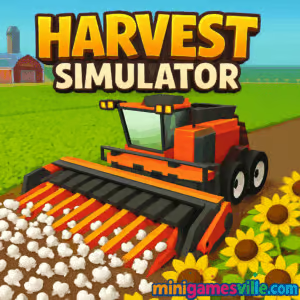
Bright fields, plump crops, and clean UI cues keep your focus on the fun. Subtle animations and a calm color palette make harvesting feel snappy without visual clutter.

Gameplay in Harvest Simulator
Each cycle begins with planning. Plant fast growers to kickstart revenue, then rotate into high value crops as storage expands. Upgrade your harvester range and speed to reduce travel time, chain actions to minimize idle moments, and schedule sells when prices peak. Expect light physics on movement, smooth pathing, and a risk reward economy where overfilling storage or selling too early can cost momentum.
Game Modes
- Free Farm: Chill sandbox growth with open ended expansion.
- Contracts: Timed orders that reward big payouts for precise planning.
- Time Trials: Race the clock to clear fields efficiently and set personal records.
- Daily Goals: Bite sized tasks that nudge steady progression.
How to Play
- Start with starter seeds and plant an initial plot.
- Harvest when ripe, then reinvest coins into more plots and basic upgrades.
- Balance short grow cycles with premium crops to build stable cash flow.
- Unlock storage and automation to scale production without micromanaging.
- Time your sales to complete contracts and hit profit milestones.
Controls
- Desktop: WASD or Arrow keys to move. Mouse to plant, harvest, upgrade, and sell. Number keys to quick select tools if available.
- Mobile: Tap to move and interact. Long press to queue actions. Pinch to zoom if supported.
Device Compatibility & Browser Support
Runs well on modern versions of Chrome, Edge, Firefox, and Safari. Chromebooks and mid range laptops handle the game smoothly. Enable hardware acceleration in your browser settings for best performance. Progress typically saves in your browser storage, so keep the same device and browser for seamless sessions.
Mobile vs. Desktop Gameplay
Desktop shines for precision routing and quick hotkeys. Mobile feels great for relaxed harvesting and short check ins. If you prefer speed farming, use desktop. If you prefer cozy tapping, mobile delivers.
Can I Play Offline?
You need an internet connection to load the game. Some progress may persist locally, but offline play is not supported for full sessions.
Can I Play Unblocked?
Yes, this is a lightweight browser game hosted on minigamesville.com, so Harvest Simulator unblocked works on most networks. If your network filters gaming sites, try a different browser or a non school network.
- Browser: Play on minigamesville.com on desktop, Chromebook, tablet, or phone.
- Official mobile app: No official iOS or Android app for Harvest Simulator at this time.
- Similar mobile alternative: Try Hay Day by Supercell
Google Play and
App Store.
Tips & Tricks
Beginner Tips
- Open with quick grow crops to fund early upgrades.
- Expand storage before buying luxury crops to prevent overflow losses.
- Harvest in loops, not lines, to reduce backtracking.
- Stagger plant times so something is always ripening.
- Complete contracts that overlap with your current crop plan.
Advanced Strategies
- Map efficient routes that pass by storage and sale points on every lap.
- Use crop rotation: fast crop, high value crop, contract crop.
- Prioritize upgrades that cut travel time, then invest in automation.
- Bank coins before big price events to sell large batches at once.
- Maintain a small emergency seed fund to avoid stall outs.
Features
- 🌾 Satisfying plant to profit loop with clear goals
- 🚜 Upgrades that boost speed, range, and automation
- 📈 Contract system for high value payouts
- 🧠 Strategy centered around timing and routing
- 📦 Expandable storage to scale income safely
- 💡 One click quality of life actions for batch tasks
- 🎯 Daily objectives to guide progression
- 📱 Smooth performance on mobile and desktop
Unlockables & Secrets
Hidden milestones may grant small boosts like quicker regrowth or bonus coin drops. Keep completing streaks and checking the upgrade panel after contract chains to find new perks.
Cheats & Mods
There are no official cheats. Browser extensions or save edits can corrupt progress and hurt performance. For a clean run, stick to in game upgrades and smart routing.
Walkthrough Summary
Kick off with fast growers, upgrade movement speed, then storage, then harvesting radius. Layer in high value crops, keep a rolling contract queue, and sell in batches. Once automation unlocks, scale fields and focus on route optimization.
Scoring, Records & Progression
Your success is measured in total coins earned, contracts completed, and time per harvest loop. Aim to reduce your average loop time as fields expand. Track personal bests by session and try to beat them with smarter crop cycles.
Why Play Harvest Simulator
You get a tight, feel good farming loop with zero friction. It is a quick loading browser game that rewards both casual planting and high level optimization. Whether you have five minutes or fifty, it always feels good to clear a field and cash in.
Pros & Cons of Harvest Simulator
- Pros: Instant play online, satisfying growth curve, approachable controls, scalable strategy.
- Cons: Requires internet, contracts can be tight on time if you overplant one crop.
- Refresh the page to load the latest build automatically.
- Close unused tabs and disable heavy extensions while playing.
- Enable hardware acceleration in browser settings.
- On mobile, switch to performance mode and keep battery saver off for smoother frames.
Similar games to Harvest Simulator
- Village Builder — Relaxing settlement builder with satisfying resource loops.
- Babel Tower — Idle vertical builder where upgrades stack into huge gains.
- Rooster Booster — Farm themed clicker with fast upgrades and fun pacing.
- Fisherman Life — Chill gather and sell loop with gear upgrades on the water.
- Merge Zoo — Merge and manage enclosures to grow earnings over time.
- Tower Merge — Merge mechanics meet incremental income strategies.
- Cozy Garden Design — Creative garden building with relaxing tasks and upgrades.
FAQ
Is Harvest Simulator free to play?
Yes, it is free to play in your browser with no download required.
Does Harvest Simulator work on school or work devices?
It is a lightweight browser game and often plays fine on school or work laptops, but access depends on local network rules.
How do I save my progress?
Your progress typically saves in your browser storage on the same device and browser.
Which browser is best?
Chrome or Edge on desktop, and Safari or Chrome on mobile, usually provide the smoothest experience.
What should I upgrade first?
Prioritize movement speed and storage, then expand harvesting radius and automation.
Conclusion
Ready to unwind, plant a field, and watch profits pile up? The tight loop, clean visuals, and smart upgrades make this farming sim endlessly replayable.
Press Play above to start Harvest Simulator on minigamesville.com, optimize your first route, and turn a humble patch of land into a thriving operation. Happy harvesting.

 Loading...
 English
 Shqip
Shqip
 বাংলা
বাংলা
 Български
 简体中文
简体中文
 Hrvatski
 Čeština
 Dansk
Dansk
 Nederlands
 Suomi
Suomi
 Ελληνικά
 हिन्दी
 Magyar
 Bahasa Indonesia
 日本語
日本語
 한국어
한국어
 Lietuvių
 Bahasa Melayu
 Norsk
Norsk
 Polski
 Português do Brasil
 Română
 Slovenčina
 Slovenščina
 Svenska
 ไทย
ไทย
 Türkçe
 Українська
 اردو
اردو
 Tiếng Việt
 isiZulu
 Español
 Français
 Deutsch
 العربية
 Italiano
 فارسی
فارسی
 Русский