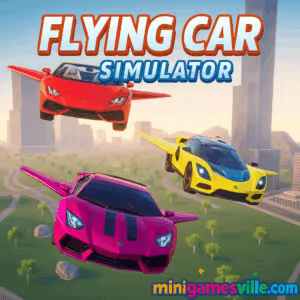
Play Flying Car Simulator now on MiniGamesVille and take a turbocharged leap from asphalt to open skies. Flying Car Simulator is a fast, physics-driven driving and flight browser game where you power down city streets, deploy wings, and soar through stunt rings in one smooth flow. Jump in for quick online sessions, master aerial drifts, and chase new personal bests. Ready for a clean, unblocked experience at school or work breaks? Hit Play and start flying.
About Flying Car Simulator
Flying Car Simulator blends arcade racing with light flight sim mechanics, creating a pick-up-and-play loop that feels fresh in your browser. You drive, you boost, you launch into the air, and you thread precise lines through checkpoints to keep combos alive. Whether you crave stunt playgrounds or time-trial sprints, the game delivers snappy controls and satisfying physics.
History of Flying Car Simulator
The idea of transforming cars has been a fan favorite in arcade racers and sandbox driving games for years. Flying Car Simulator takes that fantasy, trims the friction, and makes it work instantly in your browser. The result is a low-barrier online experience that still rewards skill and finesse.
Style & Vibe
Expect bright skies, reflective city blocks, and oversized stunt props designed for speed. The soundtrack leans energetic, the UI stays minimal, and the vibe invites short, repeatable runs that snowball into hours.

Gameplay in Flying Car Simulator
Each run starts on the ground. Build speed with nitro, hit a ramp, then toggle flight to glide over rooftops and through aerial gates. Land clean, chain boosts, and keep momentum to push your score. The flight model is simple to learn, yet nuanced enough to reward smooth angles, gentle pitch control, and timely throttle cuts. Miss a ring, clip a billboard, or over-rotate, and you will feel it in your time.
Game Modes
- Free Flight: Explore the map, practice transitions, and hunt hidden rings or collectibles.
- Time Trial: Beat the clock by flying the cleanest racing line.
- Challenges: Short skill tests like precision landings or multi-ring sequences.
- Stunt Score: Chain drifts, airtime, and near-misses into big multipliers.
How to Play
- Accelerate through city streets and aim for a ramp or runway.
- Toggle flight as you leave the lip to deploy wings.
- Feather pitch and roll to line up rings and collectibles.
- Land smoothly, re-engage boost, and link your next takeoff.
- Repeat clean lines to set new records.
Controls
- WASD or Arrow Keys: Steer and throttle
- Shift: Nitro boost
- Space: Handbrake for tight pivots
- F or V: Toggle flight mode
- R: Reset car
- C: Change camera
Tip: Small pitch inputs in the air keep speed higher than aggressive stick movements.
Device Compatibility & Browser Support
This online driving and flight game runs in modern browsers that support WebGL. For best performance, use the latest Chrome, Edge, Safari, or Firefox on a device with a dedicated or modern integrated GPU.
Mobile vs. Desktop Gameplay
Desktop offers sharper visuals and finer control with keyboard or gamepad. Mobile browsers run the game for quick sessions, though complex stunt chains are easier on desktop due to steadier frame pacing.
Can I Play Offline?
No. Flying Car Simulator is a browser game that requires an internet connection to load assets and track progress.
Can I Play Unblocked?
Yes in most cases. MiniGamesVille delivers a clean, lightweight build that commonly passes school and office filters. If your network blocks it, try a different browser, switch to full-screen, or play on a personal connection.
- Browser: Play on MiniGamesVille with no download.
- Official mobile apps: No official iOS or Android version of this exact game at this time.
- Want a similar mobile experience? Try Extreme Car Driving Simulator:
Tips & Tricks
Beginner Tips
- Use short boost bursts. Long boosts waste speed before takeoff.
- Level your car just before landing to avoid bounce and time loss.
- Aim for wide approach angles to line up multiple rings in one glide.
- Memorize two safe routes and alternate to reduce mistakes.
Advanced Strategies
- Feather throttle in flight. Cutting power briefly can drop altitude without scrubbing speed.
- Bank into turns, then counter-roll to exit flat, preserving momentum.
- Use the handbrake to snap the nose toward the next ramp after touchdown.
- Stack multipliers by linking near-miss traffic passes into your takeoff line.
Features
- 🚗 Seamless drive-to-flight transformation
- 🛫 Satisfying arcade flight with responsive physics
- 💨 Nitro boosts and drift multipliers
- 🎯 Ring routes, time trials, and stunt challenges
- 🌆 Open city playground with ramps and rooftops
- 🎮 Keyboard and gamepad support
- 📈 Personal bests and route mastery
- 🔊 Punchy sound and clean HUD
Unlockables & Secrets
Explore side alleys and rooftop gaps to discover hidden rings and bonus routes. Completing challenge chains may unlock new colorways or effects in some builds. Keep experimenting with angles and altitude.
Cheats & Mods
There are no built-in cheats. External mods or tampering can break performance and may risk your save. Play stock for the smoothest runs.
Walkthrough Summary
Start in Free Flight to learn a safe loop: street runway to rooftop ring to billboard gap to downtown landing. Once consistent, switch to Time Trial and overlay the same loop under pressure. Add new segments only after your base route is clean.
Scoring, Records & Progression
Scores reward clean lines, stunt variety, and ring accuracy. Time Trial medals depend on route memory and landing precision. Track your personal bests and shave seconds by tightening entry angles and minimizing pitch oscillations.
Why Play Flying Car Simulator
If you love arcade racers and light flight sims, this is your sweet spot. Flying Car Simulator gives instant action, satisfying physics, and short runs that always invite one more try.
Pros & Cons of Flying Car Simulator
- Pros: Snappy controls, smooth browser performance, clean learning curve, great for short sessions.
- Cons: Simple objectives by design, flight model favors arcade feel over deep simulation.
- Use the latest browser and enable hardware acceleration in settings.
- Close heavy tabs, set your GPU to High Performance in system graphics settings, and keep laptop power plugged in.
- Drop in-game resolution if your frame rate dips during dense city sections.
Similar games to Flying Car Simulator
- Parking Fury 3D: Night Thief — stealthy nighttime drives with tight parking challenges.
- Drive Mad — physics-based obstacle runs where throttle control is everything.
- Midnight Drive — neon city cruising and checkpoint sprints for pure flow.
- Stock Car Hero — high-speed oval racing with smart drafting.
- Speed King — arcade racing bursts built for quick leaderboards.
- Plane Wars — aerial routes and tactical flying for a fast change of pace.
FAQ
Is Flying Car Simulator free to play?
Yes, you can play free in your browser on MiniGamesVille.
Does Flying Car Simulator support controllers?
Most modern gamepads work via browser APIs. If inputs feel off, switch to keyboard for tighter timing.
How long is a typical run?
Most Time Trial routes take 1 to 3 minutes, perfect for quick sessions.
Is Flying Car Simulator kid friendly?
It contains driving and stunt action without graphic content, making it suitable for a wide range of ages.
Will progress carry between devices?
Progress is stored in browser data. Using a different device or clearing cache may reset it.
Conclusion
From curb to cloud in a single button press, Flying Car Simulator nails that jackpot mix of speed, airtime, and clean landings. Short runs, big rewards, and a smooth online experience make it a perfect browser game for breaks or deep sessions.
Ready to chase a new personal best? Play Flying Car Simulator on MiniGamesVille, keep your lines clean, and enjoy the glide.

 (1 votes, average: 4.00 out of 5)
 Loading...
 English
 Shqip
Shqip
 বাংলা
বাংলা
 Български
 简体中文
简体中文
 Hrvatski
 Čeština
 Dansk
Dansk
 Nederlands
 Suomi
Suomi
 Ελληνικά
 हिन्दी
 Magyar
 Bahasa Indonesia
 日本語
日本語
 한국어
한국어
 Lietuvių
 Bahasa Melayu
 Norsk
Norsk
 Polski
 Português do Brasil
 Română
 Slovenčina
 Slovenščina
 Svenska
 ไทย
ไทย
 Türkçe
 Українська
 اردو
اردو
 Tiếng Việt
 isiZulu
 Español
 Français
 Deutsch
 العربية
 Italiano
 فارسی
فارسی
 Русский