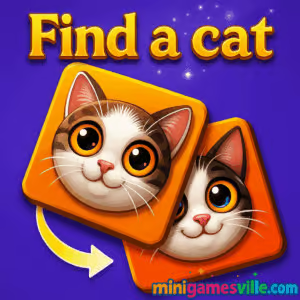
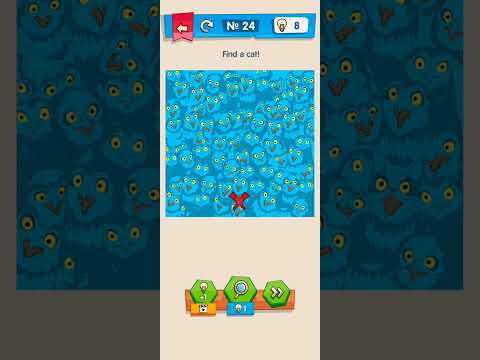
Play Find a cat right now on minigamesville.com and start spotting those sneaky felines. Find a cat is a delightful hidden object browser game that challenges your eyes and your logic in quick, satisfying bursts. If you love seek and find puzzles, spot-the-difference vibes, and cozy visuals, this online title belongs in your favorites. Load it up, scan every corner, and click each kitty before the timer or your hint limit runs out. Ready to unwind, sharpen focus, and rack up perfect clears? Click Play above and jump into Find a cat on minigamesville.com.
About Find a cat
Find a cat blends the calm of a picture book with the challenge of a puzzle hunt. Each scene hides cats in clever places, from window ledges to patterned backgrounds. The appeal is instant: anyone can understand it in seconds, yet every level pushes you to observe details, manage hints, and improve your completion time. Whether you are playing at home or on a study break, this online hidden object game delivers quick, replayable fun.
History of Find a cat
While the exact origins of Find a cat are part of the broader hidden object trend, its spirit echoes classic look-and-find books and modern mobile puzzlers. These games evolved toward minimal UI, crisp art, and rapid-fire levels. Find a cat follows that winning formula, delivering short stages, escalating difficulty, and a relaxing, family-friendly tone.
Style & Vibe
Expect clean art, playful cats, and scenes that reward careful observation. Colors are bright, silhouettes are readable, and animations feel snappy. Audio feedback on correct clicks adds a small rush, while subtle ambient sounds keep the mood cozy.

Gameplay in Find a cat
Each level presents a richly illustrated scene filled with props, textures, and hiding spots. Your goal is simple: locate and click every cat. Early stages teach you common hideouts, then later layouts introduce trickier silhouettes, partial occlusions, and color blending. The flow is pick-up-and-play, perfect for short sessions. Expect light pressure from timers or limited hints in some challenges, along with bonus star ratings for accuracy and speed.
Game Modes
- Classic Levels: Find a fixed number of cats to clear the stage.
- Timed Challenge: Beat the clock for extra stars and bragging rights.
- Relax Mode: Play at your own pace with optional hints for stress-free searching.
- Daily Scene: A rotating puzzle for steady practice and quick rewards.
How to Play
- Press Play above to launch Find a cat on minigamesville.com.
- Scan the scene from big shapes to small details, left to right or in a gentle grid.
- Click or tap each cat when you spot it. Missed taps may cost time or score.
- Use hints sparingly to reveal tough spots, then save the rest for later levels.
- Clear all cats to finish, then replay for faster times and cleaner accuracy.
Controls
- Mouse: Move to aim, Left Click to select a cat.
- Touch: Tap to select, pinch to zoom if supported, drag to pan on mobile.
- Keyboard: Not required, but Esc often opens the pause or settings menu.
Device Compatibility & Browser Support
Find a cat is a lightweight browser game that runs smoothly on modern Chrome, Edge, Firefox, and Safari. It is designed for desktop and mobile. For best performance, keep one tab focused on the game, disable heavy extensions, and ensure hardware acceleration is on.
Mobile vs. Desktop Gameplay
- Mobile: Natural pinch-zoom and tap precision, perfect for couch play.
- Desktop: Larger screen and fine mouse control, ideal for speed runs and accuracy.
Can I Play Offline?
No, Find a cat requires an internet connection since it runs in your browser.
Can I Play Unblocked?
Yes, Find a cat is an unblocked browser game for most networks. If your school or office restricts gaming sites, try switching to a different browser profile or using your mobile connection with Wi-Fi off.
- Browser: Play Find a cat on minigamesville.com.
- Mobile Apps: There is no official Google Play or App Store release of this exact browser game at the moment. Want a similar on-the-go experience? Try Brain Test: Tricky Puzzles on Google Play or App Store.
Tips & Tricks
Beginner Tips
- Start wide: scan big shapes first, then zoom in to inspect edges, shadows, and patterns.
- Look for tails, ears, and whiskers peeking behind objects.
- Reduce false clicks by hovering briefly before selecting.
- Save hints for the final one or two cats per scene.
- Replay easy levels to warm up your eyes before harder stages.
Advanced Strategies
- Create a mental grid and sweep row by row to avoid rechecking the same spots.
- Invert your expectation: hunt for shapes that do not belong, then confirm cat details.
- Dial screen brightness and contrast for better edge detection.
- Use peripheral vision to catch motion or pattern breaks while focused elsewhere.
- Time-attack technique: rapid micro-zooms on cluttered zones to accelerate verification.
Features
- 🐾 Charming hidden object puzzles with crisp, readable art
- ⏱️ Optional timed challenges for speed runners
- 🔍 Smart hint system for tricky hides
- 📱 Mobile-friendly controls with smooth pinch-zoom
- 🎯 Accuracy-based scoring and star ratings
- 🌈 Variety of scenes, from cozy rooms to busy streets
- 🎵 Light audio cues for satisfying finds
- ♻️ High replay value for practice and personal records
Unlockables & Secrets
Expect bonus stars, streak rewards for no-miss clears, and occasional special scenes that show up after a perfect run. Keep an eye out for cats that only reveal themselves after interacting with nearby objects.
Cheats & Mods
There are no legitimate cheats for Find a cat, and third-party mods can harm performance or your device security. Improve naturally with the tips above and use in-game hints as designed.
Walkthrough Summary
Approach each scene with a top-left to bottom-right sweep. Zoom on high-density prop clusters. Confirm silhouettes before clicking, then save a final pass for corners, borders, and repeating textures where cats blend in. If one remains, trigger a single hint to reveal the general zone and finish strong.
Scoring, Records & Progression
Your final score typically reflects time, accuracy, and hint usage. Perfect clears earn the highest stars. Track personal bests by replaying completed scenes, aiming to reduce total time and eliminate misses. Over sessions, you will recognize common decoys and hit cleaner streaks.
Why Play Find a cat
Find a cat is the perfect coffee-break puzzle: low commitment, big satisfaction, and zero downloads. It trains focus and visual memory while staying lighthearted and family friendly. Whether you chase stars or chill in relax mode, the gameplay loop stays fresh thanks to clever hiding spots.
Pros & Cons of Find a cat
- Pros: Accessible, polished art, quick sessions, works on almost any device, unblocked online play.
- Cons: Hardcore players may crave more difficulty variants, and hint restraint is key for top scores.
- Use the latest Chrome or Edge for the smoothest canvas rendering.
- Close background tabs and streaming apps to free memory and CPU.
- Enable hardware acceleration in your browser settings.
- On mobile, switch to full-screen and do not disturb to focus on tough scenes.
Similar games to Find a cat
- Diff — fast spot-the-difference challenges that sharpen your eye.
- Correct Lie — quirky logic puzzles where you fix tricky statements.
- Green — minimalist color-based puzzles with clever interactions.
- Robot Awake — grid lasers and mirrors in thoughtful, turn-based puzzles.
- Dual Cat — reflex-based cat action with cute style and tight controls.
- Funny Kitty Care — pet-sim comfort gameplay for cat lovers.
- The Sort Agency — tidy-up puzzles that reward pattern spotting and organization.
FAQ
What is Find a cat?
Find a cat is an online hidden object puzzle where you search each scene and click every cat to complete the level.
Where can I play Find a cat?
You can play Find a cat for free in your browser on minigamesville.com.
Is Find a cat unblocked at school?
In most cases yes, since it is a lightweight browser game. If blocked, try a different browser or your mobile connection.
Does Find a cat have a mobile app?
This exact browser version does not have official mobile apps. For a similar mobile experience, try Brain Test on Google Play or the App Store.
How do hints work in Find a cat?
Hints highlight or point toward a hard-to-see cat. Use them sparingly to keep your star rating high.
Can I pause or mute the game?
Yes, open the in-game menu to pause or adjust sound effects and music.
Conclusion
Whether you have two minutes or twenty, Find a cat delivers sweet, satisfying wins and a calm, puzzle-forward rhythm. It is simple to learn, endlessly replayable, and perfect for a quick focus boost.
Ready to put your observation skills to the test? Scroll up, press Play, and enjoy Find a cat on minigamesville.com. Happy hunting.

 Loading...
 English
 Shqip
Shqip
 বাংলা
বাংলা
 Български
 简体中文
简体中文
 Hrvatski
 Čeština
 Dansk
Dansk
 Nederlands
 Suomi
Suomi
 Ελληνικά
 हिन्दी
 Magyar
 Bahasa Indonesia
 日本語
日本語
 한국어
한국어
 Lietuvių
 Bahasa Melayu
 Norsk
Norsk
 Polski
 Português do Brasil
 Română
 Slovenčina
 Slovenščina
 Svenska
 ไทย
ไทย
 Türkçe
 Українська
 اردو
اردو
 Tiếng Việt
 isiZulu
 Español
 Français
 Deutsch
 العربية
 Italiano
 فارسی
فارسی
 Русский