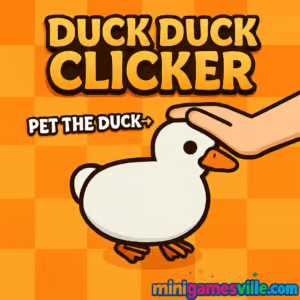
Play Duck Duck Clicker online on MiniGamesVille
Jump in and play Duck Duck Clicker right here on MiniGamesVille.com. This adorable idle clicker browser game turns every tap into progress as you collect Ducket$, unlock upgrades, and dress a stylish superstar duck. If you want a quick, satisfying loop that works on school Chromebooks and home PCs alike, you’re in the right place. Press play above, keep clicking, and watch the numbers soar. Ready to relax, grind, and giggle while you grow your feathery empire in this unblocked online game? Start Duck Duck Clicker now.
About Duck Duck Clicker
Duck Duck Clicker is a lighthearted incremental idle experience built for the modern web. You click or tap the duck to earn currency, invest in upgrades like Duck Power and Autoducker, then snowball into hilarious growth. Between the goofy outfits, achievement chimes, and satisfying upgrade cadence, it nails the “one more click” feeling. Whether you have two minutes or two hours, Duck Duck Clicker delivers a clean, lag‑free browser game loop that’s perfect for quick breaks and long sessions alike.
History of Duck Duck Clicker
The clicker genre began with simple tap‑to‑grow mechanics, then evolved with idle systems that reward players over time. Duck Duck Clicker takes that proven formula and wraps it in a charming duck theme, complete with whimsical cosmetics, floating bonus icons, and a gentle sense of progression. It’s easy to learn, endlessly replayable, and tailor‑made for instant play on any device.
Style & Vibe
Expect bright colors, bouncy UI feedback, and a cozy soundtrack that pairs well with steady tapping. The aesthetic lands somewhere between cute and cheeky, and the wardrobe options keep your duck looking fresh while your income graph climbs.

Gameplay in Duck Duck Clicker
At the center is your duck. Every click earns Ducket$. Spend those on two core tracks: per‑click power and passive income via the Autoducker. Seasonal or floating duck icons occasionally drift across the screen, so grab them for burst bonuses. As milestones pop, you’ll open new cosmetics, achievements, and beefier upgrades that compound earnings. The flow is smooth: click, buy, snowball, repeat. Fail states don’t exist here, only momentum and style points.
Game Modes
- Endless Idle: The standard loop, perfect for long‑term growth.
- Achievement Chasing: Hit milestone goals and collect badges.
- Self‑set Challenges: Speedrun a skin, set a Ducket$ target, or try no‑auto runs.
How to Play
- Click or tap the duck to earn your first Ducket$.
- Buy early upgrades that raise Duck Power and your Autoducker.
- Snag floating duck bonuses whenever they appear.
- Reinvest earnings into stronger upgrades, then dress your duck in new drip.
- Chase achievements and keep the compounding loop rolling.
Controls
- Desktop: Left‑click to earn and interact with menus.
- Mobile/Tablet: Tap to earn and navigate UI.
- Audio/Settings: Use the in‑game gear icon to tweak sound and preferences.
Device Compatibility & Browser Support
Duck Duck Clicker runs in modern browsers on Windows, macOS, Linux, and ChromeOS. It also plays smoothly on iOS and Android via mobile browsers. For best results, keep Chrome, Edge, Safari, or Firefox updated and enable hardware acceleration.
Mobile vs. Desktop Gameplay
- Mobile: Tap ergonomics are great for bursts, background idling works well if the tab remains active.
- Desktop: Easier menu navigation, faster multi‑clicks, and more screen real estate for upgrades.
Can I Play Offline?
You need an internet connection to load the game. After assets load, some browsers keep the tab running for a while, but closing the tab or clearing site data may reset progress. Keep a connection active for the smoothest experience.
Can I Play Unblocked?
MiniGamesVille hosts Duck Duck Clicker as a safe, no‑download browser game. Many school and work networks allow it, but access depends on local policies. If it’s blocked, try a different modern browser or ask your network admin to allow MiniGamesVille.com.
- Browser: Play free on MiniGamesVille.com in any modern browser.
- Official mobile apps: No official Google Play or App Store version exists for this exact browser game.
- Want a similar mobile app? Try Capybara Clicker by CrazyGames
— App Store:
Download on iOS
, Google Play:
Get it on Android.
Tips & Tricks
Beginner Tips
- Prioritize early Duck Power upgrades to raise your per‑click baseline.
- Buy the first Autoducker tiers quickly to earn while you browse menus.
- Always click floating duck bonuses for burst cash.
- Unlock one outfit early for motivation, then return to raw income.
Advanced Strategies
- Balance per‑click and per‑second so both lines climb together.
- Use milestone timing: hold big purchases until after a bonus spawns.
- Target upgrades with the best cost‑to‑gain ratio rather than chasing every shiny cosmetic right away.
- When growth slows, bank cash, then spend in a single wave to leap tiers.
Features
- 🦆 Charming duck theme with loads of drip and accessories
- 🖱️ Satisfying clicker mechanics with smooth feedback
- 📈 Idle income systems that compound over time
- 🎯 Achievement targets that nudge smart progression
- 💡 Floating bonus events for surprise bursts
- ⚙️ Simple menus, fast upgrades, no learning curve
- 🌐 HTML5 browser game that runs on nearly any device
- 🎵 Cozy audio and playful animations that keep you zen
Unlockables & Secrets
Expect hats, glasses, and themed outfits that unlock via milestones or purchase tiers. Keep an eye on rare floating icons for bigger‑than‑usual rewards. Some achievement thresholds quietly buff your income curve, so completing sets pays off long‑term.
Cheats & Mods
We don’t recommend third‑party scripts, memory editors, or autoclickers. They can corrupt saves, cause stutters, or trigger resets. The progression is tuned to feel brisk without tools, and fair play keeps your browser running smoothly.
Walkthrough Summary
- Early game: Spam clicks, buy the first two Duck Power tiers, unlock Autoducker levels 1–3.
- Mid game: Alternate between passive and per‑click upgrades, scoop every floating bonus, and start collecting outfits after key milestones.
- Late game: Focus on high‑multiplier upgrades, complete achievement sets, and make periodic bulk purchases to break plateaus.
Scoring, Records & Progression
Your main metrics are Ducket$ per click, Ducket$ per second, total earnings, and achievements unlocked. Personal bests are about how fast you hit big thresholds. If you want bragging rights, time your runs from fresh start to a chosen target hat or income tier.
Why Play Duck Duck Clicker
It’s pure serotonin for clicker fans. The loop is clean, the upgrades feel powerful, the cosmetics are silly in the best way, and the whole package loads fast in your browser. Duck Duck Clicker is great during study breaks, conference calls, and couch chill time.
Pros & Cons of Duck Duck Clicker
- Pros: Instant play in browser, cute theme, quick early progression, friendly on low‑end devices.
- Cons: No deep narrative, optimization brain can min‑max the fun if you rush cosmetics too early.
- Use an up‑to‑date browser with hardware acceleration on.
- Close heavy extensions and keep only one game tab open to avoid throttling.
- Allow cookies and local storage so your progress saves reliably.
- On mobile, keep the screen on or the tab active during longer idle stretches.
Similar games to Duck Duck Clicker
- Mr Mine — classic idle mining with deep upgrade trees.
- Ducklings.io — rescue ducklings and grow your flock in a lively pond.
- Duck Life — train, race, and evolve your champion duck.
- Virtual Voodoo — tap, poke, and upgrade in a cheeky clicker sandbox.
- 2048 Game Online — simple swipes, satisfying number merges.
- Swoop — one‑button flying with cozy vibes and quick runs.
FAQ
What is Duck Duck Clicker?
Duck Duck Clicker is a free online idle clicker browser game where you click a duck to earn Ducket$, buy upgrades, and unlock outfits.
Is Duck Duck Clicker free to play?
Yes, it’s free to play on MiniGamesVille with no downloads or sign‑ups required.
Does Duck Duck Clicker work on school Chromebooks?
Often yes, since it runs in the browser. Availability depends on your school’s network rules.
How do I save progress?
Progress is stored in your browser. Use the same device and browser, and avoid clearing site data.
Can I transfer my save between devices?
Saves are tied to local storage, so switching devices or clearing data may reset progress.
Does Duck Duck Clicker have multiplayer?
No, it’s a single‑player idle clicker focused on personal milestones.
What are the floating duck icons?
They are time‑limited bonuses. Click them quickly for extra Ducket$.
Is there a mobile app for Duck Duck Clicker?
There is no official app for this exact game. For a similar mobile experience, try Capybara Clicker on
iOS or
Android.
Conclusion
For fans of cozy numbers and cute cosmetics, Duck Duck Clicker is a perfect browser game to unwind with. The loop is silky, the upgrades make every click feel stronger, and the duck fashion show never gets old.
Press play above, start clicking, and watch your duck glow up. Bookmark MiniGamesVille, come back often, and keep building the most fashionable flock in Duck Duck Clicker.

 Loading...
 English
 Shqip
Shqip
 বাংলা
বাংলা
 Български
 简体中文
简体中文
 Hrvatski
 Čeština
 Dansk
Dansk
 Nederlands
 Suomi
Suomi
 Ελληνικά
 हिन्दी
 Magyar
 Bahasa Indonesia
 日本語
日本語
 한국어
한국어
 Lietuvių
 Bahasa Melayu
 Norsk
Norsk
 Polski
 Português do Brasil
 Română
 Slovenčina
 Slovenščina
 Svenska
 ไทย
ไทย
 Türkçe
 Українська
 اردو
اردو
 Tiếng Việt
 isiZulu
 Español
 Français
 Deutsch
 العربية
 Italiano
 فارسی
فارسی
 Русский