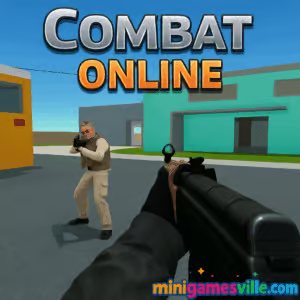
Ready to jump into fast, free FPS action? Click Play above to launch Combat Online right here on Minigamesville. Combat Online is a fast-paced multiplayer first person shooter, built for quick matches, crisp aiming, and instant fun in your browser. If you want an online FPS you can play unblocked on many networks, no downloads required, you are in the right place. Squad up, pick a map, and start racking up highlights.
About Combat Online
Combat Online is a 3D browser game that channels classic arena-shooter energy with modern WebGL performance. Lightweight, responsive, and easy to learn, it drops you straight into tight maps where movement, map awareness, and teamwork lead to streaks and scoreboard dominance. Whether you prefer Team Battle or a chaotic Free For All, the game loads fast and rewards clean aim and smart rotations.
History of Combat Online
Fans know Combat Online as a follow-up in the popular Combat series, carrying forward the arcade-friendly feel and map variety that made its predecessors so replayable. Over time the community embraced its quick matchmaking, familiar shooter physics, and accessible performance on school and work devices, which helped the game grow as a go-to browser FPS.
Style & Vibe
Bright arenas, clean silhouettes, and snappy hit feedback keep every duel readable. The UI stays minimal so you can focus on crosshair placement and flanks. Expect that classic browser game pick-up-and-play feel, with satisfying headshot pops and quick respawns that keep the pace high.

Gameplay in Combat Online
Matches are compact and intense. You spawn with a straightforward loadout, then navigate tight corridors and open lanes where angles matter. The gunplay favors recoil control and smart peeks. Sprint to reposition, jump to break lines, and swap weapons on the fly to counter long or short angles. The skill curve is friendly for newcomers, while veterans can grind KDR, master spawns, and dominate objective routes. Combat Online keeps the loop tight: move, clear, capture, repeat.
Game Modes
- Team Battle: Classic team deathmatch where coordinated pushes and trades win the lobby.
- Free For All: Pure aim practice and awareness, no backup required.
- Capture the Flag: Route planning and timing make all the difference.
- Gun Game and Customs: Rotate through weapons or hop into creative community setups.
How to Play
- Hit Play to join a server, then choose a map and mode.
- Stick with your team and clear corners as you move between power positions.
- Use sprint for rotations, jump to dodge fire, and swap to the right weapon for each angle.
- On objective modes, prioritize map control before rushing the point or flag.
- Watch the minimap and killfeed to predict enemy paths and time your pushes.
Controls
- Mouse: Aim and shoot
- W A S D: Move
- Space: Jump
- Shift: Sprint
- 1–9: Switch weapons
- R: Reload, C: Crouch, Tab: Scoreboard, Esc: Menu
Device Compatibility & Browser Support
Combat Online is a browser game that runs on modern WebGL-capable browsers like Chrome, Edge, Firefox, and Safari. A mid-range laptop or Chromebook handles it well. Close unused tabs, keep your graphics drivers updated, and set the game to a balanced quality preset for the smoothest frames.
Mobile vs. Desktop Gameplay
Desktop is recommended for precision aiming with mouse and keyboard. Some mobile browsers can load the game, but touch aiming and performance vary by device. For consistent frames and the best control, play on a desktop or laptop.
Can I Play Offline?
No. Combat Online is an online multiplayer shooter, so it requires an active internet connection for matchmaking and gameplay.
Can I Play Unblocked?
Combat Online runs in the browser on Minigamesville and may work on networks that allow gaming sites. Access always depends on your school or workplace policies.
- Browser: Play instantly on Minigamesville with no download.
- Mobile: There is no official iOS or Android version of this exact game at this time.
- Want a similar mobile FPS? Try Standoff 2:
Tips & Tricks
Beginner Tips
- Lower your mouse sensitivity so micro-adjustments feel steady.
- Pre-aim at head height when rounding corners.
- Strafe out, take a burst, then strafe back to reset recoil.
- Stick with a teammate and trade frags to keep momentum.
- Learn two favorite routes per map so you always have a Plan B.
Advanced Strategies
- Anchor strong angles on defense to drain enemy utility and time.
- Use sound cues to time peeks while enemies reload or jump.
- Counter long sightlines with tap-fire or a scoped secondary.
- Jiggle peek to bait shots before wide swinging for the finish.
- Track spawns after wipes to cut rotations and farm multi-kills.
Features
- 🎯 Crisp, skill-based FPS gunplay in your browser
- ⚔️ Multiple modes: Team Battle, FFA, CTF, customs
- 🗺️ Varied arenas with tight lanes and open dueling spaces
- 🚀 Fast loads and snappy performance on mid-range hardware
- 👥 Easy team play, quick lobbies, low friction
- 🔧 Straightforward settings to balance visuals and FPS
- 🎚️ Sensitivity and keybind options for precise control
- 🏆 Scoreboard tracking for bragging rights and goals
Unlockables & Secrets
Community servers often run custom settings and creative layouts. Explore different lobbies to find off-meta routes, sneaky power positions, and practice spots where you can dry-run headshot angles without pressure.
Cheats & Mods
Keep it fair. Third-party tools, scripts, or hacks can harm performance and put your account or device at risk. Stick to the in-game settings and legit skill building for the best experience.
Walkthrough Summary
Pick Team Battle for a warm-up. Play anchor on a power position, catch rotations, and stabilize your aim. Once you find your rhythm, switch to CTF for coordinated pushes. End your session with a few FFA rounds to stress-test crosshair placement and tracking. This flow builds map knowledge, confidence, and consistency.
Scoring, Records & Progression
Your personal progress shows in KDR, multi-kill streaks, and objective impact. Track whether your opening duels and mid-round trades are trending up. Set micro-goals like 10 headshots per match or 3 flag returns. Small wins stack into bigger improvements.
Why Play Combat Online
It is quick to load, easy to learn, and endlessly replayable. If you want a browser FPS that respects your time, Combat Online delivers sharp gunplay and clean maps without all the bloat.
Pros & Cons of Combat Online
- Pros: Instant play in browser, smooth performance, classic modes, friendly learning curve.
- Cons: Mobile experience varies, visual options are simpler than full PC shooters, voice comms depend on external tools.
- Use a Chromium-based browser and keep it updated.
- Close heavy background tabs and apps before launching.
- Switch the game’s quality to Medium if your FPS dips during busy fights.
- On laptops, plug in power and set your system to High Performance.
- Disable unnecessary extensions to reduce input delay.
Similar games to Combat Online
- Horror Dungeon 3D — Creepy first-person corridors with close-quarters combat.
- Plane Wars — Aerial shooter action with quick missions and arcade pacing.
- Archer Castle — Defend your walls with precise shots and smart upgrades.
- Stick Defenders — Merge, fortify, and blast waves in a defense shooter loop.
- Mafia Wars — Street skirmishes and tactical choices in bite-size battles.
- Blumgi Castle — Physics-based aiming and explosive payoffs in compact levels.
FAQ
Is Combat Online free to play?
Yes, you can play for free in your browser on Minigamesville with no download.
How many players are in a match?
Lobby sizes vary by server and mode, with quick matchmaking for both team and solo play.
Does Combat Online support controllers?
The game is optimized for mouse and keyboard. Some controllers may work through browser mapping tools, but support can vary.
What are the best settings for lower-end PCs?
Set the in-game quality to Low or Medium, close background apps, and use a Chromium-based browser.
Can I create private matches with friends?
Many servers allow private or custom rooms. Share the room name or code with your squad to meet up easily.
Is Combat Online safe for school laptops?
It runs in the browser and requires no install. Availability depends on your network admin’s rules.
Why does my ping spike sometimes?
Choose servers close to your region, pause large downloads, and use wired or strong Wi-Fi for stable latency.
Conclusion
If you crave quick rounds and clean aim practice without a giant install, Combat Online is your new tab-friendly favorite. It captures the heart of arena shooters with modern browser performance and the right mix of modes for any mood.
Ready to climb the scoreboard? Hit Play above and launch Combat Online on Minigamesville. Warm up in Team Battle, lock in your crosshair, and start stacking highlights.

 Loading...
 English
 Shqip
Shqip
 বাংলা
বাংলা
 Български
 简体中文
简体中文
 Hrvatski
 Čeština
 Dansk
Dansk
 Nederlands
 Suomi
Suomi
 Ελληνικά
 हिन्दी
 Magyar
 Bahasa Indonesia
 日本語
日本語
 한국어
한국어
 Lietuvių
 Bahasa Melayu
 Norsk
Norsk
 Polski
 Português do Brasil
 Română
 Slovenčina
 Slovenščina
 Svenska
 ไทย
ไทย
 Türkçe
 Українська
 اردو
اردو
 Tiếng Việt
 isiZulu
 Español
 Français
 Deutsch
 العربية
 Italiano
 فارسی
فارسی
 Русский