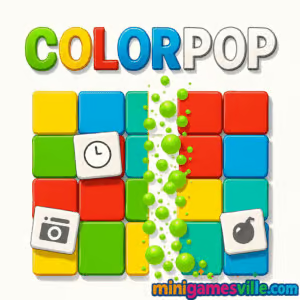
Ready to relax and match by color? Click Play to start Colorpop on Minigamesville right now and enjoy a smooth, fast browser game experience.
Introduction
Colorpop is a satisfying color-matching puzzle you can play online in your browser, no download required. This HTML5 title blends the chill vibes of a minimalist puzzler with the dopamine hit of big pops and clean boards. If you like quick-thinking logic challenges and elegant design, Colorpop will hook you in minutes. Play Colorpop on minigamesville.com to enjoy it unblocked on most networks, perfect for a quick break or a long puzzle unwind. Tap in, chase high combos, and keep clearing those tiles, then come back for daily brain-soothing sessions.
About Colorpop
Colorpop is a bite-size puzzle where your goal is to group, merge, or clear matching colors as efficiently as possible. Clean animations, clear rules, and a forgiving restart system make it great for all ages. As a modern browser game, Colorpop runs smoothly on desktop and mobile, so you can carry your progress anywhere you browse.
History of Colorpop
Colorpop follows the lineage of classic color-matching and logic games that took off with early web puzzles, evolving into today’s polished HTML5 experiences. Its focus on clarity, simple inputs, and quick-win gameplay reflects what players love in modern casual puzzle design.
Style & Vibe
Expect soft gradients, crisp shapes, and clean UI elements that make every pop feel rewarding. Colorpop’s sound and animation feedback are tuned for calm momentum, so you can zone in and hit flow state.
A clean, colorful interface makes Colorpop instantly playable.
Gameplay in Colorpop
The loop is simple. Scan the board, spot the best chain, and tap or click to clear matching colors. Early levels teach fundamentals, then the challenge ramps up with tighter layouts, limited moves, or trickier color arrangements. The physics are snappy, moves are instant, and the combo meter rewards planning ahead. Efficiency matters, so the fewer moves you use, the better your final score and streak.
Game Modes
Classic: Clear the board by matching colors and optimizing your move count.
Moves Challenge: Beat set layouts within a limited number of actions.
Time Rush: Race the clock for fast clears and bonus chains.
Endless: Chill mode for continuous boards and laid-back color popping.
How to Play
Look for the largest clusters or the move that unlocks more matches.
Tap or click to pop matching colors and trigger chain reactions.
Plan two steps ahead to keep moves low and combos high.
Use undo or restart if a path wastes moves.
Clear the board or hit the target score to advance.
Controls
Desktop: Mouse click to select and pop. R to restart level if available. U for undo if enabled.
Mobile: Tap to select and pop. On-screen buttons for undo and restart where supported.
Device Compatibility & Browser Support
Colorpop runs on modern browsers like Chrome, Firefox, Safari, and Edge. It is optimized for both touch and pointer input. For best performance, keep only a few tabs open and enable hardware acceleration in your browser settings.
Mobile vs. Desktop Gameplay
On mobile, Colorpop feels tactile and zen with tap controls and quick sessions. Desktop gives you larger real estate for scanning patterns, great for chasing low-move clears and record streaks.
Can I Play Offline?
Colorpop is an online browser game, so an active connection is required. If you need offline play, see the Platforms section for a similar mobile option you can install.
Can I Play Unblocked?
Colorpop is an HTML5 browser game and typically works unblocked on many networks. If your school or workplace restricts gaming sites, availability can vary. Use the HTTPS version and a modern browser, and check with your network admin if needed.
Platforms
Browser: Play directly on Minigamesville, no download, no plugin.
Mobile: There is no official Colorpop app listing at the time of writing.
Looking for a similar mobile experience? Try Water Sort Puzzle:
Start with obvious large clusters to create space early.
Avoid scattering colors. Consolidate one color at a time when possible.
Use undo to study the board state that opens up the most matches.
Save boosters or special moves for late-board cleanups.
Advanced Strategies
Think in chains. A good move creates the next two moves.
Prioritize colors that block high-yield areas near the board center.
Count moves. If two paths clear the board, choose the one with fewer actions.
Leave single tiles that set up a multi-color cascade on the next action.
Features
🎯 Clean, goal-focused puzzles with clear win states
💡 Smart hint and undo options for learning and mastery
⚡ Fast, responsive feel on desktop and mobile
🎵 Minimal audio for calm, focused sessions
🌈 Crisp visuals that make every pop satisfying
🧠 Modes for casual play or efficient, low-move runs
📈 Session-friendly design, perfect for short breaks
🔁 Instant restarts for speed practice
Unlockables & Secrets
Expect cosmetic themes, gentle difficulty steps, and occasional special boards. Keep clearing levels to reveal new layouts and visual tweaks.
Cheats & Mods
There are no official cheats for Colorpop. Third-party mods or scripts can harm performance or stability. For a safer edge, practice efficient patterns, use undo wisely, and replay tricky levels to internalize routes.
Walkthrough Summary
Scan for the densest color and create breathing room with your first pop.
Build two-step chains that unlock the board’s center area.
Finish with cleanup pops, using undo to shave off extra moves.
Scoring, Records & Progression
Colorpop rewards efficient clears and long combo chains. Track your best move counts and fastest times per layout. Aim to beat personal records by reducing wasted moves and planning multi-pop sequences.
Why Play Colorpop
If you want a calming browser puzzle that still prizes smart planning, Colorpop delivers. It is quick to learn, hard to put down, and perfectly suited for online, unblocked play sessions on minigamesville.com.
Pros & Cons of Colorpop
Pros: Smooth color-matching, fast loads, friendly difficulty curve, great on any device.
Cons: Later levels can get tight if you rush moves, and online play requires a stable connection.
Latest Updates & Browser Performance Tips
Keep your browser updated for smoother animations.
Enable hardware acceleration in settings.
Close heavy tabs or extensions before long play sessions.
On mobile, lower system animations for better battery life during extended runs.
Similar games to Colorpop
Color Water Sort 3D — Pour and sort vibrant liquids to group matching colors.
Puzzle Blocks Classic — Fit block pieces cleanly to clear lines and relax your mind.
Bubble Shooter — Aim and pop bubbles to chain color matches and rack up points.
Bubble Pop Adventures — Casual bubble popping with friendly level goals and powerups.
2048 Game Online — Swipe to merge tiles and reach the elusive 2048 block.
Totemia Cursed Marbles — Shoot and match rolling marbles before the chain reaches the end.
Color Circles — Time your taps to align and stack colorful rings.
Suika Sort — Sort juicy pieces in a fresh spin on the color-sorting formula.
FAQ
Is Colorpop free to play? Yes, Colorpop is a free online browser game you can play on Minigamesville with no download.
Does Colorpop support touch controls? Absolutely, Colorpop supports tap input on phones and tablets and clicks on desktop.
What is the best strategy for beginners? Work one color at a time, create space early, and use undo to test safer routes.
Can I pause Colorpop mid-level? Yes, switch tabs or lock your device and the current board state will persist in most browsers.
Is Colorpop unblocked at school? It often is, since it runs in-browser, but access depends on your network’s rules.
Conclusion
Colorpop brings soothing design and clever problem solving together in a smooth browser package. Whether you have two minutes or twenty, it is easy to drop in, pop some colors, and leave with a clearer head.
Ready to play Colorpop online? Tap Play above on minigamesville.com and start popping. Chase cleaner routes, longer chains, and new personal bests today.

 Loading...
 English
 Shqip
Shqip
 বাংলা
বাংলা
 Български
 简体中文
简体中文
 Hrvatski
 Čeština
 Dansk
Dansk
 Nederlands
 Suomi
Suomi
 Ελληνικά
 हिन्दी
 Magyar
 Bahasa Indonesia
 日本語
日本語
 한국어
한국어
 Lietuvių
 Bahasa Melayu
 Norsk
Norsk
 Polski
 Português do Brasil
 Română
 Slovenčina
 Slovenščina
 Svenska
 ไทย
ไทย
 Türkçe
 Українська
 اردو
اردو
 Tiếng Việt
 isiZulu
 Español
 Français
 Deutsch
 العربية
 Italiano
 فارسی
فارسی
 Русский