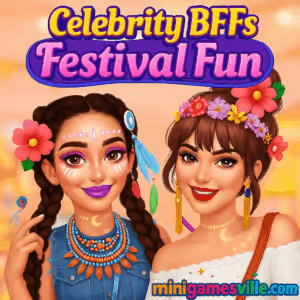
Hit Play and jump into Celebrity BFFs Festival Fun on minigamesville.com. Celebrity BFFs Festival Fun is a festival-themed dress-up and makeover browser game that lets you style besties for music fest season, complete with makeup, accessories, and photo-ready looks. If you enjoy fashion games online, this lightweight title runs right in your browser and is perfect for quick styling sessions at school, at home, or on the go. Ready to create headliner-worthy outfits in an unblocked, easy-to-play experience? Press play above and start styling now.
About Celebrity BFFs Festival Fun
Set backstage at a summer festival, Celebrity BFFs Festival Fun puts you in charge of glam. Choose glittery makeup, boho-chic tops, denim, fringe, and statement accessories, then capture your best looks in a photo scene. The pacing is relaxed, the UI is friendly, and everything happens in-browser, so there is no download or signup barrier. Fashion, makeover, dress-up, and casual players will feel right at home.
History of Celebrity BFFs Festival Fun
Celebrity BFFs Festival Fun sits in the modern wave of festival-inspired dress-up titles. It pairs classic virtual makeover mechanics with a streamlined wardrobe system, letting players focus on creativity rather than grinding. If you love styling challenges and music festival vibes, this online game delivers that feel-good loop in minutes.
Style & Vibe
Boho trends, neon accents, and glitter makeup give Celebrity BFFs Festival Fun its standout festival look.

Gameplay in Celebrity BFFs Festival Fun
The flow is simple and satisfying. Pick a BFF, move through makeup stations, then assemble a head-to-toe festival outfit. You can drag and drop items, swap palettes, and preview accessories before locking the fit. There is no harsh timer, so you can experiment with layers, color combos, and hairstyles. The challenge comes from balancing bold choices with cohesive looks that photograph well.
Game Modes
- Makeup Studio: Eyeshadow, blush, lipstick, and face accents to match your outfit mood.
- Dress-Up Wardrobe: Mix tops, skirts, shorts, and jackets with jewelry and bags.
- Photo Scene: Pose your duo, pick a backdrop, and save the final look.
- Style Prompts: Occasional themed suggestions like boho glam or neon night to guide your choices.
How to Play
- Press Play, select your BFF, and head to the Makeup Studio.
- Apply eyeshadow, mascara, blush, and a lip color that matches your theme.
- Open the Wardrobe and try different tops, bottoms, dresses, and hairstyles.
- Add accessories like sunglasses, chokers, and crossbody bags.
- Enter the Photo Scene, set a background, and snap your festival-ready pic.
Controls
- Desktop: Use the mouse to click UI icons, then drag items onto the character.
- Mobile: Tap to open categories, use swipe to preview variations, and tap to equip.
- Photo: Click or tap the camera icon to save or share the final look.
Device Compatibility & Browser Support
Celebrity BFFs Festival Fun runs in modern browsers on desktop and mobile. For best performance, use the latest Chrome, Firefox, Edge, or Safari with hardware acceleration enabled. Keep a few tabs open at once for quick reference, and close heavy apps on mobile to preserve memory during play.
Mobile vs. Desktop Gameplay
- Mobile: Bigger UI buttons, quick taps to swap colors and outfits, perfect for couch play.
- Desktop: Faster navigation with a mouse and more precise drag-and-drop control for layering.
Can I Play Offline?
No, Celebrity BFFs Festival Fun is a browser game that requires an active internet connection to load assets and save your session.
Can I Play Unblocked?
Many schools and offices allow casual browser games like Celebrity BFFs Festival Fun. If you encounter a restricted network, try a personal device and a non-restricted connection. The game is lightweight and loads quickly when allowed.
- Browser: Play on minigamesville.com in your desktop or mobile browser.
- Mobile Apps: There are no official App Store or Google Play versions for Celebrity BFFs Festival Fun. If you want a mobile-friendly fashion experience, try Project Makeover on iOS and Android:
Tips & Tricks
Beginner Tips
- Pick a palette first. Choose two main colors and one accent, then match makeup to the outfit.
- Start subtle. Apply softer makeup, then bump saturation until it fits the vibe.
- Layer textures. Fringe, denim, and sequins combine well for festival flair.
- Accessory rule of three. Limit big accessories to three so the look stays balanced.
Advanced Strategies
- Contrast highlight: Pair warm eyeshadow with cool-toned accessories for pop.
- Triangle styling: One bold piece up top, one at waist, one near shoes creates visual flow.
- Pose to match the fit: Edgy outfits look better with dynamic poses in the photo scene.
- Save presets: Reuse favorite looks as a base and swap a few items to diversify your gallery.
Features
- 🎨 Makeup studio with blendable palettes and fun face decals
- 👗 Drag-and-drop dress-up across tops, skirts, shorts, and dresses
- 🕶️ Accessories from sunnies to chokers for festival flair
- 💇 Multiple hairstyles that shift the entire outfit mood
- 📸 Photo scene with backgrounds for shareable looks
- 🧭 Style prompts to spark creativity when you need it
- ⚡ Fast-loading browser performance with low system demand
- ✅ Family-friendly fashion play without steep learning curves
Unlockables & Secrets
Cycle through categories carefully, as some items only appear after you finalize earlier steps. Try different makeup first, then reopen the wardrobe to reveal new colorways that pair with your palette. Swapping the hairstyle can trigger fresh accessory matches you might not expect.
Cheats & Mods
There are no built-in cheats for Celebrity BFFs Festival Fun. Third-party mods can harm performance or compromise security, so stick to the official in-browser version on minigamesville.com for the smoothest play.
Walkthrough Summary
Makeup first, accessories second, outfit third, and photo last. This order keeps your palette locked and reduces rework. If a look feels off, change the hair before you redo everything. One hairstyle swap often fixes the balance and brings the outfit together.
Scoring, Records & Progression
This dress-up experience focuses on creativity, not high scores. Treat the gallery like your style portfolio, snap variations, and compare side by side. Over time you will build a lookbook of cohesive festival fits that showcase your personal aesthetic.
Why Play Celebrity BFFs Festival Fun
It is a laid-back, fashion-first browser game with instant gratification. No long tutorials, no grind, just creative styling and photo-ready results. Whether you have two minutes or twenty, Celebrity BFFs Festival Fun is a quick style sandbox that scratches the makeover itch.
Pros & Cons of Celebrity BFFs Festival Fun
- Pros: fast loading, friendly UI, strong festival theme, creative freedom, mobile and desktop support.
- Cons: no deep progression system, limited competitive elements, requires internet to play.
- Keep your browser up to date and enable hardware acceleration.
- On mobile, close background apps to free memory for smoother drag-and-drop.
- If assets stall, refresh the page or clear the site cache to reload styles.
Similar games to Celebrity BFFs Festival Fun
- Cooking Mama — cozy time-management fun where you perfect recipes with quick taps.
- Nose Hospital — lighthearted medical makeover play with simple tools and silly fixes.
- Foot Hospital — casual clinic care and cleanup for fast, satisfying sessions.
- Color Water Sort 3D — soothing puzzle sorting with vibrant color matching.
- Bubble Pop Adventures — classic bubble-shooter action with cheery level design.
- Scary Teacher 3D — mischievous stealth antics in a quirky, cartoonish neighborhood.
FAQ
What kind of game is Celebrity BFFs Festival Fun?
It is a casual dress-up and makeover browser game focused on styling best friends for a summer music festival.
Do I need to download anything to play?
No, Celebrity BFFs Festival Fun runs online in your browser on minigamesville.com.
Is there a timer or scoring system?
There is no strict timer or leaderboard, the goal is to create cohesive, stylish festival looks.
Does the game work on my phone?
Yes, it plays in mobile browsers and on desktop, so you can style anywhere you have internet.
Can I play Celebrity BFFs Festival Fun unblocked?
Many networks allow it, and the game loads quickly when accessible. If blocked, try a non-restricted connection.
Are there official iOS or Android apps?
No, the game is built for browser play. For a mobile alternative, try Project Makeover on the App Store and Google Play.
Conclusion
Festival fashion is all about fearless combos and glittery confidence, and Celebrity BFFs Festival Fun makes it effortless. Mix colors, layer textures, snap a photo, and keep building your lookbook until your BFFs are headliners.
Ready to style like a pro? Click Play above to start Celebrity BFFs Festival Fun on minigamesville.com, experiment with bold makeup and accessories, and create the ultimate festival fits today.

 Loading...
 English
 Shqip
Shqip
 বাংলা
বাংলা
 Български
 简体中文
简体中文
 Hrvatski
 Čeština
 Dansk
Dansk
 Nederlands
 Suomi
Suomi
 Ελληνικά
 हिन्दी
 Magyar
 Bahasa Indonesia
 日本語
日本語
 한국어
한국어
 Lietuvių
 Bahasa Melayu
 Norsk
Norsk
 Polski
 Português do Brasil
 Română
 Slovenčina
 Slovenščina
 Svenska
 ไทย
ไทย
 Türkçe
 Українська
 اردو
اردو
 Tiếng Việt
 isiZulu
 Español
 Français
 Deutsch
 العربية
 Italiano
 فارسی
فارسی
 Русский