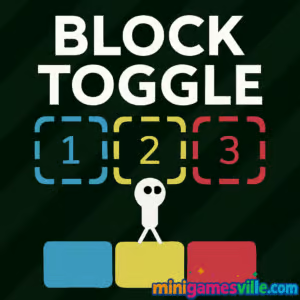
Play Block Toggle free on MinigamesVille. Click the Start button above and jump into Block Toggle, a clever puzzle platformer you can play right in your browser. This online brain teaser mixes tight platforming with switch-based logic, perfect when you want a quick challenge without downloads. Ready to flip between solid and phantom tiles, thread tricky jumps, and reach the glowing exit? Hit Play on minigamesville.com and see how far you get in Block Toggle unblocked.
About Block Toggle
Block Toggle is a minimalist browser game that blends platforming and logic puzzles. Each level introduces color coded blocks you can enable or disable, changing the layout on the fly. You will time jumps, route plan around hazards, and master when to toggle groups to clear a path. With crisp controls, instant restarts, and short stages, Block Toggle is ideal for quick sessions or full-on marathons.
History of Block Toggle
Created by indie designer Robert Alvarez, also known as Rob1221, Block Toggle first appeared on web portals in early 2020. Since launch it has become a favorite among puzzle fans for its clean rules, fair difficulty curve, and inventive level design that keeps layering new block behaviors.
Style & Vibe
The presentation is clean and readable, with high contrast tiles, smooth transitions, and quick feedback when you switch states. The soundtrack stays low key so you can focus on timing and problem solving. Every world adds a new twist that looks simple at first, then surprises you with smart combinations.

Gameplay in Block Toggle
Each stage is a compact puzzle. Your goal is to reach the portal. Colored blocks are mapped to numbers, and pressing those numbers toggles entire groups. Some blocks vanish the moment you jump, some only appear while you hold a key, and others switch permanently when touched. Success comes from planning a safe sequence, then executing tight jumps while flipping states midair. Mistime a switch and the floor might disappear under your feet, but instant restarts keep the pace snappy. Block Toggle rewards experimentation, and most puzzles have more than one viable route.
Game Modes
- Main Levels: Progressive set of handcrafted stages with new block rules introduced over time.
- Speedrun Your Favorites: Replay cleared levels to chase faster paths and cleaner toggle sequences.
- No-Death Challenge: Try completing a batch of levels in a row without a single fall.
How to Play
- Survey the level and identify which colors map to 1, 2, and 3.
- Plan a sequence that keeps platforms solid when you need them and transparent when you do not.
- Move toward the exit, timing jumps while toggling blocks on approach or midair.
- If you get stuck, reset quickly and adjust the order of your toggles.
Controls
- Desktop: Arrow keys or WASD to move, Up or W to jump, 1 2 3 to toggle block groups, R to restart, Esc to pause.
- Mobile: On screen arrows and jump, tap the numbered toggle buttons to flip blocks.
Device Compatibility & Browser Support
Block Toggle runs in modern browsers on desktop, Chromebook, iOS, and Android. For best results, use the latest version of Chrome, Edge, Firefox, or Safari with hardware acceleration enabled. The game is lightweight, so it loads quickly over typical school or office connections.
Mobile vs. Desktop Gameplay
- Desktop: Most precise for midair toggles and advanced jumps using number keys.
- Mobile: Great for casual runs with touch buttons, short sessions, and on the go practice.
Can I Play Offline?
Block Toggle is a web based title, so you need an internet connection to load and play.
Can I Play Unblocked?
Block Toggle on MinigamesVille is designed for quick play in a standard browser with no downloads. If your network restricts gaming, try a different modern browser, keep HTTPS enabled, or switch to a personal connection.
No official App Store or Google Play app for Block Toggle exists as of today. Want a mobile puzzle with quick logic hits on both platforms? Try Brain Test: Tricky Puzzles by Unico Studio here:
Tips & Tricks
Beginner Tips
- Before moving, press 1, 2, and 3 once to see what each color controls.
- Stand on a safe ledge and practice midair toggles in place to learn the timing.
- If a jump feels impossible, your toggle order is off. Change the sequence, not the jump.
- Use resets freely. Most levels take under a minute when you know the route.
Advanced Strategies
- Buffer inputs: press the next toggle as you leave a platform so the landing spot appears on time.
- Create temporary scaffolding by enabling one color, crossing, then disabling it to clear hazards below.
- Route for rhythm, not distance. Consistent cadence makes tight chains simpler to execute.
- When blocks deactivate on jump, short hop to conserve floor, then long jump after you create the path.
Features
- 🧩 Smart toggle based puzzles that evolve across worlds
- 🎯 Tight platforming with instant restarts
- 📱 Seamless browser play on desktop and mobile
- ⌨️ Number keyed block groups for quick midair switches
- 🔁 Multiple solutions for creative route planning
- 🎵 Minimalist audio that keeps you focused
- ⚡ Fast loading and low system footprint
- 🏆 Great for speedruns and personal best chases
Unlockables & Secrets
Block Toggle keeps things pure. There are no skins or currencies, but you will find clever alternate paths and sequence breaks in some stages. Watch for ledges that become reachable only when you briefly spawn a platform midair.
Cheats & Mods
There are no official cheats or downloadable mods. For a fair experience, stick to the browser version on MinigamesVille and use the reset key to practice tough sections.
Walkthrough Summary
Early levels teach one color at a time. Mid game combines two colors with jump triggered behavior. Late game mixes three color sets, moving hazards, and midair state changes. If you ever feel stuck, back up a step and adjust your toggle order. The path is there, you just need to reveal it at the right moment.
Scoring, Records & Progression
Progression is level based. While there is no global leaderboard, many players chase personal bests by timing clears or counting toggles. Keep a simple spreadsheet of clear times or record sessions to track improvement and refine routes.
Why Play Block Toggle
Block Toggle hits a sweet spot between brain teaser and platforming skill. Short stages make it perfect for study breaks, and the toggle system teaches forward planning in a playful way. If you enjoy logic challenges with clean controls, this one belongs in your browser bookmarks.
Pros & Cons of Block Toggle
- Pros: Elegant rules, instant retries, great level variety, plays smoothly on most devices.
- Cons: Number key toggles are harder on small screens, no built in timer or leaderboard if you love competition.
- Use an up to date browser and enable hardware acceleration for the smoothest frame rate.
- Close heavy tabs while playing, especially on older laptops or Chromebooks.
- On mobile, add the page to your Home Screen for quick access and fewer distractions.
Similar games to Block Toggle
- Robot Awake — laser routing logic puzzles with strict step planning.
- Green — minimalist color puzzles that twist your expectations each level.
- Arrower — guide blocks using arrow tiles that redirect your path.
- Circloo XL — circular platformer with momentum based challenges and clean physics.
- Mini Train — draw supports and place shapes to get a train to safety.
- Big Tower Tiny Square — precision platforming gauntlet with tight checkpoints.
- Slime Laboratory — retro physics platformer where slippery movement is the puzzle.
FAQ
What is Block Toggle?
Block Toggle is a puzzle platformer browser game where you toggle colored block groups to create or remove platforms and reach the exit.
Is Block Toggle free to play?
Yes, you can play Block Toggle online for free on MinigamesVille with no downloads.
Does Block Toggle work on school Chromebooks?
In most cases yes, since it runs in the browser. Access depends on your network rules.
Are there save files or continues?
Your progress is kept in the browser. If you clear cache or switch devices you may need to replay earlier levels.
Can I use a controller?
Block Toggle is designed for keyboard and touch. Some browsers allow gamepad remapping, but keyboard offers the best precision.
Is there an app for iOS or Android?
No official app exists for Block Toggle. For a mobile alternative, try Brain Test on the App Store and Google Play using the links above.
Conclusion
Clean rules, crafty level design, and instant retries make Block Toggle a perfect pick for puzzle fans. It is easy to learn and keeps surprising you with new block behaviors and timing tricks. Whether you are warming up your brain or pushing for a flawless run, this browser game delivers.
Ready to flip those tiles? Press Play above to start Block Toggle on MinigamesVille, then come back for tips as you climb through the levels. Have fun, and share your favorite routes with friends so they can try Block Toggle too.

 Loading...
 English
 Shqip
Shqip
 বাংলা
বাংলা
 Български
 简体中文
简体中文
 Hrvatski
 Čeština
 Dansk
Dansk
 Nederlands
 Suomi
Suomi
 Ελληνικά
 हिन्दी
 Magyar
 Bahasa Indonesia
 日本語
日本語
 한국어
한국어
 Lietuvių
 Bahasa Melayu
 Norsk
Norsk
 Polski
 Português do Brasil
 Română
 Slovenčina
 Slovenščina
 Svenska
 ไทย
ไทย
 Türkçe
 Українська
 اردو
اردو
 Tiếng Việt
 isiZulu
 Español
 Français
 Deutsch
 العربية
 Italiano
 فارسی
فارسی
 Русский