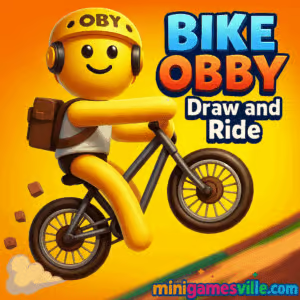
Play Bike Obby: Draw and Ride on MiniGamesVille.com now. Hit play, sketch your path, and ride your way through obstacle-packed tracks in this smart, physics-driven browser game. Bike Obby: Draw and Ride blends line-drawing creativity with precision bike handling, perfect for fast sessions and speedrun chases. If you enjoy online obstacle courses, tight controls, and unblocked play at school or work, you are in the right place. Ready to build the perfect ramp and nail the landing? Jump in and start riding on MiniGamesVille.
About Bike Obby: Draw and Ride
Bike Obby: Draw and Ride is an inventive physics and obby-style challenge where you sketch ramps, bridges, and safety rails, then pedal across your own creations to reach the goal. Every level teaches a new trick: angle your line for momentum, draw counterweights to tame seesaws, and lean your rider to stick the landing. It is a quick to learn, hard to master online experience that rewards patience, planning, and a little flair.
History of Bike Obby: Draw and Ride
While bike stunt games and obby courses have been fan favorites for years, Bike Obby: Draw and Ride fuses those ideas with the classic line-drawing formula. The result is a modern browser game that feels fresh, letting you solve obstacles by designing the terrain, then proving your design works under real-time bike physics.
Style & Vibe
The game keeps things bright and readable, so your sketched lines stand out against clean obstacle layouts. Expect satisfying ragdoll physics, crunchy landings, and checkpoint pops that make every successful section feel rewarding.

Gameplay in Bike Obby: Draw and Ride
Your run begins with a gap, hazard, or moving trap. Use the drawing tool to sketch a ramp, arc, or guard rail, then ride across your design. Momentum matters. Shallow lines add speed, steep lines sap it, and tiny bumps can send you flipping. Levels often hide optional stars or bonus routes, so experiment. Checkpoints help you iterate quickly: fail, tweak your sketch, retry, and celebrate the perfect flow.
Game Modes
- Level-Based Progression: Clear handcrafted stages with escalating traps, from simple gaps to swinging hammers and seesaws.
- Time Challenges: Replay completed stages to set faster times, polish lines, and optimize lean angles.
- Star Hunts: Optional collectibles that push you to draw riskier, more creative paths.
How to Play
- Study the obstacle layout, hazards, and checkpoints.
- Click or tap and drag to draw your support lines and ramps.
- Press the on-screen Play or Ride button to start pedaling.
- Lean your rider to stabilize landings and carry speed.
- Use checkpoints to iterate: adjust your sketch and retry until it flows.
Controls
- Draw: Mouse or touch, click and drag to sketch lines.
- Ride: On-screen Play button to start. Arrow keys or WASD to accelerate, brake, and lean.
- Reset: R for quick restart, or use the on-screen reset to go back to the last checkpoint.
Device Compatibility & Browser Support
Bike Obby: Draw and Ride runs in modern browsers on desktop and mobile. For best performance, use the latest version of Chrome, Edge, Firefox, or Safari. Close heavy tabs, keep hardware acceleration on, and switch to fullscreen to reduce input hiccups.
Mobile vs. Desktop Gameplay
Desktop gives you pixel-precise line control and easy lean inputs via keyboard. Mobile’s touch drawing is intuitive for quick sketches, and the on-screen buttons make casual runs simple. If you care about speedrunning, desktop usually wins for precision, while mobile is perfect for on-the-go practice.
Can I Play Offline?
No. This is a browser game that needs an internet connection to load and save your progress.
Can I Play Unblocked?
Yes, Bike Obby: Draw and Ride is designed for web play and is often accessible as an unblocked game. Access can still depend on your school or work network settings, so check local policies if a page is restricted.
- Browser: Play Bike Obby: Draw and Ride right here on MiniGamesVille.com.
- Mobile stores: There is no official iOS or Android version of Bike Obby: Draw and Ride at this time.
- Want a similar mobile experience? Try Free Rider HD:
Tips & Tricks
Beginner Tips
- Draw fewer lines at first. Simple, smooth arcs keep your speed up.
- Land on gentle slopes, not flat ground, to avoid bounce-outs.
- Use short guard rails right before hazards so small mistakes do not end the run.
- Zoom your browser in a notch if you need finer sketch control.
- Restart quickly after a failed test so your rhythm stays strong.
Advanced Strategies
- Preload momentum: drop into a shallow bowl before a big jump to build speed.
- Feather the lean. Micro leans midair align your wheels for cleaner landings.
- Split paths: draw a safe line to finish, then add a faster, riskier arc for star grabs.
- Minimize pen lifts. One continuous stroke reduces seams that can catch your wheels.
- Practice checkpoint optimization. Rebuild only the trouble segment, not the whole run.
Features
- Creative line-drawing that lets you design the terrain.
- Responsive bike physics with satisfying air control.
- Optional star routes for extra challenge and replay value.
- Checkpoints for rapid iteration and quick learning loops.
- Time-chasing runs for speedrunners and leaderboard chasers.
- Clever obby traps including seesaws, swings, and moving platforms.
- Smooth play on desktop and mobile browsers.
- Instant resets to master tough sections.
Unlockables & Secrets
Keep an eye out for hidden stars tucked behind ramps or past detours. Some layouts reward bold aerial routes that shave seconds off your time. Replaying levels with cleaner lines often reveals faster angles and safer landings you missed the first time.
Cheats & Mods
There are no legit cheats for this browser game. Third-party extensions or hacks can break levels or compromise your device. If you are stuck, simplify your sketch, adjust the landing angle, and use checkpoints to iterate smarter.
Walkthrough Summary
Scan the stage, sketch a basic path, ride and observe where you lose speed or crash, then refine. Add a catch rail before risky gaps, flatten harsh peaks, and keep the final approach smooth so you do not wipe out at the goal. Two or three quick iterations usually crack even the trickiest section.
Scoring, Records & Progression
Progress by clearing levels and collecting stars. Your personal bests come from cleaner lines and better lean timing. Treat each checkpoint split as a mini time trial and aim to beat your last segment. Small line edits often unlock big time savings.
Why Play Bike Obby: Draw and Ride
If you love creative problem solving, satisfying physics, and fast restarts, Bike Obby: Draw and Ride is that perfect five-minute break that can stretch into an hour. It is bite-sized, endlessly replayable, and ideal as an online unblocked challenge on your laptop or phone.
Pros & Cons of Bike Obby: Draw and Ride
- Pros: Creative drawing plus precision riding, quick retries, great for short sessions, runs on almost any device.
- Cons: Precision sketches can be trickier on small phones, and expect a learning curve on tougher star routes.
- Use the latest browser version for the best WebGL performance.
- Disable heavy ad blockers on this page if you notice input lag.
- Close background tabs and enable hardware acceleration in browser settings.
- Switch to fullscreen and lock your refresh rate for smoother inputs.
Similar games to Bike Obby: Draw and Ride
- Drive Mad — wild physics driving with wobbling bridges and stunt-heavy tracks.
- Stock Car Hero — arcade racing where timing boosts and lines wins medals.
- Parking Fury 3D: Night Thief — stealthy night drives that test precision and control.
- Mini Train — draw and place pieces to guide a train safely to the finish.
- Big Tower Tiny Square — tough platforming with tight jumps and clean level design.
- Balance Duel — physics duels where subtle movement and timing decide every match.
FAQ
Is Bike Obby: Draw and Ride free to play?
Yes, you can play the full browser game for free on MiniGamesVille.
Does Bike Obby: Draw and Ride work on mobile?
Yes, it runs in mobile browsers with touch drawing and on-screen ride controls.
How do I get better at landing jumps?
Land on a downhill slope and use light midair leans to align your wheels before impact.
Are there checkpoints?
Yes, checkpoints let you retry tough sections quickly so you can refine your sketch.
Can I play unblocked at school?
Often yes, since it is a web game, but availability depends on your network policies.
Is there an official app?
No official mobile app exists for Bike Obby: Draw and Ride. If you want a phone or tablet alternative, try Free Rider HD on iOS or Android using the links above.
Conclusion
Draw the line, drop the hammer, and let the physics tell you if your plan was genius or chaos. Bike Obby: Draw and Ride turns every level into a mini design challenge that is perfect for online play and quick unblocked fun.
Ready to test your best ramp ideas right now? Play Bike Obby: Draw and Ride on MiniGamesVille.com, chase those stars, and share your cleanest runs with friends.

 Loading...
 English
 Shqip
Shqip
 বাংলা
বাংলা
 Български
 简体中文
简体中文
 Hrvatski
 Čeština
 Dansk
Dansk
 Nederlands
 Suomi
Suomi
 Ελληνικά
 हिन्दी
 Magyar
 Bahasa Indonesia
 日本語
日本語
 한국어
한국어
 Lietuvių
 Bahasa Melayu
 Norsk
Norsk
 Polski
 Português do Brasil
 Română
 Slovenčina
 Slovenščina
 Svenska
 ไทย
ไทย
 Türkçe
 Українська
 اردو
اردو
 Tiếng Việt
 isiZulu
 Español
 Français
 Deutsch
 العربية
 Italiano
 فارسی
فارسی
 Русский