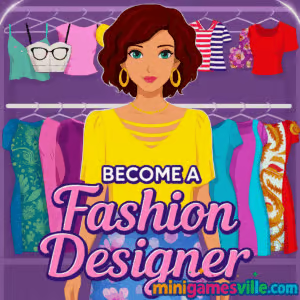
Play Become a Fashion Designer online on MiniGamesVille
Ready to create runway looks right now? Click play above and jump into Become a Fashion Designer on minigamesville.com. This stylish browser game lets you sketch, stitch, and style outfits in your web browser with no download. If you love dress up, fashion design, and makeover challenges, Become a Fashion Designer delivers quick creative fun. Build your brand, impress your clients, and share your signature style. Start designing today and play Become a Fashion Designer online, unblocked and free on MiniGamesVille.
About Become a Fashion Designer
Become a Fashion Designer is a casual fashion-simulation browser game where you mix and match fabrics, cuts, and accessories to produce eye-catching outfits. From princess gowns to party looks, you combine tops, skirts, sleeves, and trims to craft showstopping ensembles. Simple tap or click controls make it easy to prototype ideas fast, which keeps the creative loop addictive. Whether you have five minutes or an hour, Become a Fashion Designer is the perfect online playground for style lovers.
History of Become a Fashion Designer
Fashion design sims have been wardrobe staples for years, and Become a Fashion Designer carries that spirit into modern HTML5. It focuses on instant creativity: fewer menus, more making. The result is a smooth browser game that runs on most devices, perfect for quick styling sessions or longer design marathons.
Style & Vibe
The game leans into upbeat colors, clean UI, and bold silhouettes. Expect glossy fabrics, sparkling accessories, and a mood that feels equal parts atelier and catwalk rehearsal. Each finished look feels like a mini win.

Gameplay in Become a Fashion Designer
Every session begins with a brief prompt, then you choose garment templates and customize them. Swap necklines, add sleeves, pick skirt shapes, and layer patterns. Finish with colors, textures, and accessories to complete the story of your outfit. A client satisfaction or event rating pushes you to tweak details for better scores. The loop is fast: pick, preview, refine, submit, repeat. Physics are minimal by design, which keeps the focus on aesthetics and pacing.
Game Modes
- Client Requests: Meet a brief such as prom, party, or royal event with the right silhouette and palette.
- Style Events: Time-friendly challenges where you chase higher ratings with bolder choices.
- Free Design: Sandbox mode to experiment with cuts, colors, and prints at your own pace.
How to Play
- Press Play, then choose a theme or accept a client brief.
- Select a top and skirt base, then adjust sleeves, straps, and length.
- Pick fabrics, colors, and patterns. Layer accents like belts, bows, or lace.
- Add accessories to elevate the look and lock in the vibe.
- Preview, refine, and submit your design to see your score.
Controls
- Desktop: Mouse click to select, drag to adjust, scroll to browse options.
- Mobile: Tap to select, swipe to navigate, pinch to scroll lists.
Device Compatibility & Browser Support
Become a Fashion Designer runs in modern browsers like Chrome, Edge, Firefox, and Safari. It works on Windows, macOS, iOS, Android, and Chromebooks. For the smoothest experience, keep your browser updated and close extra tabs while you design.
Mobile vs. Desktop Gameplay
- Mobile: Perfect for quick styling bursts. Touch input makes selecting trims and colors effortless.
- Desktop: Better for long sessions and fine detail work thanks to precision pointing and larger screen real estate.
Can I Play Offline?
No, Become a Fashion Designer is an online browser game that needs an active internet connection to load assets and save progress.
Can I Play Unblocked?
On most networks, yes. Become a Fashion Designer is an HTML5 title that runs directly in your browser. If your school or office restricts gaming sites, access can vary by policy. Try using HTTPS, switching browsers, or playing on a personal network.
- Web: Play Become a Fashion Designer in your browser on minigamesville.com.
- Mobile stores: There are no verified App Store or Google Play pages for this exact browser version on today’s date. Want a similar mobile experience? Try Covet Fashion:
Tips & Tricks
Beginner Tips
- Start with the silhouette. Lock the right neckline, sleeve, and skirt shape before picking prints.
- Limit your palette to two main colors and one accent for cleaner scores.
- Use textures to add depth when a look feels flat.
- Accessories should support the garment, not steal the scene.
Advanced Strategies
- Contrast finishes, like matte fabric with metallic accents, for runway pop.
- Echo a pattern color in your accessories to unify the look.
- Iterate fast: preview, tweak one element, resubmit. Small changes boost ratings.
- Build a personal style, then bend the rules for special events.
Features
- 🎨 Deep color and fabric picker with prints and textures
- 👗 Mix-and-match tops, skirts, sleeves, and trims
- 💎 Accessories that polish any theme or brief
- ⏱️ Quick sessions, perfect for on-the-go styling
- 📱 Touch friendly on mobile, precise on desktop
- ⭐ Ratings that reward bold, cohesive designs
- 🧵 Free design mode for pure creativity
- 🏆 Event prompts to test your fashion instincts
Unlockables & Secrets
As you submit stronger looks, you open more fabric choices and trimmings. Keep an eye on event themes, since high scores there often unlock unique patterns and colorways.
Cheats & Mods
There are no approved cheats or mods for Become a Fashion Designer. Third-party tools can break saves or harm performance. Play fair, experiment often, and your scores will climb.
Walkthrough Summary
- Read the brief and decide on a silhouette.
- Choose a base top and skirt, then refine sleeves and length.
- Pick two main colors, add one accent, and test a pattern.
- Add accessories that echo colors or shapes in the garment.
- Preview, refine, and submit to secure the rating you want.
Scoring, Records & Progression
Scores reflect theme fit, color harmony, and finish quality. Track your personal bests by event type. Aim for consistent high ratings to expand your style toolkit and speed up future builds.
Why Play Become a Fashion Designer
It is a fast, friendly way to practice fashion thinking. You can try silhouettes you would never cut in real life, test color theory instantly, and watch your taste evolve. If you enjoy creative play with real design choices, Become a Fashion Designer belongs in your rotation.
Pros & Cons of Become a Fashion Designer
- Pros: Instant creativity, smooth browser performance, satisfying design loop, accessible on most devices.
- Cons: Light simulation depth, no offline play, limited narrative layers compared with full-scale sims.
- Use the latest Chrome or Safari for best compatibility.
- Close unused tabs and disable heavy extensions during play.
- Enable hardware acceleration in browser settings if animations feel choppy.
- On mobile, free up storage and keep your OS updated for smoother touch input.
Similar games to Become a Fashion Designer
FAQ
Is Become a Fashion Designer free to play?
Yes, you can play Become a Fashion Designer free in your browser on minigamesville.com.
Does Become a Fashion Designer work on my phone?
Yes, it runs in mobile browsers. For best results, use an up-to-date browser and stable connection.
How do I get higher scores?
Match the brief, keep a focused color palette, and polish with complementary accessories.
Can I play Become a Fashion Designer unblocked at school?
Many networks allow it, but access depends on local rules. If blocked, try a different network or device.
Is any download required?
No, Become a Fashion Designer is a browser game. Press play and start designing.
Can I save my designs?
Your progress is tied to the browser session. Keep the tab open and avoid clearing site data during a run.
Conclusion
When inspiration strikes, Become a Fashion Designer gives you a fast canvas to bring ideas to life. The creative loop is snappy, the styling tools feel intuitive, and the results look runway ready in minutes.
Slide back up and hit play to dive into Become a Fashion Designer on minigamesville.com. Whether you are chasing top scores or just vibing with colors and cuts, this online fashion game is your pocket atelier. Now go craft your next showstopper.

 Loading...
 English
 Shqip
Shqip
 বাংলা
বাংলা
 Български
 简体中文
简体中文
 Hrvatski
 Čeština
 Dansk
Dansk
 Nederlands
 Suomi
Suomi
 Ελληνικά
 हिन्दी
 Magyar
 Bahasa Indonesia
 日本語
日本語
 한국어
한국어
 Lietuvių
 Bahasa Melayu
 Norsk
Norsk
 Polski
 Português do Brasil
 Română
 Slovenčina
 Slovenščina
 Svenska
 ไทย
ไทย
 Türkçe
 Українська
 اردو
اردو
 Tiếng Việt
 isiZulu
 Español
 Français
 Deutsch
 العربية
 Italiano
 فارسی
فارسی
 Русский