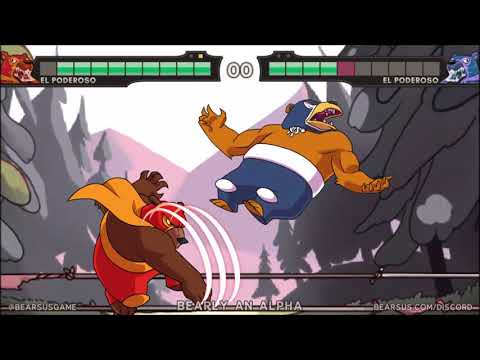
Play Bearsus now on Minigamesville
Ready to rumble? Click the Play button above to jump into Bearsus on Minigamesville and start clawing your way to victory. Bearsus is a fast, funny, and surprisingly deep online fighting browser game where wrestling bears settle scores with a slick two-button system. If you want an unblocked, low-friction way to spar from any device, you are in the right place. Pick your favorite bear, learn a few combos, and see how long you can survive the gauntlet.
About Bearsus
Bearsus is a physics-flavored, arcade fighting game built for browsers, which means instant play and zero downloads. Matches are quick, inputs are simple, and the skill ceiling is higher than you might expect. The charm comes from its snappy animations, colorful arenas, and a control scheme that makes every exchange feel like a mind game. Whether you are chasing high streaks solo or sparring in local two-player, Bearsus nails that just-one-more-round feel.
History of Bearsus
What began as a quirky indie concept grew into a compact, competitive brawler built around accessibility. Over time, Bearsus evolved with polished art, punchier audio, and smarter AI pacing, while keeping the signature two-button core intact. The end result is a lean, responsive browser fighter that respects your time and rewards mastery.
Style & Vibe
Expect bright, punchy visuals and a playful ring-announcer energy. Every hit lands with cartoon crunch, every arena has readable platforms and edges, and each bear has a distinct silhouette so you never lose track during scrambles.

Gameplay in Bearsus
Bearsus favors brainy spacing over button mashing. Movement doubles as offense, so timing and direction matter. Feints, short hops, and quick side switches set up counterpunches. Because moves are mapped to simple inputs, the real depth comes from when you commit, how you bait, and where you land. Rounds are fast, so momentum and edge control decide everything.
Game Modes
- Arcade streaks: face a lineup of opponents with escalating difficulty and see how far your skills carry you.
- 2-Player local: share a keyboard to settle friendly rivalries in best-of series.
- Endurance: health or momentum carries forward, rewarding clean rounds and smart defense.
How to Play
- Press Play above, let the browser load the arena, then pick your bear.
- Start with basic left and right movement to feel the speed and jump timing.
- Use quick double-taps to chain simple attacks and confirm hits near edges.
- Practice short hops, fast side switches, and mid-air pokes to control space.
- In 2-Player, agree on a best-of format, then rotate who starts on the left side between sets.
Controls
- Move or short hop left: A or Left Arrow
- Move or short hop right: D or Right Arrow
- Quick combo left: tap A or Left Arrow twice
- Quick combo right: tap D or Right Arrow twice
- Air poke: tap toward the direction while in mid-air
- 2-Player tip: one player uses A/D, the other uses Left/Right for clean input separation
Device Compatibility & Browser Support
Bearsus runs in modern browsers on desktop, laptop, Chromebook, and most mobile devices. For the smoothest results, use an up-to-date Chromium-based browser, enable hardware acceleration, and close heavy background tabs before you fight.
Mobile vs. Desktop Gameplay
- Desktop: best for precise timing and longer sessions.
- Mobile: quick practice on the go. Rotate to landscape and keep a thumb near each side for snappy movement.
Can I Play Offline?
Bearsus is a browser game, so you need an internet connection to load the game and assets. Once loaded, keep the tab open if you plan to step away briefly.
Can I Play Unblocked?
On many school and work networks, Minigamesville’s browser games, including Bearsus, will load without issue. Access still depends on your local firewall settings, so if a network blocks gaming sites, try again from a personal connection.
- Browser: play Bearsus right here on Minigamesville.
- Mobile stores: there is no official Google Play or App Store release for Bearsus at this time.
- Want a similar mobile fighter with official apps? Try Skullgirls: Fighting RPG:
Tips & Tricks
Beginner Tips
- Learn to short hop. Small jumps bait whiffs and keep you safe.
- Double-tap sparingly. Predictable rushes get stuffed near edges.
- Control the center first, then escort foes to the ledge.
- Reset neutral after each knockdown so you do not overextend.
Advanced Strategies
- Micro-space outside your opponent’s poke range, then whiff-punish with a quick two-tap.
- Side-switch at the last second to protect your back from corner pressure.
- Vary jump timing to throw off anti-air rhythms.
- In endurance runs, play risk-off after a big life lead to preserve health for the next round.
Features
- 🐻 Two-button controls with surprising depth
- 🥊 Snappy physics and clean, readable collisions
- 🎨 Colorful arenas and distinct bear personalities
- 🧠 Quick rounds that reward timing and mind games
- 👫 Local 2-player on one keyboard
- 🏆 Arcade streaks and endurance challenges
- ⚙️ Runs in the browser, no installs
- 📱 Works on desktop, Chromebook, and mobile
Unlockables & Secrets
Keep winning in arcade or endurance runs to reveal more bear variants and color palettes. Performance streaks often unlock cosmetics faster than trading blowouts for risky finishes, so aim for clean sweeps.
Cheats & Mods
There are no official cheats or approved mods for the browser version. Third-party extensions can create instability or input lag, so stick to the vanilla experience for best performance.
Walkthrough Summary
Start in practice or easy arcade, drill short hops and two-taps, then graduate to endurance where resource management matters. When you feel consistent, hop into local 2-player and practice edge traps against a human who adapts.
Scoring, Records & Progression
Your personal bests hinge on round streaks and health preserved. Track how many consecutive bears you beat and how often you close out sets without losing stock. Improving those two numbers is the quickest way to see real progress.
Why Play Bearsus
If you want a quick-to-learn, hard-to-master fighting game that runs anywhere, Bearsus is perfect. It loads instantly, teaches spacing without complex inputs, and keeps you smiling with its playful bear-wrestling theme. Whether you have five minutes or fifty, it fits your schedule.
Pros & Cons of Bearsus
- Pros: instant play in browser, crisp inputs, great for local 2-player, lively presentation.
- Cons: no online matchmaking, simple move list can feel limited if you want deep command inputs.
- Keep your browser updated and enable hardware acceleration in settings.
- Close heavy tabs, music streams, or video calls before long streaks.
- If inputs feel delayed, switch to a different Chromium-based browser or try incognito to avoid extensions.
- On mobile, lock screen orientation to landscape and reduce system animations in OS settings.
Similar games to Bearsus
- House of Hazards — chaotic local multiplayer where traps, timing, and pranks win the round.
- Ping Pong Chaos — physics-heavy 2-player duels with hilarious momentum swings.
- Balance Duel — keep your footing, bump your rival, and rule the platform.
- Rumble Rush — quick brawls that favor positioning and timely pushes.
- Blumgi Castle — explosive physics battles with creative shots and clutch saves.
- Stickman Go — nimble platforming challenges that sharpen movement fundamentals.
FAQ
What is Bearsus?
Bearsus is a fast, two-button fighting browser game where bear wrestlers battle across colorful arenas.
Is Bearsus free to play?
Yes, you can play Bearsus free online in your browser here on Minigamesville.
Does Bearsus have 2-player?
Yes, Bearsus supports local two-player on one keyboard for instant couch competition.
Can I play Bearsus unblocked at school?
Many networks allow it, but final access depends on local filters. If it does not load, try from a personal connection.
Are there mobile apps for Bearsus?
No official mobile apps exist for Bearsus. If you want a similar mobile fighting experience, try Skullgirls on iOS or via the Autumn Games developer page on Google Play using the links above.
What browsers work best?
Current versions of Chrome, Edge, or other Chromium-based browsers generally provide the smoothest performance.
Conclusion
Bearsus proves you do not need complex inputs to get real fighting game thrills. Clean reads, tight hops, and sharp edge control deliver endless replay value in convenient browser form. If you love compact brawlers with personality, this one will hook you.
Hit Play above to dive into Bearsus on Minigamesville, learn the simple inputs, and let the bear-knuckle mind games begin. Have fun, and share your best streaks with friends to spark that next rivalry.

 Loading...
 English
 Shqip
Shqip
 বাংলা
বাংলা
 Български
 简体中文
简体中文
 Hrvatski
 Čeština
 Dansk
Dansk
 Nederlands
 Suomi
Suomi
 Ελληνικά
 हिन्दी
 Magyar
 Bahasa Indonesia
 日本語
日本語
 한국어
한국어
 Lietuvių
 Bahasa Melayu
 Norsk
Norsk
 Polski
 Português do Brasil
 Română
 Slovenčina
 Slovenščina
 Svenska
 ไทย
ไทย
 Türkçe
 Українська
 اردو
اردو
 Tiếng Việt
 isiZulu
 Español
 Français
 Deutsch
 العربية
 Italiano
 فارسی
فارسی
 Русский