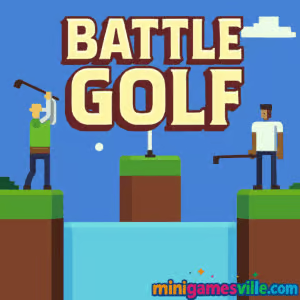
Click Play to dive into Battle Golf on minigamesville.com and start sinking shots before your rival does. Battle Golf is a fast, funny mini golf browser game where timing, physics, and a tiny bit of trolling win the round. Play Battle Golf online in your desktop browser, challenge a friend, or practice against the CPU. If you’re hunting for an unblocked sports title that loads in seconds and delivers instant laughs, this one’s a keeper. Ready to tee off? Smash that Play button and make Battle Golf your next coffee‑break obsession.
About Battle Golf
Battle Golf turns putting into a head‑to‑head duel, with two golfers firing at a shared set of pop‑up holes across a lake. Rounds are short, the rules are simple, and the chaos is intentional. The goal is to score five points first, which means you’ll balance quick shots with smart angles, wind‑up timing, and the occasional cheeky headshot. Because it’s an HTML5 browser game, Battle Golf launches instantly on minigamesville.com with no downloads required.
History of Battle Golf
Battle Golf gained popularity for its stripped‑down controls and couch‑friendly versus play. Over time, the game became a staple for bite‑size competitive sports fans who love pixel‑style graphics, punchy feedback, and one‑screen showdowns. Its simplicity and replay loop helped it stick around as a go‑to quick match for browser players and local rivals.
Style & Vibe
Bright, chunky pixels keep the tone playful while the sudden appearance of holes, sea creatures, and platforms adds just enough unpredictability to spark a rematch. Sound effects are snappy, UI is clean, and the whole package feels built for friendly trash talk.

Gameplay in Battle Golf
Each round starts with your golfer on one side of the water and your opponent on the other. A hole rises somewhere between you. Your shot meter oscillates, you tap to set the angle, tap again to set power, and send the ball sailing. Sink the putt before your rival, earn a point, then do it again as the layout changes. The physics are predictable but punishing if you panic, which keeps every match tense even when you’re one point from victory. Battle Golf rewards rhythm, quick reads, and a little mischief, since well‑timed shots can stun your opponent.
Game Modes
- Versus CPU: Practice your tempo and learn hole patterns at your own pace.
- Local 2‑Player: Share a keyboard and race to five points. Best for bragging rights.
- Time Attack: Speed‑focused solo play that sharpens your aim and timing.
How to Play
- Watch the hole spawn, then track the moving aim meter.
- Tap or press to lock your angle.
- Tap or press again to set power as the bar swings.
- Adjust quickly for high arcs, flat lasers, or bank shots off platforms.
- Repeat until you reach five points, or your rival beats you to it.
Controls
- Desktop: Space or Left Click to set angle, Space or Left Click again to shoot.
- Mobile touch: Tap to aim, tap to shoot. If your device keyboard appears, switch to tap input.
Device Compatibility & Browser Support
Battle Golf runs best in modern Chromium‑based browsers like Chrome or Edge, and also plays nicely in Firefox and Safari. Chromebooks and standard desktops deliver the smoothest experience. Clear cache if you notice input delay, and keep one game tab open for maximum performance.
Mobile vs. Desktop Gameplay
On desktop, keyboard or mouse timing feels crisp and competitive. On mobile, tapping works, but smaller screens can make ultra‑precise edge shots tougher. For the most consistent aim window and physics feel, desktop is recommended.
Can I Play Offline?
Battle Golf is a browser game that needs an internet connection to load and save your progress locally in the session. Keep your connection active to avoid resets and to reload quickly after matches.
Can I Play Unblocked?
Yes. Battle Golf is an HTML5 mini golf game that often runs on school or work networks where downloadable clients are blocked. If your network restricts gaming sites, try a different browser or network profile, and keep the tab focused.
- Browser: Play on minigamesville.com in your desktop or Chromebook browser.
- iOS: Official App Store listing for Battle Golf
Get on the App Store.
- Android: An official Google Play listing for Battle Golf is not currently available. If you want a mobile golf fix on Android, check our Similar Games section below.
Tips & Tricks
Beginner Tips
- Lock angle first, power second. Rushing angle causes more misses than low power.
- Go high when the hole is far or elevated. Arcs land softer and hold the cup.
- Quickly reset after a miss instead of watching the whole flight. Speed matters.
- Use the waterline as a level reference to judge height fast.
Advanced Strategies
- Bait shots: Fire a near‑miss that blocks your opponent’s line, then clean up.
- Headshot timing: Aim at the rival golfer right as they shoot to stun and steal the point.
- Bank mastery: Practice two‑hop banks off platforms to reach awkward angles.
- Tempo rhythm: Count the aim bar beats to lock perfect power on repeat.
Features
- ⏱️ Lightning‑fast rounds perfect for quick breaks
- 🎯 One‑tap timing that still rewards skill
- 🧠 Predictable, learnable physics for mastery
- 👥 Local 2‑player duels on one device
- 🏆 First‑to‑five scoring for instant rivalries
- 🌊 Dynamic pop‑up holes and cheeky obstacles
- 📈 Solo practice and time attack for improvement
- 🖥️ Runs in your browser, no download required
Unlockables & Secrets
Battle Golf keeps things lean. The real unlocks are your muscle memory and faster reads. Try setting personal records in time attack or racing friends to see who can sweep a set without a miss.
Cheats & Mods
There are no official cheats or mods. Scripted tools can break the timing and ruin matches. For a fair, fun experience, play straight and use practice modes to sharpen your aim.
Walkthrough Summary
Memorize the meter rhythm, learn when to choose high arcs versus low lasers, and attack the first makeable cup you see. If your opponent lines up a clean shot, consider a quick stun. Repeat for five points and claim the set. Simple on paper, spicy in real play.
Scoring, Records & Progression
Versus matches end when a player reaches five points. Solo modes track your pace and consistency. Create mini‑goals, like three perfect makes in a row or sub‑minute sets, and watch your win rate climb.
Why Play Battle Golf
It’s instant, learnable, and hilarious. Battle Golf delivers pure browser‑based fun without menus getting in the way. Whether you want to warm up your aim, settle a desk feud, or chase a flawless run, this mini golf duel hits the sweet spot.
Pros & Cons of Battle Golf
- Pros: snappy controls, short matches, great for local versus, reliable physics.
- Cons: minimal customization, best played on desktop, mobile precision can be tougher.
- Close unused tabs and background streams to cut input lag.
- Enable hardware acceleration in your browser settings.
- On laptops, plug in power for higher CPU performance curves.
- If aim timing stutters, reload the page to reset memory usage.
Similar games to Battle Golf
- Wrassling — floppy physics wrestling chaos from the same quirky sports vibe crowd.
- Penalty Shooters 2 — quick‑fire soccer penalties with mind‑game bluffing.
- Penalty Shooters 3 — upgraded goalie AI and snappier shots for soccer duel fans.
- Basket Champs — tournament‑style free throws with timing‑based swishes.
- Raft Wars — aim‑and‑arc projectile battles with cheeky tactics and upgrades.
- Stick Duel Battle — two‑player physics duels across wild arenas.
- Basketball Jam Shots — fast basket challenges built around clean timing.
FAQ
Is Battle Golf free to play on minigamesville.com?
Yes, you can play Battle Golf online in your browser for free with no download.
Can I play Battle Golf unblocked at school or work?
In many cases yes, since it runs in the browser. Network rules vary, so try a modern browser and keep only one game tab open.
How long does a typical Battle Golf match last?
Most versus rounds finish in about a minute since the target score is five points.
Does Battle Golf support two players on one device?
Yes, local 2‑player mode lets you share a keyboard and race to five.
What are the best browsers for Battle Golf?
Chrome, Edge, Firefox, and Safari all work well. Chrome on desktop or Chromebook usually feels the most responsive.
Are there power‑ups or gear unlocks?
The focus is pure timing and physics. The challenge ramps up through faster reads, bank shots, and pressure from your opponent.
Does the game save progress?
Progress for your current session stays while the tab is open. Close the tab and your run resets, which is perfect for quick pick‑up play.
Conclusion
Battle Golf is all about fast decisions, clean physics, and laugh‑out‑loud swing‑steals. It is the kind of mini golf browser game you open for one round and end up rematching five times because someone wants redemption.
Ready to lace up for a speedy showdown? Fire up Battle Golf on minigamesville.com, challenge a friend, and race to five. Tee up, breathe, and drain that clutch putt.

 Loading...
 English
 Shqip
Shqip
 বাংলা
বাংলা
 Български
 简体中文
简体中文
 Hrvatski
 Čeština
 Dansk
Dansk
 Nederlands
 Suomi
Suomi
 Ελληνικά
 हिन्दी
 Magyar
 Bahasa Indonesia
 日本語
日本語
 한국어
한국어
 Lietuvių
 Bahasa Melayu
 Norsk
Norsk
 Polski
 Português do Brasil
 Română
 Slovenčina
 Slovenščina
 Svenska
 ไทย
ไทย
 Türkçe
 Українська
 اردو
اردو
 Tiếng Việt
 isiZulu
 Español
 Français
 Deutsch
 العربية
 Italiano
 فارسی
فارسی
 Русский