Play Sudoku Village right now on minigamesville.com. Tap the big Play button above and dive into a crisp, calming number puzzle you can enjoy free in your browser. Sudoku Village is a clean online Sudoku experience with multiple difficulties, smart notes, and a satisfying flow that works beautifully on desktop or mobile. If you are hunting for an unblocked logic browser game to sharpen focus, this one fits perfectly. Ready to test your brain and relax at the same time? Hit Play and start solving in Sudoku Village.
About Sudoku Village
Sudoku Village blends classic 9×9 Sudoku rules with a modern web UI, quick load times, and intuitive inputs. Every grid follows the familiar goal, fill each row, column, and 3×3 box with digits 1 to 9 without repeats. You get optional pencil marks, gentle error feedback, and a timer for players who like to speedrun. Whether you are a first timer or a veteran, Sudoku Village makes the core puzzle loop smooth and replayable. Play online, stress free, and keep your streak alive right on minigamesville.com.
History of Sudoku Village
Sudoku as a genre rose from print puzzles to digital favorite, then to today’s fast, HTML5 browser games. Sudoku Village follows that lineage, bringing zero-install play, precise inputs, and quick restarts into a lightweight package you can launch on any device. It keeps the classic feel, then refines the edges so you can focus on strategy, not menus.
Style & Vibe
The look is clean and readable, with generous spacing and clear contrast that supports long play sessions. Subtle animations and a tidy palette keep attention on the grid while small sound cues and highlights make each correct move feel good.

Gameplay in Sudoku Village
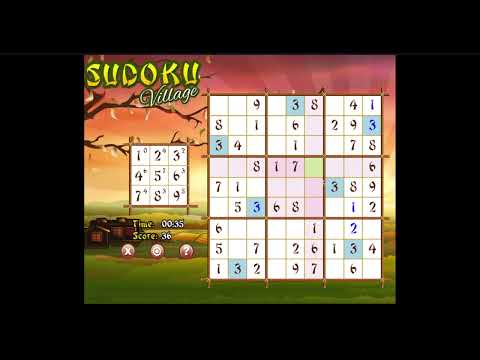
Start a difficulty, scan the grid, and begin filling singles. Toggle notes to track candidates, use highlights to avoid duplicates, and chip away at each box. The flow is quick, no clutter, just you and the logic. Mistake indicators help you learn, while the timer and move counter give speed fans a target to beat. Sudoku Village supports short bursts or deep sessions, perfect as a daily brain warm up.
Game Modes
- Multiple Difficulties: Easy, Medium, Hard, and Expert style layouts for every skill level.
- Timed Runs: Race the clock if you want pressure and personal bests.
- Zen Play: Ignore the timer, relax, and solve at your pace.
- Daily Warm Up: Treat a quick grid like a daily challenge and build a streak.
How to Play
- Pick a difficulty and open the grid.
- Scan rows, columns, and boxes for singles. Place sure numbers first.
- Toggle Notes and pencil possible candidates in each cell.
- Use elimination, pairs, and line-box interactions to narrow options.
- Keep the board tidy, convert notes to placements, and finish the last box for a clean win.
Controls
- Mouse or Touch: Tap a cell, then tap a number.
- Keyboard: Select a cell, press 1-9 to place, press 0 or Backspace to clear.
- Notes: Toggle pencil mode, then press 1-9 to add or remove candidates.
- Quality of Life: Undo, Redo, and error highlights help you keep momentum.
Device Compatibility & Browser Support
Sudoku Village runs in modern browsers like Chrome, Safari, Firefox, and Edge. The lightweight HTML5 build loads fast on laptops, tablets, and phones. No downloads, no logins, just open and play.
Mobile vs. Desktop Gameplay
- Mobile: Big tap targets and number pad keep thumbs happy on smaller screens.
- Desktop: Mouse plus number keys gives the fastest solve times for experts.
Can I Play Offline?
Sudoku Village is an online browser game, so you need an internet connection to load and play.
Can I Play Unblocked?
Yes, Sudoku Village is a small web title that usually works on school or office networks. If a network blocks gaming domains, try a different browser or ask an admin, but on most connections this Sudoku plays unblocked in your browser.
- Browser: Play Sudoku Village right here on minigamesville.com.
- Mobile Apps: There is no official Sudoku Village app at this time. If you want a mobile Sudoku with native features, try Sudoku.com by Easybrain on
Google Play or
App Store.
Tips & Tricks
Beginner Tips
- Start with singles: fill obvious numbers in rows, columns, and boxes.
- Use notes early: candidates prevent guess loops and keep logic clean.
- Clear conflicts: if a number already appears in a row or box, remove it from candidates.
- Sweep systematically: scan row by row, then column by column to catch easy wins.
Advanced Strategies
- Hidden Singles: a digit appears once among candidates in a unit, place it.
- Naked Pairs/Triples: if two cells in a unit share the same two candidates, eliminate those from others.
- Pointing Pairs and Box-Line Reduction: candidates constrained to a line inside a box can be removed from that line outside the box.
- X-Wing basics: look for two rows that restrict a digit to the same two columns, then eliminate elsewhere.
Features
- 🧩 Classic 9×9 Sudoku with fair, solvable grids
- 📝 Smart notes and quick toggles for fast candidate management
- ⏱️ Optional timer, personal bests, and streak-friendly play
- 🎯 Error highlights and undo for smooth learning
- 📱 Responsive layout that feels great on phones and desktops
- 🎨 Clean UI with readable fonts and calming colors
- 🔊 Subtle effects that never distract from logic
- ⚡ Instant restarts for back-to-back runs
Unlockables & Secrets
Sudoku Village keeps things minimalist. Treat faster times, lower mistake counts, and streaks as your unlockables. Some players set custom goals like finishing Hard with zero notes, or beating Expert under a set time.
Cheats & Mods
There are general Sudoku solvers out there, but using them removes the fun. Sudoku Village is best enjoyed as a pure logic puzzle. Use notes, not guesses, and you will improve quickly.
Walkthrough Summary
Open Easy, fill singles, then learn to spot hidden singles. Move up to Medium and practice pairs. On Hard, use pointing pairs and box-line reductions. Expert grids reward disciplined note taking and patient eliminations. Keep your board tidy, commit placements only when they are certain, and let the logic guide you.
Scoring, Records & Progression
Your wins are measured by completion time, mistakes made, and consistency across difficulties. Track personal bests on each level, then try to lower them one by one. Many players alternate between a quick warm up and a tough late session to balance speed and depth.
Why Play Sudoku Village
Because it feels smooth. Sudoku Village loads fast, controls cleanly, and keeps you in the zone. If you want an online Sudoku that respects your time, this browser game is a great daily ritual.
Pros & Cons of Sudoku Village
- Pros: Fast loads, intuitive notes, crisp visuals, works on any device, great for unblocked play.
- Cons: Requires internet to start, no native app version, very advanced technique fans may still crave extreme variants.
- Use a modern browser and keep one tab active while solving.
- Enable hardware acceleration in browser settings for smoother animations.
- Close heavy background tabs, then reload the game for the best timer stability.
- On mobile, switch off battery saver during play to avoid input lag.
Similar games to Sudoku Village
- SudoBlocks, a Sudoku flavored block puzzle where number logic meets relaxing placement.
- Robot Awake, plan command paths to light tiles and solve clever grid logic challenges.
- Green, minimalist color puzzles that ask you to find the rule behind each level.
- Wordsmith, connect letters to craft words and test pattern recognition in a chill format.
- Mini Train, draw supports and guide a tiny train across physics based levels.
- Diff, a spot the difference brain teaser that rewards sharp eyes and patience.
- The Sort Agency, tidy up by sorting objects with escalating constraints and strategy.
FAQ
What is Sudoku Village?
Sudoku Village is a free online Sudoku browser game on minigamesville.com where you solve classic 9×9 number puzzles with notes, highlights, and multiple difficulties.
Is Sudoku Village free to play?
Yes, Sudoku Village is free to play in your browser with no downloads.
Can I play Sudoku Village on my phone?
Yes, it runs in mobile browsers, so you can play on your phone or tablet without installing anything.
Does Sudoku Village work unblocked at school?
In most cases yes, Sudoku Village is a lightweight web game that often works on school networks. If your network blocks gaming sites, access may vary by policy.
How do I get faster at Sudoku Village?
Practice scanning for singles, use notes consistently, and learn techniques like naked pairs and box-line reduction to cut solve times.
Can I pause and resume?
You can step away and return to the page. For longer breaks, leave the tab open so your current grid stays on screen.
Is there an offline mode?
Sudoku Village requires an internet connection to load and play.
Is there an official Sudoku Village app?
No, Sudoku Village is browser based. If you prefer native play, try the recommended mobile Sudoku app listed above.
Conclusion
If you want clear logic with no clutter, Sudoku Village delivers. It is the kind of online Sudoku you can launch in seconds, solve a grid over coffee, then come back later for a harder run. The experience feels crisp on any screen, perfect for quick focus sessions or winding down.
Ready to solve your next grid? Press Play above and start Sudoku Village on minigamesville.com. Keep your streak alive, chase a new personal best, and enjoy a relaxing unblocked number puzzle that fits your day.

 Loading...
 English
 Shqip
Shqip
 বাংলা
বাংলা
 Български
 简体中文
简体中文
 Hrvatski
 Čeština
 Dansk
Dansk
 Nederlands
 Suomi
Suomi
 Ελληνικά
 हिन्दी
 Magyar
 Bahasa Indonesia
 日本語
日本語
 한국어
한국어
 Lietuvių
 Bahasa Melayu
 Norsk
Norsk
 Polski
 Português do Brasil
 Română
 Slovenčina
 Slovenščina
 Svenska
 ไทย
ไทย
 Türkçe
 Українська
 اردو
اردو
 Tiếng Việt
 isiZulu
 Español
 Français
 Deutsch
 العربية
 Italiano
 فارسی
فارسی
 Русский