Introduction to G Switch 3
G Switch 3 is a high-speed gravity runner that turns a simple tap into pulse-pounding parkour. This one-button browser game flips your character between floor and ceiling at breakneck speed, perfect for quick sessions and marathon chases alike. Play G Switch 3 online right here, no download needed, and test your reflexes across devious traps, shifting platforms, and slick momentum. Looking for an unblocked skill game for school or work breaks, or a couch multiplayer showdown, this gravity-switch classic delivers. Click Play above, warm up your fingers, and see how far you can run without missing a beat.
About G Switch 3
At its core, G Switch 3 is a minimalist, physics-based runner where timing beats everything. You control a futuristic runner sprinting along tracks that bend, rise, and split. One tap flips gravity, sending you to the opposite surface. The pace ramps up, obstacles evolve, and the track layout keeps you guessing. It is easy to learn, hard to master, and perfect for quick browser game sessions.
History of G Switch 3
The G-Switch series began as a Flash-era hit, then evolved into modern HTML5 for smooth performance across devices. G Switch 3 refines the formula with tighter physics, punchier visuals, and expanded local multiplayer options that make party play a standout feature.
Style & Vibe of G Switch 3
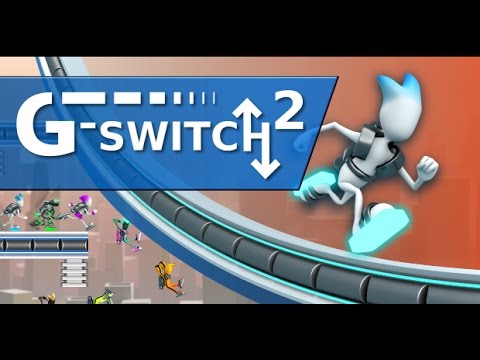
Expect clean silhouettes, sharp contrast, and bold track geometry that communicates danger instantly. The soundtrack leans into energetic beats that match the rhythm of your taps. Minimal UI lets you focus on flow, while subtle effects, like speed trails and screen shake, make every switch feel electric.
Gameplay in G Switch 3
Every run hinges on timing. Tap too early and you clip a corner, tap too late and you tumble into the void. The gravity flip has a brief cooldown, so spamming is risky. Tracks introduce moving platforms, tight gaps, low ceilings, steep angles, and speed zones that demand clean inputs. Master the cadence and you will find a satisfying flow where your eyes lead and your fingers follow.
Game Modes
- Endless: Survive as long as possible while speed and obstacle density increase. Your personal best is the target to beat.
- Race/Versus: Local multiplayer on one keyboard with individual keys, last runner standing or first to finish wins.
- Checkpoint/Stage Play: Progress through handcrafted sections that introduce new mechanics and trickier timing windows.
- Practice: Learn patterns and sharpen timing without pressure.
How to Play
- Press the on-screen button, tap, or hit the assigned key to start running.
- Flip gravity to avoid obstacles and cross gaps, land on any solid surface.
- Anticipate cooldown, plan the next flip before your runner reaches edges.
- Chain clean flips to carry momentum into faster segments.
- In multiplayer, watch your lane and sync flips to the terrain you see, not your rivals.
Controls for G Switch 3
- Desktop: Press a single key to switch gravity, commonly X or Space. Mouse click also works on many builds.
- Mobile: Tap anywhere on the screen to flip.
- Local Multiplayer: Each player uses a unique key displayed on the character select screen.
- Pause/Settings: Use the in-game menu icon or Esc where available.
Device Compatibility & Browser Support for G Switch 3
G Switch 3 runs in HTML5, so it performs well on modern browsers like Chrome, Edge, Firefox, and Safari. It is great on Windows, macOS, and Chromebook, and plays smoothly on recent iOS and Android devices.
Mobile vs. Desktop Gameplay
On phones and tablets, tap timing feels natural and the game shines in short bursts. On desktop, keyboard input offers crisp feedback, higher frame rates, and easy local multiplayer.
Can I Play Offline?
You need an internet connection to load the game. After assets are loaded, some sessions may continue if the tab stays open, but full offline play is not guaranteed.
Can I Play Unblocked?
Many schools and workplaces restrict gaming domains. G Switch 3 unblocked versions exist on some education-friendly portals. Always follow local policies and play over secure HTTPS for the best chance of access.
Tips & Tricks for G Switch 3
Beginner Tips
- Look ahead two platforms, not at your runner’s feet.
- Learn the cooldown rhythm, count a quick beat between flips.
- Use edges as visual cues, flip just before your toes reach the lip.
- Stay low when speed rises, ceiling routes can shorten reaction time.
- Practice on slower segments to build muscle memory before chasing records.
Advanced Strategies
- Buffer flips early on gentle slopes to maintain momentum into steep climbs.
- Route choice matters, favor lines with longer flats and fewer transitions.
- In multiplayer, force errors by switching routes, not by watching opponents.
- Use micro-taps near corners to skim and reduce air time.
- Memorize hazard patterns that repeat, save reactions for the random sections.
- Warm up with a short practice run to lock timing before serious attempts.
- Cap your frame rate distractions, close heavy tabs to stabilize input timing.
- Record your runs, review where mistimed flips cluster, then drill that segment.
Features of G Switch 3
- ⚡ One-button gravity flipping with tight, responsive physics.
- 🎮 Local multiplayer on one keyboard for instant party play.
- 🧠 Skill-first design that rewards rhythm, pattern reading, and precision.
- 📈 Endless mode with scaling difficulty and personal best tracking.
- 🎵 Energetic soundtrack and clean, high-contrast visuals.
- 🖥️ HTML5 performance across desktop, Chromebook, and mobile.
- 🛠️ Simple settings for audio, visuals, and accessibility preferences.
- 🏁 Handcrafted sections that teach advanced techniques through play.
Rules in G Switch 3
- You can run on floor or ceiling, flip only when the cooldown allows.
- Falling off-screen, colliding with hazards, or missing a landing ends your run.
- In versus modes, last runner on the track or first across the finish wins.
- Checkpoints or stages must be cleared in order to progress.
Unlockables & Secrets in G Switch 3
Progress-based surprises may include new tracks, visual tweaks, or tougher variants. Keep an eye on stage completions and milestone pop-ups, they often hint at extra content or added difficulty paths.
Cheats & Mods for G Switch 3
There are no official cheats for the standard web build, and third-party mods can hurt performance or risk security. If you want a gentler start, use practice modes and adjust visual effects for clarity.
Walkthrough Summary of G Switch 3
- Start in practice or early stages to nail the flip rhythm.
- Learn how cooldown influences when you can safely switch.
- Identify safe zones on each section, then stitch those zones together.
- Move into endless or race once your timing is consistent.
- Refine lines, trim air time, and push speed segments for records.
Scoring, Records & Progression in G Switch 3
Your main metrics are distance survived, time to finish, and wins in multiplayer. The game tracks personal bests locally, so you can return and improve. Serious players focus on consistent mid-run splits, not just end totals, to spot where seconds slip away.
Why Play G Switch 3
G Switch 3 distills platforming to pure timing and flow, perfect for a quick break or a long chase for a new PB. It is a clean, skill-forward experience with a satisfying learning curve and thrilling multiplayer chaos.
Pros & Cons of G Switch 3
- Pros: Instant controls, great on any device, deep mastery curve, lively local multiplayer.
- Cons: One-hit failures can feel punishing, later speeds demand near-perfect rhythm.
- Use an up-to-date browser for smoother input handling.
- Enable hardware acceleration and close heavy tabs or extensions.
- On laptops, plug in power and set performance mode to reduce input lag.
- If stutter appears, drop other streaming apps and keep the game in a focused tab.
Similar Games
- G Switch 2: Earlier entry in the gravity runner series, a great way to feel how the physics evolved.
- G Switch: The minimalist original that popularized one-button gravity flipping in browser form.
- Run 3: A tunnel platformer with drifting physics and endless levels that challenge your spatial awareness.
- Vex 7: Precision platforming with traps, wall jumps, and speedrun routes for competitive players.
- Vex 6: Fast stickman parkour with tight inputs and collectible challenges across stylish stages.
- Slope: Guide a rolling ball down neon tracks at rising speeds, a reflex-heavy classic for the web.
- Slope Tunnel: A streamlined, high-FPS version of downhill dodging inside a hypnotic tunnel.
- Tunnel Rush: Dodge vibrant obstacles in first person, built for quick reactions and short sessions.
- OvO: Momentum-based parkour where jumps and slides chain into satisfying speed-tech lines.
- Geometry Neon Dash: Cube-jumping rhythm action that rewards memorization and perfect taps.
- Chrome Dino Game: Offline runner with clean hitboxes and deceptively hard late-game speed.
- Line Rider: Draw tracks and ride them, a creative physics sandbox that sharpens trajectory intuition.
FAQ
What is G Switch 3?
It is a one-button gravity runner where you flip between floor and ceiling to survive obstacles and race to new records.
Is G Switch 3 free to play?
Yes, it is a free online browser game that runs without a download.
Does G Switch 3 have multiplayer?
Yes, local multiplayer lets several players use different keys on one keyboard for chaotic races.
Can I play G Switch 3 on Chromebook?
Yes, it runs well in Chrome on most Chromebooks and supports keyboard or touch input.
How do I save progress or high scores?
Your best distances and wins are stored locally in the browser, clearing cache may reset them.
Does G Switch 3 support controllers?
Some browsers can map a controller button to click or key inputs, but keyboard or touch is the default.
Why does the game lag for me?
Older devices or busy tabs can cause stutter, update your browser, enable hardware acceleration, and close heavy apps.
Can I mute music and sound effects?
Yes, open the in-game settings menu and toggle audio options.
Is G Switch 3 safe for kids?
It features abstract visuals and no graphic content, parental guidance over screen time is recommended.
Can I play G Switch 3 unblocked at school?
Access depends on local policies, look for approved learning-friendly portals if games are restricted.
Conclusion
G Switch 3 turns a single input into a high-speed dance with gravity, perfect for fans of quick reflex games and clean, modern presentation. Whether you are chasing a personal best in endless mode or trash talking friends in a living room race, the loop is instantly satisfying.
Ready to flip, skim corners, and sprint into a new record, hit Play above and dive into G Switch 3 right now. Keep your timing tight, trust your rhythm, and enjoy the rush.

 Loading...
 English
 Shqip
Shqip
 বাংলা
বাংলা
 Български
 简体中文
简体中文
 Hrvatski
 Čeština
 Dansk
Dansk
 Nederlands
 Suomi
Suomi
 Ελληνικά
 हिन्दी
 Magyar
 Bahasa Indonesia
 日本語
日本語
 한국어
한국어
 Lietuvių
 Bahasa Melayu
 Norsk
Norsk
 Polski
 Português do Brasil
 Română
 Slovenčina
 Slovenščina
 Svenska
 ไทย
ไทย
 Türkçe
 Українська
 اردو
اردو
 Tiếng Việt
 isiZulu
 Español
 Français
 Deutsch
 العربية
 Italiano
 فارسی
فارسی
 Русский