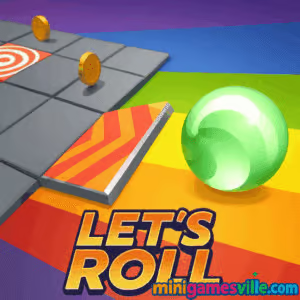
Play Let’s Roll on Minigamesville now. Tap or click the big Play button above and jump into Let’s Roll, a fast, skill-based rolling ball browser game that runs right in your tab. This online arcade challenge blends precision swipes with smooth physics, perfect for quick sessions or high-score marathons. Whether you need a coffee-break run or a late-night reflex test, Let’s Roll is ready, unblocked-friendly for most networks, and optimized for instant gameplay on minigamesville.com. Chase streaks, nail perfect lines, and keep the ball alive as long as you can. Hit Start to play Let’s Roll and see how far you can roll.
About Let’s Roll
Let’s Roll is an HTML5 arcade runner where you guide a small, speedy ball through twisty tracks and reactive obstacles. Momentum matters, timing is everything, and the level flow rewards rhythm, clean inputs, and smart risk taking. Lightweight visuals, crisp sound cues, and responsive controls make it a natural fit for an online browser game you can fire up anytime without downloads.
History of Let’s Roll
Built in the tradition of minimalist rolling ball and runner games, Let’s Roll focuses on feel over fluff. The result is a modern, polished web title that prioritizes tight physics, smooth performance, and instant access. It is designed for cross-device play, so you can swap between desktop and mobile without losing momentum.
Style & Vibe
Clean geometry, bold color accents, and punchy hit effects keep your eyes locked on the track. Animations are snappy, hitboxes are fair, and the camera stays steady so your focus stays on timing and lines.

Gameplay in Let’s Roll
Each run starts simple, then ramps up as the track shifts and obstacles stack. Glide along safe tiles, thread narrow lanes, and use speed windows to dash through riskier sections. The physics model favors controlled swipes over frantic flings, so consistent inputs beat wild moves. Score grows with distance, streaks, and flawless segments, and you’ll feel the pace rise as you chain clean passes. One mistake ends the run, so reading patterns early is the key to climbing the leaderboard.
Game Modes
- Endless Run: Survive as long as possible while difficulty steadily climbs.
- Daily Challenge: Fixed layout for the day. Learn the route, then push for a cleaner line.
- Time Attack: Race the clock to hit checkpoints before the timer drains.
- Hardcore: Faster pace, tighter gaps, and fewer forgiveness zones for experts.
How to Play
- Press Play, then watch the opening lane to spot safe paths.
- Swipe or use keys to steer the ball onto safe tiles and through gaps.
- Build rhythm. Small, steady corrections keep momentum under control.
- Bank score by surviving longer sections without collisions.
- When the track speeds up, look ahead and commit early to clean lines.
Controls
- Desktop: Arrow keys or A/D to move, Space to pause, Enter to restart run.
- Mouse: Click-drag left or right to steer.
- Mobile: Swipe left or right to move, tap with two fingers to pause.
Device Compatibility & Browser Support
Let’s Roll runs in modern browsers like Chrome, Edge, Firefox, and Safari. It is touch-friendly on phones and tablets, and keyboard-ready on laptops and desktops. No plugins, no downloads, just press Play.
Mobile vs. Desktop Gameplay
On mobile, swipes give you fluid lateral control and a great on-the-go feel. On desktop, keyboard inputs offer pixel-clean micro-adjustments, ideal for expert lines and high-score attempts.
Can I Play Offline?
No. Let’s Roll is an online browser game. You need an active connection to load and play.
Can I Play Unblocked?
Many schools and workplaces allow access to Minigamesville, so Let’s Roll often works unblocked. If you run into a filter, try a different browser, ensure HTTPS is enabled, or switch networks. Avoid third-party mirrors, play only on minigamesville.com for best performance and safety.
- Web: Play on minigamesville.com in your browser, no install required.
- Official mobile apps: No official iOS or Android app for Let’s Roll at this time.
If you want a similar mobile experience, try Helix Jump by VOODOO here:
Tips & Tricks
Beginner Tips
- Keep inputs light. Gentle swipes give steadier control than big swings.
- Look two segments ahead and plan your landing, not just your next move.
- Practice in Endless first to learn tile patterns and obstacle pacing in Let’s Roll.
- Use early sections to build rhythm. Avoid risky gaps until the lane opens.
- Pause when you feel rushed, then restart focused. Clean starts set the tone.
Advanced Strategies
- Feather the stick or swipe to ride edges and create straighter exit lines.
- Chain safe zones into long streaks to push score multipliers higher.
- Memorize repeating layouts in Daily Challenge for reliable personal bests.
- During speed spikes, commit early and trust your first read to avoid overcorrection.
- Use the full lane width. Wide arcs smooth out micro-dodges through tight gates.
Features
- 🎯 Tight, skill-first rolling physics that reward rhythm
- ⚡ Smooth performance on desktop and mobile
- 🧠 Pattern-based lanes that teach without hand-holding
- 🎵 Clean audio cues that reinforce timing
- 🏆 Endless mode with escalating difficulty
- 📅 Daily Challenge layouts for repeatable practice
- 🕹️ Keyboard, mouse, and touch controls
- 🚀 Instant play in your browser, no downloads
Unlockables & Secrets
Expect cosmetic unlocks like ball skins and trail colors for hitting milestones and streaks. Hidden shortcut lines appear in some segments when you approach at the right angle, giving savvy players a faster path and a score boost.
Cheats & Mods
There are no supported cheats or mods. Third-party extensions can hurt performance or cause input lag. For the best experience, play the original version on minigamesville.com.
Walkthrough Summary
Start steady, learn the first three segments, then widen your arcs and commit to clear lanes. In mid-game, pace increases, so pre-position before tough gates and keep your line smooth. Finish strong by avoiding last-second flinches. A calm rhythm outperforms frantic corrections.
Scoring, Records & Progression
Distance and streaks drive your score. Survive longer sections without collisions to raise multipliers. Daily Challenge scores are perfect for benchmarking, while Endless runs define your personal records over time.
Why Play Let’s Roll
It is quick to learn, tough to master, and perfect for instant play. The controls feel great, runs are short and satisfying, and every retry teaches you a cleaner line. If you love precision arcade experiences, you will love chasing a new high score here.
Pros & Cons of Let’s Roll
- Pros: Responsive controls, smooth physics, instant loading, great on both mobile and desktop.
- Cons: One-hit fails can feel punishing, and expert speed spikes may challenge newcomers.
- Close extra tabs and background apps to reduce input lag.
- Enable hardware acceleration in your browser settings.
- Use full-screen mode to minimize distractions and missed inputs.
- On mobile, disable low-power mode for steadier frame pacing.
Similar games to Let’s Roll
- Space Ballz — fast arcade ball dodger with tight lanes and quick reactions.
- Double Bounce — juggle timing and angles to keep the action going.
- Fire Road — one-tap runner with rising speed and clean minimalist tracks.
- Bounce Ball — classic bounce mechanics with precise landing challenges.
- Circloo XL — physics loops and clever pathing in a stylish circular world.
- Drive Mad — physics driving where balance and throttle control rule every level.
FAQ
Is Let’s Roll free to play?
Yes, it is free to play online in your browser on minigamesville.com.
Do I need to download anything to play?
No, just press Play above and the game loads instantly in your browser.
Does Let’s Roll support controllers?
The game is optimized for keyboard, mouse, and touch. Some controllers may work through browser mapping, but keyboard and touch are recommended.
How do I improve my high score?
Use small steering inputs, look ahead two segments, and practice Daily Challenge routes to polish your timing.
Will Let’s Roll work on my phone?
Yes, it is touch-friendly and runs on most modern iOS and Android browsers.
Is there an official mobile app for Let’s Roll?
Not at the moment. For a similar feel on mobile, try Helix Jump on the App Store and Google Play using the links above.
Conclusion
Let’s Roll nails the sweet spot between simple controls and high ceiling. Every run is a lesson, every clean lane feels great, and that next PB is always one try away. It is the kind of online arcade thrill you can launch in seconds and replay for hours.
Ready to set a new record? Hit the Play button to jump into Let’s Roll on Minigamesville, keep those lines smooth, and roll your way up the leaderboard.

 Loading...
 English
 Shqip
Shqip
 বাংলা
বাংলা
 Български
 简体中文
简体中文
 Hrvatski
 Čeština
 Dansk
Dansk
 Nederlands
 Suomi
Suomi
 Ελληνικά
 हिन्दी
 Magyar
 Bahasa Indonesia
 日本語
日本語
 한국어
한국어
 Lietuvių
 Bahasa Melayu
 Norsk
Norsk
 Polski
 Português do Brasil
 Română
 Slovenčina
 Slovenščina
 Svenska
 ไทย
ไทย
 Türkçe
 Українська
 اردو
اردو
 Tiếng Việt
 isiZulu
 Español
 Français
 Deutsch
 العربية
 Italiano
 فارسی
فارسی
 Русский