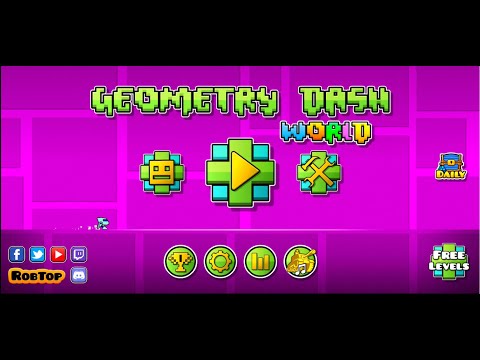
Introduction to Geometry Dash World
Ready for a fast, flashy rhythm runner that tests reflexes and timing in seconds, not hours? Geometry Dash World drops you into bite-size platforming levels where every jump syncs with the beat. Play Geometry Dash World online as a browser game right on this page, no installs required, and chase that perfect run. If you are looking for an unblocked arcade challenge, this sleek spin on precision platforming is a tap or click away. Hit Play, follow the music, and see how far your focus can take you.
About Geometry Dash World
Geometry Dash World is a compact entry in the beloved rhythm platformer series, tuned for quick sessions, catchy tracks, and satisfying one-button control. The browser version keeps the core feel of the franchise, crisp obstacle layouts, punchy visual effects, and music-driven level design, all optimized for instant play.
History of Geometry Dash World
Built as a streamlined companion to the main series, Geometry Dash World focuses on short, thematic level packs, daily content, and unlockable cosmetics. The browser adaptation preserves the signature cube, ship, and other forms, along with practice checkpoints and collectible goodies that reward mastery.
Style & Vibe of Geometry Dash World
Expect neon palettes, clean geometric shapes, and bass-forward tracks. The vibe mixes arcade intensity with a playful, almost toy-like polish. Visual cues, pulsing backgrounds, and sound effects point to patterns you can learn, then perfect. Quick restarts keep the loop snappy, which makes each near-miss feel addictive in the best way.
Gameplay in Geometry Dash World
Geometry Dash World uses one input, but it layers speed changes, gravity flips, and vehicle morphs to turn a simple jump into a deep challenge. Rhythm guides your timing: spikes punish hesitation, portals shake up physics, and pads and rings add vertical variety. The flow rewards muscle memory, yet the soundtrack helps you anticipate hazards before they fill the screen.
Game Modes
- Normal Mode: One hit resets the run. Finish a level in one clean attempt to claim full credit.
- Practice Mode: Place automatic checkpoints and rehearse tricky sections until your timing clicks.
- Daily Level / Challenges: Fresh short stages and tasks that mix up routes and reward persistence.
- Community Levels: Curated picks that echo the series’ creator scene, great for variety after the main worlds.
How to Play
- Press play and learn the first bars by sight and sound, do not rush the opening patterns.
- Tap, click, or press your jump key to hop over spikes and gaps. Hold to fly or glide when your form changes.
- Use pads, rings, and portals to change height, gravity, and speed. Keep eyes ahead, listen to the beat.
- Missed a section? Switch to Practice Mode, map the rhythm, then return to Normal for a full clear.
Controls for Geometry Dash World
- Desktop: Space, Up Arrow, W, or Left Mouse to jump. Hold to keep flying or for long jumps when the form allows.
- Mobile: Tap anywhere on the screen to jump or hold. Enable vibration for extra feedback if available.
- Pause/Retry: Esc or on-screen pause button. Restart quickly to keep rhythm in your head.
Geometry Dash World Device Compatibility & Browser Support
This browser game runs on modern Chromium-based browsers, Chrome and Edge, plus recent Firefox and Safari versions. A stable 60 FPS is ideal, with hardware acceleration on for smooth animations and reliable input timing.
Mobile vs. Desktop Gameplay
- Mobile: Great for quick runs, thumb taps line up nicely with the soundtrack. Use full-screen for clarity.
- Desktop: Best for competitive clears. Keyboard or mouse offers tight timing, plus larger visuals for reading hazards.
Can I Play Offline?
Geometry Dash World loads assets through your browser, so you need an internet connection for first-time play and for saving or syncing progress. Some assets may cache, but reliable play and features require being online.
Can I Play Unblocked?
Many school and workplace networks allow access to this browser game, but policies vary. If Geometry Dash World appears blocked, check local rules or try a different supported browser on the same device.
Geometry Dash World Tips & Tricks
Beginner Tips
- Play with sound on, the beat hints at incoming jumps and ring taps.
- Use Practice Mode early, drop checkpoints after every new obstacle.
- Focus on the cube’s shadow and the ground line, it improves jump accuracy.
- Do not spam the button, short taps produce the most reliable arcs.
- Learn pad colors, yellow for bounce, blue for gravity portals, and anticipate the change.
- Lower visual effects in your browser if frames stutter.
- Stay calm after a late-level mistake, quick restarts keep your rhythm sharp.
- Master short levels first, consistency beats speed.
Advanced Strategies
- Memorize ring timings, hit on the rise for clean arcs that chain into the next platform.
- Count beats, 4 or 8-count phrases align with spikes and pads in many stages.
- Micro-adjust on ship and UFO forms with feathered taps, avoid hard holds that overcorrect.
- Use visual landmarks, background objects can cue upcoming flips and speed portals.
- Warm up on a mid-tier level before new clears, it primes your timing window.
- Record tough sections, replay to spot early or late inputs you did not feel in the moment.
- Chase coin routes only after a standard clear, keep the first win simple.
- Group sessions by theme, practicing similar speeds back to back cements muscle memory.
Geometry Dash World Features
- 🎵 Music-synced platforming that teaches timing through rhythm.
- ⚡ Short, punchy levels perfect for quick browser sessions.
- 🔁 Practice checkpoints for stress-free mastery.
- 🌀 Multiple forms, cube, ship, ball, wave, and more.
- 🎯 Daily challenges and curated community stages for variety.
- 🎨 Unlockable icons, colors, and trails for visual flair.
- 📈 Smooth performance on modern browsers with quick restarts.
- 💾 Browser-based play, jump in instantly without installs.
Rules of Geometry Dash World
- One touch equals one jump or sustained flight depending on your form.
- Colliding with spikes or hazards resets the run in Normal Mode.
- Checkpoints activate only in Practice Mode.
- Portals may alter gravity, speed, size, or form, react quickly.
- Coins and optional routes are extra, clear the main path first.
Unlockables & Secrets in Geometry Dash World
Collect orbs and keys to unlock icons, colors, and trails. Hidden paths may hide secret coins or switches. Daily tasks and achievements grant extra currency for cosmetic upgrades, which adds long-term goals between clears.
Geometry Dash World Cheats & Mods
There are no official cheats for this browser game. Third-party mods can break performance or introduce security risks. For a fair and stable experience, stick to the standard version. Cosmetic-only tweaks can be fun, but use caution and avoid untrusted downloads.
Geometry Dash World Walkthrough Summary
- Start with the first world, learn pad timing and simple gravity flips.
- Clear levels in Normal Mode after a quick Practice run to lock in patterns.
- Revisit cleared stages for coins and alternate routes.
- Tackle daily or community levels to diversify your rhythm reads.
- Use your earned orbs and keys to personalize icons, then move to tougher worlds.
Geometry Dash World Scoring, Records & Progression
Progress tracks through level completions, coin routes, and collected currency for unlocks. Personal bests come from clean, one-attempt clears and optional collectibles. Many players aim for flawless full-song runs, coin completions, and consistent streaks across daily levels.
Why Play Geometry Dash World
It blends arcade simplicity with rhythmic depth, a rare combo that rewards both quick reflexes and long-term practice. If you want a browser game that feels polished, fast to load, and endlessly replayable, this is a standout pick for short breaks or focused grind sessions.
Pros & Cons of Geometry Dash World
- Pros: Instant online play, tight one-button control, memorable music, quick restarts, satisfying unlocks.
- Cons: Shorter main campaign, trial and error can feel punishing, performance dips on low-end devices can affect timing.
- Enable hardware acceleration in your browser settings for smoother play.
- Close unused tabs and background apps to reduce input delay.
- Use full-screen for clear sightlines and fewer distractions.
- Try a wired keyboard or mouse if your wireless input adds latency.
- Match your display to 60 Hz or higher and keep battery saver off while playing.
Similar Games to Geometry Dash World
- Geometry Dash: The flagship rhythm platformer with longer stages and massive community-level variety, ideal after warming up here.
- Geometry Dash SubZero: A compact expansion with icy visuals and punchy tracks, great for short online sessions.
- Geometry Dash Meltdown: High-energy themes and beginner-friendly intros that teach core jump rhythms fast.
- The Impossible Game: Minimalist one-button jumping with razor-clean spike layouts for pure precision practice.
- Vex 7: Agile parkour platforming with traps, wall jumps, and speedrun-friendly stage design.
- Vex 6: A slick stick-figure runner packed with hazards and time trials that reward flawless movement.
- Run 3: Endless-style tunnel running with gravity-defying paths and a gentle learning curve.
- Slope: Tilt a speeding ball down neon hills, read the terrain, and react fast to stay alive.
- Super Hexagon: Micro-session survival with rotating walls, a rhythm-adjacent twitch challenge for pros.
- Color Switch: Tap to pass through matching colors, timing and patience make all the difference.
- Rolling Sky: Drag to dodge and jump through music-led obstacle courses that escalate smoothly.
- Dash Till Puff 2: Arcade-style dodging with multiple modes and reactive music for quick hits of challenge.
- Cube Runner: Simple obstacle dodging that sharpens spatial awareness and reaction speed.
- Beat Stomper: Vertical rhythm jumping with chunky beats and tight timing windows.
- Stack: A chill reflex builder, line up falling blocks and train precision between intense runs.
FAQ
Is Geometry Dash World free to play online?
Yes, you can play Geometry Dash World in your browser for free on this page.
How do I play Geometry Dash World unblocked at school or work?
Access depends on local network rules. If it is blocked, try a different supported browser or device and check policies before you play.
Does Geometry Dash World support controllers?
This browser game is tuned for tap, click, or keyboard input. Some controllers may work through browser mapping, but keyboard or touch is most reliable.
Why are my inputs delayed?
Close extra tabs, enable hardware acceleration, and use full-screen to reduce input lag and frame drops.
Can I save progress in the browser?
Progress saves locally in your browser storage. Clearing cache or switching devices can reset local data.
Is Geometry Dash World safe for kids?
It features bright visuals and music with no violence, but the difficulty can be intense. Supervision is wise for younger players.
What do coins and keys do?
They unlock icons, colors, trails, and other cosmetic rewards as you complete levels and challenges.
Does Practice Mode count as a level clear?
No, Practice helps you learn layouts. You need a clean Normal Mode run to complete a level.
Will it run on Chromebook?
Yes, modern Chromebooks run this browser version well. Keep other apps closed for smoother performance.
Are there daily levels in Geometry Dash World?
Yes, daily content adds short challenges that refresh your routine and grant extra rewards.
Conclusion: Geometry Dash World
Short levels, punchy beats, instant retries, Geometry Dash World delivers that just-one-more-run loop in a perfect browser-friendly package. Whether you are warming up for longer platformers or chasing coin routes, every attempt teaches a new rhythm pattern.
Hit Play, turn up the volume, and jump into Geometry Dash World right now. Your next best run is one clean tap away.


 Loading...
 English
 Shqip
Shqip
 বাংলা
বাংলা
 Български
 简体中文
简体中文
 Hrvatski
 Čeština
 Dansk
Dansk
 Nederlands
 Suomi
Suomi
 Ελληνικά
 हिन्दी
 Magyar
 Bahasa Indonesia
 日本語
日本語
 한국어
한국어
 Lietuvių
 Bahasa Melayu
 Norsk
Norsk
 Polski
 Português do Brasil
 Română
 Slovenčina
 Slovenščina
 Svenska
 ไทย
ไทย
 Türkçe
 Українська
 اردو
اردو
 Tiếng Việt
 isiZulu
 Español
 Français
 Deutsch
 العربية
 Italiano
 فارسی
فارسی
 Русский