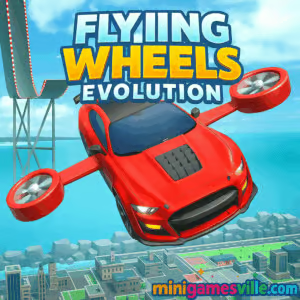
Play Flying Wheels Evolution on MiniGamesVille.com right now and send a turbocharged car soaring across the sky. This physics-driven arcade browser game blends car jumping, gliding, and upgrade strategy into one ultra-satisfying loop. If you want a high-flying online racer that loads fast, works on school networks, and feels great on both touch and keyboard, Flying Wheels Evolution is your pick. Strap in, chase distance records, and evolve your ride to go even farther. Hit play and enjoy Flying Wheels Evolution on MiniGamesVille.
About Flying Wheels Evolution
Flying Wheels Evolution is a light, pick-up-and-play browser game where you drag to launch, tilt or steer midair, and cash in distance for upgrades. It’s part stunt driving, part flyer, all about momentum. Runs beautifully in modern browsers, quick sessions or marathon grinds. If you search for unblocked racing fun, Flying Wheels Evolution nails that sweet spot between simple controls and depth.
History of Flying Wheels Evolution
Launched as a modern WebGL title in 2025, Flying Wheels Evolution rolled out first as an online browser game, then expanded to mobile with an Android build. The concept is classic distance racing, refreshed with sleek 3D visuals, buttery physics, and a rewarding upgrade tree. Regular tuning since release has improved performance, touch handling, and balance.
Style & Vibe
Sleek neon trails, glossy car shells, and sunlit vistas give every launch a stylish, arcadey feel. Hits and bounces look punchy without being punishing, so even imperfect flights feel exciting and watchable.

Gameplay in Flying Wheels Evolution
Each run starts at the slingshot. Pull back to set power, fine-tune your angle, then let your wheels fly. While airborne, steer to string together coin lines, boosters, and bounce pads. Touch down clean to conserve speed, clip ramps to relaunch, and chain momentum for huge distance. Between runs, invest in speed, aerodynamics, fuel, and special utilities to push past your last marker. The loop is fast, satisfying, and perfect for short breaks or deep progression sessions.
Game Modes
- Endless Distance: Go as far as possible, set personal records, and climb local leaderboards.
- Target Challenges: Hit specific milestones like coin counts, speed gates, or perfect landings.
- Time Attack: Squeeze out maximum distance or earnings within a short timer.
How to Play
- Drag the car backward to set launch strength and angle.
- Release to fire into the air, then steer toward coins and boosters.
- Land wheels-first to keep speed, avoid hard nose-dives.
- Use ramps and bounce pads to relaunch.
- Spend earnings on upgrades, then repeat to beat your best distance.
Controls
- Desktop: Click and drag to aim and launch, A/D or Left/Right to steer midair, R to quickly restart.
- Mobile: Hold and drag to aim, release to launch, swipe or tap left/right to steer.
Device Compatibility & Browser Support
Runs in Chrome, Edge, Firefox, and Safari with WebGL enabled. Smooth on modern laptops, Chromebooks, tablets, and phones. For the best frame rate, keep only one game tab open and close heavy background apps.
Mobile vs. Desktop Gameplay
Mobile offers intuitive drag controls and quick sessions. Desktop gives you precise steering and slightly easier angle control with a mouse. Both versions save progress locally in your browser.
Can I Play Offline?
This is an online browser game, so an internet connection is needed to load the game. After loading, some browsers can cache assets, but a connection is recommended for optimal play.
Can I Play Unblocked?
Yes, Flying Wheels Evolution is an unblocked-style browser game on MiniGamesVille. If your school or office network allows HTTPS game pages, you can usually play without extra installs. If a network filter appears, try a different browser or device profile.
- Browser: Play on MiniGamesVille if you prefer instant, no-download fun.
- Android: Official Google Play version is available here: Flying Wheels Evolution on Google Play.
- iOS: There is no official App Store version at this time. If you want a similar mobile feel on iPhone or iPad, try the classic physics racer:
Tips & Tricks
Beginner Tips
- Start with a medium launch angle, then adjust based on where you land.
- Prioritize aerodynamics and speed early for bigger gains per run.
- Steer gently, avoid over-correcting midair to reduce drag.
- Collect coin lines even if they seem slightly off path, they fund faster upgrades.
Advanced Strategies
- Time landings on downhill slopes to preserve velocity.
- Chain ramps: aim to bounce into a second ramp for compounding height.
- Feather inputs in the last third of flight to keep glide smooth.
- Use a slightly lower angle once upgrades are high, relying on raw speed to carry distance.
Features
- 🚗 Drag, aim, and launch car-jump action with responsive physics
- 🪙 Rewarding upgrade tree for speed, aero, and utility boosts
- 🌆 Vivid 3D environments designed for momentum chaining
- ⚡ Boost pads, ramps, and bounce surfaces to extend flights
- 📈 Distance records, milestones, and satisfying progression
- 📱 Touch-friendly on mobile, precise on keyboard and mouse
- 🔊 Punchy VFX and SFX that make every landing feel great
- 🌐 Fast-loading WebGL for instant play in your browser
Unlockables & Secrets
As you improve, new environments and visual upgrades come into play. Keep an eye out for boosters tucked behind coin rings, and use angled ramps to access hidden aerial paths for bonus payouts.
Cheats & Mods
There are no built-in cheats. Third-party mods can risk your save or performance. For a clean, stable experience, play the official browser and Google Play versions.
Walkthrough Summary
Open the game, set a medium angle, then steer into the first coin arc. Land wheels-first on a slope, hit the next ramp, and chain a second bounce. Bank your earnings, upgrade aero and speed, then repeat with a slightly lower angle as your stats rise. Aim to string three clean ramps to break early distance walls.
Scoring, Records & Progression
Score is driven by distance and collectibles gathered midair. Upgrades steadily reduce randomness and increase peak speed. You will feel clear plateaus at certain distances, then a single upgrade tier unlocks a fresh leap forward. Keep a mental note of your best launch angle as stats change.
Why Play Flying Wheels Evolution
It is quick to learn, hard to put down, and perfect for short breaks. Flying Wheels Evolution rewards smart angle selection and momentum management, which makes every run a little puzzle to solve.
Pros & Cons of Flying Wheels Evolution
- Pros: Snappy physics, zero install in browser, meaningful upgrades, great performance on mid-range devices.
- Cons: RNG in booster spawns can swing runs, limited mode variety if you prefer structured campaigns.
- Use a single browser tab and close heavy extensions for steadier FPS.
- On laptops, set power mode to Performance to prevent CPU throttling.
- If inputs feel laggy, toggle hardware acceleration in your browser settings.
Similar games to Flying Wheels Evolution
- Wheelie Bike — one-button balance challenge with clean physics and endless runs.
- Moto X3M Bike Race Game — stunt-packed bike tracks with tight timing and explosive obstacles.
- Moto Maniac 2 — precision trials riding across tricky platforms and gaps.
- Stickman Biker — lightweight physics biking with smooth level flow.
- Superbike Hero — top-down racing on fast circuits with slipstream boosts.
- Eggy Car — careful throttle control keeps a fragile egg safe over hills.
- Free Rider Jumps — line-rider style jumps and landings that reward momentum mastery.
FAQ
Is Flying Wheels Evolution free to play?
Yes, you can play the browser version for free on MiniGamesVille, and the Android build is free to download with optional ads and purchases.
Does Flying Wheels Evolution work on school Chromebooks?
Yes, it is a lightweight WebGL game that runs on most modern Chromebooks. If a filter blocks it, try a different profile or browser.
What upgrades should I buy first?
Focus on aerodynamics and top speed early. Then add fuel and situational perks to extend glides.
How do I keep speed after landing?
Touch down on a downward slope with wheels level, then steer into the next ramp instead of overcorrecting in midair.
Is there an iOS version?
There is no official App Store version right now. iPhone and iPad players can try Hill Climb Racing, which scratches a similar physics-racing itch.
Can I transfer progress between devices?
Browser progress is saved locally per device. For cross-device play, stick to one platform or use the Android version.
Conclusion
If you love physics racers that feel great from the very first launch, Flying Wheels Evolution belongs in your rotation. It delivers quick sessions, smart upgrades, and that one-more-run pull as you chase bigger air and cleaner landings.
Ready to fly farther than ever? Fire up Flying Wheels Evolution on MiniGamesVille.com, steer for the coin arcs, and set a new personal best today.

 Loading...
 English
 Shqip
Shqip
 বাংলা
বাংলা
 Български
 简体中文
简体中文
 Hrvatski
 Čeština
 Dansk
Dansk
 Nederlands
 Suomi
Suomi
 Ελληνικά
 हिन्दी
 Magyar
 Bahasa Indonesia
 日本語
日本語
 한국어
한국어
 Lietuvių
 Bahasa Melayu
 Norsk
Norsk
 Polski
 Português do Brasil
 Română
 Slovenčina
 Slovenščina
 Svenska
 ไทย
ไทย
 Türkçe
 Українська
 اردو
اردو
 Tiếng Việt
 isiZulu
 Español
 Français
 Deutsch
 العربية
 Italiano
 فارسی
فارسی
 Русский