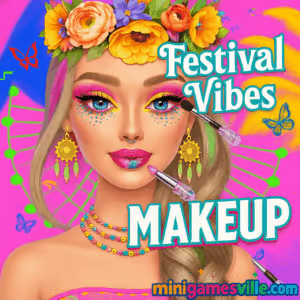
Tap Play and jump into Festival Vibes Makeup on minigamesville.com. Create glitter-drenched looks, neon liners, and boho flair in this quick, creative makeover browser game. Festival Vibes Makeup is an online, unblocked styling experience where you transform models for music-festival season using bold palettes, stickers, and sparkles. If you love makeup games, dress-up challenges, and instant creativity without downloads, you are in the right place. Hit play, try a look, and share your cutest screenshot now.
About Festival Vibes Makeup
Festival Vibes Makeup blends dress-up, face art, and beauty-salon play into a fast, tap-and-style flow. You pick a theme, experiment with eyeshadow and face stickers, then finish with lips and glitter accents. It is simple to learn, relaxing to master, and built to run smoothly in the browser for snappy sessions between classes, commutes, or coffee breaks.
History of Festival Vibes Makeup
Festival-themed makeup exploded alongside music and culture events, and this title captures that neon-and-glitter vibe in a lightweight HTML5 package. While it plays like a classic makeover sandbox, the style set leans into modern festival aesthetics like boho prints, grunge details, and glow-up colors that look great on mobile and desktop.
Style & Vibe
Expect bright palettes, artsy face decals, holographic accents, and photo-ready looks. Whether you build a soft glam or full-on glitter bomb, the interface helps you move fast and undo freely so you can chase the perfect combo.

Gameplay in Festival Vibes Makeup
Sessions flow from hair and brows to eyes, cheeks, and lips, then to stickers and finishing sparkle. Each category offers multiple swatches and patterns. Try a base scheme, layer accents, and swap styles as you go. There is no penalty for experimentation, so go wild with color theory. Festival Vibes Makeup rewards playful iteration, screen grabs, and sharing your final look.
Game Modes
- Freestyle Studio: Build any festival look with open-ended choices.
- Theme Prompts: Use neon, boho, or grunge cues as your creative guide.
- Photo Finish: Pose, frame, and save a screenshot-worthy result.
How to Play
- Press Play and select a style prompt or start Freestyle.
- Pick hair and brow accents to set your base vibe.
- Blend eyeshadow colors, add liner, and choose mascara.
- Apply blush or highlight, then finish with lips.
- Decorate with stickers, gems, or glitter for festival sparkle.
- Review, tweak any step, then save your look.
Controls
- Desktop: Mouse click to select, click or click-drag to apply, right-click or back button to undo or switch.
- Mobile: Tap to select, tap to apply, two-finger pinch to scroll pages if needed.
Device Compatibility & Browser Support
This online makeup game runs in modern browsers on Windows, macOS, iOS, Android, and ChromeOS. For best results, use the latest Chrome, Edge, Safari, or Firefox with hardware acceleration on. Close extra tabs if your device is low on memory.
Mobile vs. Desktop Gameplay
- Mobile: Bigger UI elements and quick taps for couch play.
- Desktop: Faster category switching and precise color picking with a mouse.
Can I Play Offline?
Festival Vibes Makeup is a browser game that requires an internet connection. There is no offline mode.
Can I Play Unblocked?
Yes, you can play unblocked in most networks because it runs directly in your web browser on minigamesville.com. If your school or office restricts gaming domains, try a personal connection or check with your administrator.
- Web Browser: Play free on minigamesville.com, no download, no signup.
- Official mobile app: No official iOS or Android release for this exact title.
Prefer a mobile makeover app? Try Project Makeover here:
Tips & Tricks
Beginner Tips
- Start neutral, then add one bold accent. Neon liner or glitter brows can carry a look.
- Use complementary colors. Teal eyes with peach cheeks, or purple lids with gold gems.
- Layer light to dark. Set a soft base, then deepen edges for instant depth.
- Take screenshots as checkpoints so you can compare variations.
Advanced Strategies
- Split-tone eyeshadow. Different inner and outer corner shades create festival drama.
- Monochrome mood. Pick one hue family and vary saturation for cohesive looks.
- Sticker symmetry. Mirror placements around eyes or cheeks for clean framing.
- Texture contrast. Pair matte lids with gloss lips or vice versa for balance.
Features
- 🎨 Bold palettes, neon liners, and holographic accents
- ✨ Face stickers, gems, and glitter finishes
- 🖌️ Easy tap-and-apply controls on any device
- 📸 Photo-ready results for quick screenshots
- 🧠 Zero-pressure sandbox creativity
- ⚡ Fast-loading HTML5 performance in the browser
- 🔁 Unlimited redo and remix freedom
- 📱 Mobile-friendly UI for on-the-go styling
Unlockables & Secrets
While this is a creative sandbox, you can refresh categories to discover new combinations. Try revisiting hair or eyes after stickers to fine-tune balance, then re-add glitter as a finishing pop.
Cheats & Mods
There are no official cheats. Third-party extensions or mod scripts can break the game or harm your device. For the smoothest, safest play, use a modern browser and keep extensions minimal.
Walkthrough Summary
Open Freestyle, set a base hairstyle, and match brows to hair tone. Build eyes with a soft transition shade, add liner and sparkle. Apply blush and highlighter, then define lips. Add 2 to 4 stickers for structure, preview, and screenshot. Repeat with a different theme for your personal lookbook.
Scoring, Records & Progression
Festival Vibes Makeup is about expression, not points. Track progress by saving screenshots of favorite looks and setting personal challenges like “best neon gradient” or “clean boho glam.”
Why Play Festival Vibes Makeup
It is instant creativity with zero friction. No downloads, no wait, just polish, glitter, and color mastery in a lightweight online experience. Festival Vibes Makeup is perfect when you want a quick creative reset or a longer styling session with multiple variations.
Pros & Cons of Festival Vibes Makeup
- Pros: Fast load, intuitive UI, tons of creative combos, great on mobile and desktop.
- Cons: Sandbox focus means no deep progression systems, and offline play is not available.
- Keep your browser current and enable hardware acceleration.
- Close heavy tabs or background apps to free memory.
- On mobile, switch to Wi-Fi for lower input lag and faster asset loads.
- If elements look off, refresh the page or try an incognito window to bypass conflicting extensions.
Similar games to Festival Vibes Makeup
FAQ
Is Festival Vibes Makeup free to play?
Yes, you can play free in your browser on minigamesville.com with no download required.
Does Festival Vibes Makeup work on iPhone and Android?
Yes, it runs in mobile browsers. For a native app alternative, check Project Makeover on iOS and Android using the store links above.
How do I save my finished look?
Use your device’s screenshot tool. On desktop, press Print Screen or Shift + Command + 4 on Mac. On mobile, use your phone’s screenshot shortcut.
Is there a timer or score?
No, it is a creative sandbox. Set your own challenges and collect screenshots.
Can I play Festival Vibes Makeup at school?
Many networks allow it since it is a lightweight web game. If your network blocks gaming sites, try a personal connection.
What browsers are recommended?
Latest versions of Chrome, Edge, Safari, or Firefox are recommended for the best performance.
Conclusion
Ready to glow up your festival look with zero hassle? Festival Vibes Makeup delivers instant, colorful creativity in your browser, from neon cat eyes to gem-studded cheekbones. It is the perfect online makeup playground when you want quick styling fun without a download.
Press Play and create your first look in Festival Vibes Makeup on minigamesville.com. Capture your favorite before-and-after, remix a new theme, and keep the good vibes rolling.

 Loading...
 English
 Shqip
Shqip
 বাংলা
বাংলা
 Български
 简体中文
简体中文
 Hrvatski
 Čeština
 Dansk
Dansk
 Nederlands
 Suomi
Suomi
 Ελληνικά
 हिन्दी
 Magyar
 Bahasa Indonesia
 日本語
日本語
 한국어
한국어
 Lietuvių
 Bahasa Melayu
 Norsk
Norsk
 Polski
 Português do Brasil
 Română
 Slovenčina
 Slovenščina
 Svenska
 ไทย
ไทย
 Türkçe
 Українська
 اردو
اردو
 Tiếng Việt
 isiZulu
 Español
 Français
 Deutsch
 العربية
 Italiano
 فارسی
فارسی
 Русский