Ready to play Craftomation 1 online right now? Hit the Play button above and jump into Craftomation 1 on minigamesville.com. This clever browser game blends crafting, logic, and light programming into bite-sized levels you can enjoy at home, at school, or on the go. If you’re hunting for an automation puzzle that feels fresh, fast, and unblocked for most networks, this is your next obsession. Start crafting, combine elements, program your bot, and beat the level. Click Play and let’s build.
About Craftomation 1
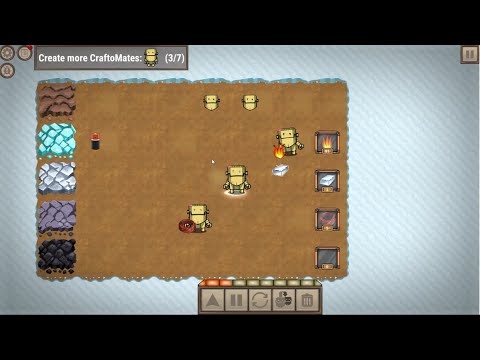
Craftomation 1 is a compact automation and crafting puzzle where you mix items to discover new components, assemble a tiny robot, and then visually program it to finish the objectives. Each stage nudges you to think like a maker: plan your recipe, prototype the routine, then refine until your robot runs the show. Because it runs in the browser, Craftomation 1 is quick to load, easy to replay, and perfect for short sessions or deep problem solving.
History of Craftomation 1
Craftomation 1 began life as a streamlined web experience from a team known for playful logic games. It captures the charm of building, automating, and iterating in a format that works beautifully online. Over time the concept grew into a fuller automation vibe, yet this original browser game remains a favorite for quick, creative puzzles.
Style & Vibe
The look is clean and cozy, with colorful tiles and snappy feedback that make every combine and command feel satisfying. The interface keeps your focus on crafting and logic, not menus. Expect a calm soundtrack and crisp effects that reward each successful step.

Gameplay in Craftomation 1
Each level starts with a handful of basic materials. Drag to combine pieces, discover recipes, and create what you need to wake up and assemble your robot. When the bot is ready, craft a simple program using visual blocks. Tell it what to pick up, where to move, and what to craft. The loop is satisfying: experiment, test, adjust, repeat. Early stages teach you the rules, then puzzles escalate with multi-step chains and tighter constraints. Craftomation 1 keeps runs short, so restarting to improve your logic feels quick and fun.
Game Modes
- Level-based puzzles: Self-contained stages with clear goals and recipe discovery.
- Challenge-style runs: Aim for cleaner programs with fewer steps or faster execution.
How to Play
- Survey the board and available items.
- Drag and drop to combine materials into new components.
- Assemble your robot when you unlock the right pieces.
- Open the visual programming panel and arrange command blocks.
- Test your routine, watch the bot work, then tweak until the goal is met.
Controls
- Mouse or touch: Click or tap to select items, drag to combine or place blocks.
- Visual programming: Drag blocks, connect them, and press play to run.
Device Compatibility & Browser Support
Craftomation 1 is an HTML5 browser game that runs smoothly on modern Chrome, Edge, Firefox, and Safari. It works on Windows, macOS, Chromebooks, iOS, and Android devices with a current browser. Progress usually saves to local storage, so using the same device and browser helps keep your runs.
Mobile vs. Desktop Gameplay
- Desktop: More screen space for programming blocks and quick drag precision.
- Mobile: Tap-friendly and portable. Pinch to zoom if your browser supports it for tighter layouts.
Can I Play Offline?
This is a browser title, so a stable internet connection is recommended. Some browsers may cache assets, but reliable offline play is not guaranteed. For the best experience, stay online.
Can I Play Unblocked?
Craftomation 1 is a lightweight online game that typically runs on school and work networks that allow gaming sites. Access depends on local rules. If your network blocks games, try playing at home or on a mobile connection.
- Browser: Play Craftomation 1 free on minigamesville.com in your web browser.
- Official mobile apps: There is no official Craftomation 1 app on Google Play or the App Store.
- Want a similar mobile experience? Try while True: learn() by the same creators:
Tips & Tricks
Beginner Tips
- Combine basics first. Simple recipes often unlock the robot faster.
- Work backward from the goal. Identify the final item, then map its ingredients.
- Keep programs short. Fewer steps mean fewer mistakes and quicker wins.
- Test early, test often. Run partial routines to verify behavior.
Advanced Strategies
- Reuse logic chunks. If a sub-routine works, adapt it for later levels.
- Sequence with intention. Place pickup, craft, and drop commands to minimize movement.
- Limit branching. Clear linear flows are easier to debug than complex forks.
- Optimize paths. Position crafted items near the next action to cut travel time.
Features
- 🧩 Level-based automation puzzles with quick restarts
- 🧪 Recipe discovery and combination mechanics
- 🤖 Visual programming with simple, readable blocks
- ⚙️ Craft, assemble, and iterate until your bot runs flawlessly
- 📱 Plays in the browser on desktop, mobile, and Chromebooks
- 💡 Short sessions that still scratch the logic itch
- 🎧 Clean audio and tactile feedback for every action
- 🚀 Lightweight, fast loading, and easy to share
Unlockables & Secrets
New combinations and logic patterns reveal themselves as you experiment. Keep an eye on how certain materials interact, since an early discovery can simplify a late-level routine. Small layout tweaks often unlock cleaner solutions.
Cheats & Mods
There are no built-in cheats or supported mods for Craftomation 1. The fun comes from learning the recipes and refining your program. If you get stuck, reset the board, rebuild your chain, and try a simpler version of the routine.
Walkthrough Summary
- Identify the level goal and list the required components.
- Craft the missing materials by combining basics in the right order.
- Assemble your robot once its parts are ready.
- Program a short action chain: gather, craft, deliver, finish.
- Trim any extra steps to improve speed and reliability.
Scoring, Records & Progression
Progress is tracked by clearing levels. Your personal milestone is the quality of your solution, measured by step count, efficiency, and how reliably your bot completes the task. Many players replay to reduce steps or time.
Why Play Craftomation 1
It is the sweet spot between a crafting puzzle and a beginner-friendly automation sim. Craftomation 1 teaches planning, sequencing, and debugging without heavy complexity. Because it is a browser game, you can start in seconds and share it with friends just as fast.
Pros & Cons of Craftomation 1
- Pros: Smart recipes, intuitive programming blocks, quick restarts, runs great online, unblocked on many networks.
- Cons: Level-based scope means shorter runs, and a few puzzles may require trial and error before your routine clicks.
- Use a modern browser with hardware acceleration enabled.
- Close heavy tabs and background apps to free memory.
- If input feels sluggish, lower your system’s display scaling or zoom out slightly.
- Clear cached site data if you encounter loading issues, then reload the page.
Similar games to Craftomation 1
- Mr. Mine — idle mining with upgrades and automation vibes as you dig deeper and optimize output.
- Minecraft Builder — freeform sandbox building where creativity and planning drive the experience.
- Thief Puzzle — logic puzzles that reward clever sequencing and careful timing.
- Puzzle Blocks Classic — satisfying block-fitting challenges that exercise spatial planning.
- Color Water Sort 3D — minimalist sorting puzzles that reward step-efficient solutions.
- Wordslide — relax with a clean brain teaser that sharpens pattern recognition.
FAQ
What is Craftomation 1?
Craftomation 1 is a browser-based crafting and automation puzzle where you combine items, build a small robot, and program it to complete level goals.
Is Craftomation 1 free to play online?
Yes, you can play Craftomation 1 online for free here on minigamesville.com.
Does Craftomation 1 work on mobile?
Yes, it runs in mobile browsers. For the best view of programming blocks, a tablet or desktop is recommended.
Is there an unblocked version of Craftomation 1?
Many networks allow it, but access depends on local rules. If it is blocked, try playing on a different connection.
Does Craftomation 1 have an official app?
No, Craftomation 1 does not have an official app on Google Play or the App Store. You can still play in your browser.
How do I save progress?
Most browsers save progress locally. Using the same device and browser helps keep your data.
Conclusion
If you love clever logic and the satisfying click of a working routine, Craftomation 1 delivers. Its blend of crafting, programming, and quick iteration makes it a standout browser game you can enjoy in minutes or marathon for hours.
Ready to automate your first win? Press Play above to start Craftomation 1 on minigamesville.com, discover new recipes, and teach your tiny robot to do the heavy lifting.

 Loading...
 English
 Shqip
Shqip
 বাংলা
বাংলা
 Български
 简体中文
简体中文
 Hrvatski
 Čeština
 Dansk
Dansk
 Nederlands
 Suomi
Suomi
 Ελληνικά
 हिन्दी
 Magyar
 Bahasa Indonesia
 日本語
日本語
 한국어
한국어
 Lietuvių
 Bahasa Melayu
 Norsk
Norsk
 Polski
 Português do Brasil
 Română
 Slovenčina
 Slovenščina
 Svenska
 ไทย
ไทย
 Türkçe
 Українська
 اردو
اردو
 Tiếng Việt
 isiZulu
 Español
 Français
 Deutsch
 العربية
 Italiano
 فارسی
فارسی
 Русский