Ready to flex your vocabulary and logic? Click Play above to start Brain Test: Tricky Words on MiniGamesVille.com right now. Brain Test: Tricky Words is a clever word puzzle browser game that mixes picture clues, riddles, and lateral thinking. If you enjoy quick brain teasers you can play online, this unblocked challenge is your new go to. Solve witty levels, outsmart trick questions, and keep your streak alive for bragging rights. Jump in, warm up your brain, and have fun unlocking answers one letter at a time.
About Brain Test: Tricky Words
Brain Test: Tricky Words delivers the familiar charm of the Brain Test series with a fresh, word first twist. Each level gives you a visual hint, a short riddle, or a quirky prompt, then asks you to type the solution. The pace is snappy, the humor is light, and the puzzles are perfect for bite sized breaks in your day. Play it online in your browser, no downloads needed, and enjoy an unblocked word puzzle that rewards out of the box thinking.
History of Brain Test: Tricky Words
The Brain Test brand grew from viral brain teasers into a family of puzzle hits. Tricky Words takes the series’ signature misdirection and converts it into compact word challenges. Expect playful artwork, meme friendly humor, and puzzles that often hide the real answer in plain sight.
Style & Vibe
The vibe is colorful, friendly, and just cheeky enough to make every aha moment satisfying. Minimal UI keeps your focus on the clue, while tidy sound effects celebrate correct answers without getting in your way.

Gameplay in Brain Test: Tricky Words
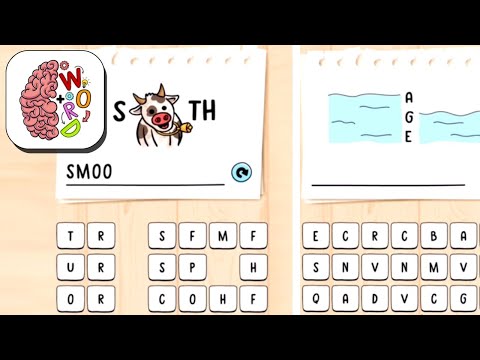
Each level presents a clue, then you type the solution using the on screen keyboard. Some answers are single words, others are short phrases. The trick is reading between the lines. Rotate objects mentally, combine ideas, or take the clue very literally. Earn coins for correct answers, spend them on hints, and keep your streak alive by solving multiple puzzles in a row. Brain Test: Tricky Words ramps up gently, then surprises you with creative twists that test both vocabulary and logic.
Game Modes
- Levels: Progress through a curated path of handcrafted word puzzles.
- Daily Challenge: A fresh puzzle drops each day to keep your streak alive.
- Streak Mode: Solve consecutive puzzles without misses to build score multipliers.
- Timed Puzzles: Beat short timers for bonus coins and a speed run vibe.
How to Play
- Look closely at the picture, riddle, or prompt on screen.
- Think laterally. Consider synonyms, homophones, and visual puns.
- Tap the letters to type your answer, then confirm.
- If stuck, use a hint to reveal a letter or nudge your thinking.
- Keep solving to maintain your streak and unlock new puzzle sets.
Controls
- Desktop: Click letters with your mouse or type on your keyboard when enabled.
- Mobile: Tap letters on the virtual keyboard and swipe to navigate menus.
- Audio: Toggle sound in the settings for quiet play sessions.
Device Compatibility & Browser Support
Brain Test: Tricky Words runs smoothly in modern browsers like Chrome, Edge, Firefox, and Safari. It works on desktops, laptops, tablets, and phones. For the best experience, keep your browser updated, enable hardware acceleration, and close extra tabs if your device has limited memory.
Mobile vs. Desktop Gameplay
On mobile, the touch keyboard makes letter input quick, perfect for short sessions. On desktop, full keyboard input speeds up answers and makes longer play more comfortable. Both feel responsive and snappy.
Can I Play Offline?
The web version requires an internet connection to load levels and sync progress. If you want offline play, install a mobile version on your device and open it after the first run while connected.
Can I Play Unblocked?
Yes, you can play Brain Test: Tricky Words unblocked right here at MiniGamesVille.com. If your network uses strict filters, try switching to a different browser or network, or clear cached site settings to refresh permissions.
- Browser: Play free online on MiniGamesVille.com.
- iOS: Available on the App Store. Search for “Brain Test Tricky Words” by the official publisher.
- Android: Available on Google Play. Search for “Brain Test Tricky Words” by the official publisher.
If you prefer direct store links, ask us to add them and we will include the official listings.
Tips & Tricks
Beginner Tips
- Read the prompt twice. The first read primes you, the second reveals the trick.
- Try synonyms. If the obvious word fits the clue but not the letters, swap it.
- Cover part of the picture with your hand to notice hidden shapes or letters.
- Use hints early if a level stops your streak. Coins are easier to earn than lost time.
Advanced Strategies
- Map letter frequency. If rare letters appear, the answer might include a twisty word.
- Look for multi meaning clues. Words like light, right, or watch often hide puns.
- Reverse the clue. Sometimes the answer is the opposite of what the picture suggests.
- Chain solves. Keep momentum by answering quick levels first to maintain focus.
Features
- 🧠 Lateral thinking word puzzles that teach you to spot patterns
- 🖼️ Visual clues, riddles, and picture based prompts
- ⌨️ Smooth typing controls on desktop and mobile
- 💡 Smart hint system that nudges without spoiling
- 🎯 Daily challenges and streak rewards
- 🏆 Progression with coins, milestones, and badges
- 🎨 Clean, colorful art with playful micro animations
- 🔊 Optional sound effects for satisfying feedback
Unlockables & Secrets
As you advance, you unlock new puzzle packs and cosmetic badges tied to streaks or perfect runs. Keep an eye out for levels that reference earlier puzzles. These callbacks often hide bonus coin opportunities when solved with no hints.
Cheats & Mods
There are no official cheat codes for Brain Test: Tricky Words. Third party mods can harm your device or break saves. If a level feels impossible, take a short break, then return with fresh eyes or use a single letter hint to kickstart your logic.
Walkthrough Summary
Approach each level by scanning for literal clues first, then consider homophones and visual wordplay. Eliminate letter combinations that cannot form common words, try a likely synonym, and lock in the answer. Save coins by reserving hints for levels that threaten your streak.
Scoring, Records & Progression
Your progression is tracked by levels cleared, coins earned, and streak length. Fast solves and streak milestones grant bonus coins. Aim for clean runs on daily challenges to climb your personal best and keep momentum across sessions.
Why Play Brain Test: Tricky Words
It is quick to learn, fun to master, and perfect for sharpening vocabulary in minutes. Whether you are on a study break or winding down at night, this online puzzle is a satisfying way to exercise your brain without long tutorials or heavy downloads.
Pros & Cons of Brain Test: Tricky Words
- Pros: Clever wordplay, crisp UI, fast levels, fair hints, great on both desktop and mobile.
- Cons: A few puzzles can feel too pun heavy, timed challenges may pressure casual players.
- Use an up to date browser and enable hardware acceleration in settings.
- Close extra tabs and extensions that inject content into pages.
- If input feels laggy, switch to Chrome or Edge and try an incognito window.
- Clear site cache if levels fail to load after a long session.
Similar games to Brain Test: Tricky Words
- Word Search Classic: Relaxing letter grids with themed word lists for all ages.
- Crossword Daily: Bite sized crosswords that build vocabulary with casual difficulty.
- 4 Pics 1 Word: Guess the common word that connects four photos, great for visual thinkers.
- Hangman Challenge: Classic guess the word gameplay with clean visuals and adjustable difficulty.
- Word Connect: Swipe letters to form words, unlock packs, and train pattern recognition.
FAQ
What is Brain Test: Tricky Words?
It is a word puzzle game that blends picture clues, riddles, and witty prompts you solve by typing the correct word or phrase.
Can I play Brain Test: Tricky Words online for free?
Yes, you can play free in your browser on MiniGamesVille.com with no download required.
Is Brain Test: Tricky Words unblocked at school or work?
In most cases it is, since it runs in the browser. If blocked, try another browser or network and refresh site permissions.
How hard are the puzzles?
Difficulty ramps from easy warm ups to creative challenges that reward lateral thinking and vocabulary depth.
Do I need an account to save progress?
No account is required to start. Your device and browser store your session, so avoid clearing data if you want to keep progress.
Are there hints in Brain Test: Tricky Words?
Yes, you can spend coins to reveal letters or get a clue nudge when a level stalls your streak.
Conclusion
Brain Test: Tricky Words nails that sweet spot between clever and casual. The humor, visuals, and simple controls make it a perfect go to when you want a quick brain boost without long commitments.
Ready to play now? Hit the Play button and enjoy Brain Test: Tricky Words free on MiniGamesVille.com. See how long you can keep your streak alive, then share your best runs with friends.

 Loading...
 English
 Shqip
Shqip
 বাংলা
বাংলা
 Български
 简体中文
简体中文
 Hrvatski
 Čeština
 Dansk
Dansk
 Nederlands
 Suomi
Suomi
 Ελληνικά
 हिन्दी
 Magyar
 Bahasa Indonesia
 日本語
日本語
 한국어
한국어
 Lietuvių
 Bahasa Melayu
 Norsk
Norsk
 Polski
 Português do Brasil
 Română
 Slovenčina
 Slovenščina
 Svenska
 ไทย
ไทย
 Türkçe
 Українська
 اردو
اردو
 Tiếng Việt
 isiZulu
 Español
 Français
 Deutsch
 العربية
 Italiano
 فارسی
فارسی
 Русский