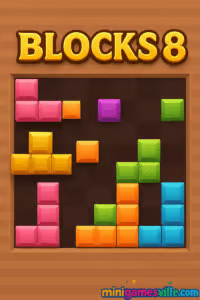
Ready to play now? Click the iframe above and jump into Blocks 8 on Minigamesville. Blocks 8 is a free online block puzzle browser game that blends chill vibes with satisfying line clears. If you love quick, tactically smart gameplay you can pick up anytime, this unblocked puzzler is a perfect coffee-break companion. Build combos, chase high scores, and see how long you can keep the grid under control. Hit Play to start clearing rows and columns in Blocks 8 today.
About Blocks 8
Blocks 8 is a modern block puzzle that riffs on the spirit of classic falling-block games, then slows things down with drag-and-drop placement. You receive sets of shapes, position them on the grid, and clear complete rows or columns to score. No timer, no panic, just clean logic and clever spatial planning. Because it runs in your browser, there is no download, and Blocks 8 feels great on both desktop and mobile screens.
History of Blocks 8
Launched on the web in the early 2020s, Blocks 8 quickly gained traction across browser game hubs thanks to its simple rules and addicting score chase. It channels the DNA of legendary block puzzlers while introducing free placement and combo-friendly scoring. That mix made Blocks 8 a go-to pick for players who want a thoughtful, bite-size challenge that scales with skill.
Style & Vibe
Clean, colorful tiles, crisp line-clear effects, and lightweight UI keep your focus on the grid. The vibe is calm and minimal, which makes every well-placed shape feel extra satisfying.

Gameplay in Blocks 8
The core loop is elegantly simple. You drag shapes from your queue onto the board, aiming to complete full rows or columns. Clear more than one line at once to trigger juicy combo points. Space management is everything: leave breathing room for awkward shapes, bank clears when you have alignment, and avoid stranding single cells in the corners. As the board fills, tension rises, and every placement matters. That risk-reward rhythm is why Blocks 8 keeps you saying just one more run.
Game Modes
- Classic endless: a pure score-chase mode where the session ends when no shapes fit.
- Self-set challenges: speedrun your first 1,000 points, go for back-to-back multi-clears, or play a no-corner rule for extra spice.
How to Play
- Look at the three available shapes in your queue.
- Scan the grid for places that set up future clears, not just immediate ones.
- Drag a piece into position and release to place it.
- Complete full rows or columns to clear them and earn points.
- Chain clears to build combos and push your high score.
Controls
- Mouse or trackpad: click and drag to place blocks.
- Touch: press and drag with one finger, release to drop.
Device Compatibility & Browser Support
Blocks 8 runs smoothly in modern browsers. For best performance, use the latest version of Chrome, Safari, Edge, or Firefox. It plays great on Windows, macOS, iOS, Android, and Chromebooks.
Mobile vs. Desktop Gameplay
On mobile, touch dragging feels natural and quick. On desktop, a mouse gives pixel-precise placement and fast adjustments. Scores are achievable on both, but desktop users may enjoy slightly tighter control near crowded areas.
Can I Play Offline?
Blocks 8 is a browser game, so it requires an internet connection to load. Once loaded, keep the tab open to avoid reloading mid-session.
Can I Play Unblocked?
Yes, Blocks 8 is an unblocked browser game for most networks. If your school or workplace restricts gaming, try a personal device and connection.
- Browser: play Blocks 8 right here on Minigamesville, no download required.
- Official mobile apps: there is no verified App Store or Google Play app for Blocks 8 at this time.
- Want a similar mobile experience?
Tips & Tricks
Beginner Tips
- Keep the center open. Central space keeps options alive for odd shapes.
- Bank easy clears. If a line is one cell away, plan two moves ahead to convert it into a combo.
- Avoid single-cell pockets. They are hard to fill and can end runs early.
- Place big pieces first when the board gets crowded.
Advanced Strategies
- Combo engineering: set up perpendicular lines to clear multiple rows and columns at once.
- Queue reading: before placing, visualize all three shapes and test different orders in your head.
- Edge mirroring: build symmetric lanes along both sides to reduce dead zones.
- Sacrifice now, win later: sometimes placing a suboptimal piece preserves space for a massive combo next turn.
Features
- 🧩 Clean drag-and-drop block puzzle gameplay
- 🎯 Combo scoring for multi-line clears
- 📈 Endless high-score chase
- ⚡ Lightweight, fast-loading browser performance
- 📱 Touch-friendly on phones and tablets
- 🖱️ Precise mouse control on desktop
- 🔊 Satisfying visual feedback on clears
- 💾 No account needed, play instantly
Unlockables & Secrets
Blocks 8 focuses on pure skill. There are no character unlocks, but players love chasing personal milestones like first 5x combo, 10 consecutive clears, or 10,000+ point runs.
Cheats & Mods
There are no built-in cheats. Third-party mods are risky and can harm performance. For the best experience, play the official browser game on Minigamesville.
Walkthrough Summary
Start by carving lanes through the center. Use early turns to establish flexible shapes, then convert near-complete lines into double or triple clears. When the board tightens, place the largest piece first, clear space, and then thread smaller shapes to prevent isolation.
Scoring, Records & Progression
Each cleared row or column grants points. Clear more than one line at once to earn bonus combo points, which is the key to beating your personal record. Track progress by setting session goals, like achieving two multi-clears per minute or maintaining a low board height for five consecutive placements.
Why Play Blocks 8
It is quick to learn, hard to master, and endlessly replayable. Blocks 8 lets you relax, think a few moves ahead, and feel great about every clever clear. Whether you have two minutes or twenty, it fits your schedule.
Pros & Cons of Blocks 8
- Pros: intuitive controls, unblocked online play, great on any device, rewarding combo system.
- Cons: no official mobile app, minimal cosmetics, runs end abruptly if you mismanage corners.
- Keep one tab open for the game to prevent reloads mid-run.
- Enable hardware acceleration in your browser settings for smoother dragging.
- Close heavy background apps on mobile to improve touch responsiveness.
- If input feels sticky, switch to a different browser or clear cached files.
Similar games to Blocks 8
- Puzzle Blocks Classic — place wooden tiles on a grid and clear lines for a relaxing score chase.
- Color Water Sort 3D — sort liquids by color, a satisfying logic puzzler with no timer.
- Suika Sort — fruit-themed sorting fun that rewards planning and pattern spotting.
- Bubble Pop Adventures — aim and clear clusters for chain reactions and high scores.
- Bubble Shooter — classic bubble-matching arcade energy with infinite replayability.
FAQ
What is Blocks 8?
Blocks 8 is a free online block puzzle browser game where you drag shapes onto a grid and clear full rows or columns to score.
Where can I play Blocks 8?
You can play Blocks 8 directly on Minigamesville in your browser, no download needed.
Is Blocks 8 unblocked?
Yes, it is accessible on most networks. If your network restricts gaming, try a personal connection.
Does Blocks 8 have multiple modes?
The core experience is an endless score chase. You can create personal challenges like time goals or combo targets.
Does Blocks 8 work on mobile?
Yes, it plays smoothly on modern iOS and Android browsers with responsive touch controls.
Are there official mobile apps for Blocks 8?
No official apps. If you want a similar feel, try Blockudoku on the App Store and Google Play using the links above.
Any tips for higher scores in Blocks 8?
Keep the center open, avoid single-cell gaps, and engineer perpendicular lines to convert placements into multi-clears.
Conclusion
Blocks 8 takes a beloved puzzle formula and turns it into a calm, strategic score chase that fits any schedule. Smart placements feel great, combos feel even better, and every run teaches a new trick for the next attempt.
Ready to set a new personal best? Scroll up and play Blocks 8 on Minigamesville right now. Keep the grid tidy, stack those clears, and watch your score rocket.

 Loading...
 English
 Shqip
Shqip
 বাংলা
বাংলা
 Български
 简体中文
简体中文
 Hrvatski
 Čeština
 Dansk
Dansk
 Nederlands
 Suomi
Suomi
 Ελληνικά
 हिन्दी
 Magyar
 Bahasa Indonesia
 日本語
日本語
 한국어
한국어
 Lietuvių
 Bahasa Melayu
 Norsk
Norsk
 Polski
 Português do Brasil
 Română
 Slovenčina
 Slovenščina
 Svenska
 ไทย
ไทย
 Türkçe
 Українська
 اردو
اردو
 Tiếng Việt
 isiZulu
 Español
 Français
 Deutsch
 العربية
 Italiano
 فارسی
فارسی
 Русский