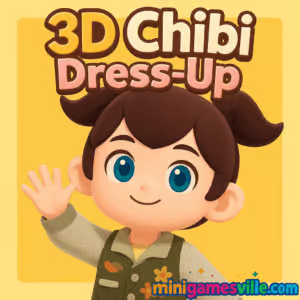
Play 3D Chibi Dress-Up on minigamesville.com now and start styling your cutest 3D avatar in seconds. 3D Chibi Dress-Up is a quick, creative dress-up browser game that runs online with no download, perfect for casual fashion fans, avatar makers, and cozy-game lovers. Mix hairstyles, outfits, colors, and accessories in a vibrant 3D space, then capture your look and share. If you want an unblocked fashion game you can launch right in your browser, 3D Chibi Dress-Up on minigamesville.com is a fast, free way to scratch that styling itch.
About 3D Chibi Dress-Up
3D Chibi Dress-Up focuses on what style gamers love most, play with color, silhouette, and personality. The sandbox format keeps the pressure low and the creativity high. You choose a base chibi model, rotate the camera, swap categories like hair, tops, bottoms, dresses, shoes, and extras, then fine-tune colors to build a unique aesthetic. It is lightweight, runs in your browser, and is aimed at quick sessions that turn into longer styling marathons.
History of 3D Chibi Dress-Up
Chibi dress-up games have been a staple of web play for years, and 3D Chibi Dress-Up brings that tradition into modern HTML5 and WebGL. The move to 3D adds playful depth, better lighting, and smoother rotations, making your finished outfits feel like mini dioramas rather than flat paper dolls.
Style & Vibe
The look is cute, colorful, and approachable with glossy materials and rounded proportions. Outfits lean into pop, pastel, and kawaii trends, but the flexible color tools invite more edgy streetwear or monochrome minimal looks too.

Gameplay in 3D Chibi Dress-Up
Everything revolves around fast, tactile customization. Pick a category, preview items in real time, and adjust hues to match your palette. The camera lets you orbit the model, zoom for detail, and frame a final screenshot. There is no timer or fail state, which keeps the focus on expression. Many players set personal challenges like building themed looks, matching color swatches, or recreating trending aesthetics. The physics are simple and snappy, ideal for smooth performance on laptops, Chromebooks, and phones.
Game Modes
- Free Play, unlimited outfit mixing and color testing at your pace.
- Photo Mode, pose the camera, hide the UI, and save your styled avatar as an image.
- Self-made Challenges, create your own prompts like pastel goth, back-to-school, or festival looks.
How to Play
- Click Play on 3D Chibi Dress-Up here on minigamesville.com.
- Rotate the camera to inspect the model from all angles.
- Open a category, try items, and tweak colors to fit your theme.
- Mix layers, accessories, and hair until your outfit clicks.
- Enter Photo mode, center your frame, and save a clean screenshot.
Controls
- Desktop, Left click to select items, drag to rotate camera, scroll to zoom.
- Mobile, Tap to select, pinch to zoom, drag to orbit.
- UI, Use on-screen tabs or arrows to switch categories and color pickers.
Device Compatibility & Browser Support
3D Chibi Dress-Up runs on modern browsers that support HTML5 and WebGL. Best results on the latest Chrome, Edge, Firefox, or Safari. It works on Windows, macOS, ChromeOS, Android, and iOS via mobile browsers.
Mobile vs. Desktop Gameplay
On desktop, you get finer camera control and quick category switching. On mobile, touch input is intuitive and perfect for short sessions. Both versions load fast and keep visuals crisp.
Can I Play Offline?
No, 3D Chibi Dress-Up is an online browser game that requires an internet connection to load assets and run.
Can I Play Unblocked?
Because it is a lightweight HTML5 dress-up game that plays inside the browser, 3D Chibi Dress-Up is often accessible on networks that allow educational or casual gaming sites. If you run into a blocked page, try a different modern browser, clear your cache, or use your mobile device on a personal connection. Always follow your school or workplace guidelines.
- Web, Play free in your browser on minigamesville.com.
- iOS and Android, There are no official App Store or Google Play versions of 3D Chibi Dress-Up at this time.
- Want a mobile alternative with deep fashion systems, Try these official store versions:
Tips & Tricks
Beginner Tips
- Pick a palette first. Choose 2 to 3 colors and keep every item within that scheme.
- Work big to small. Lock hair and core outfit pieces, then sprinkle in accessories.
- Use contrast. Pair light outfits with darker hair or shoes to anchor the look.
- Rotate often. Check front, side, and three-quarter views before saving.
- Keep screenshots. Save multiple angles so you can compare and refine later.
Advanced Strategies
- Color blocking, Create bold sections with complementary hues and minimal patterns.
- Material mixing, Balance glossy pieces with matte fabric for depth on camera.
- Silhouette balance, Big hair works best with slimmer outfits, oversized tops pair nicely with sleek shoes.
- Theme prompts, Rebuild trending aesthetics like coquette, pastel goth, or city pop to practice range.
- Batch styling, Create a series of looks that share a palette for a cohesive gallery.
Features
- 🎨 Real-time color customization for hair, clothes, and accessories.
- 📸 Photo mode for clean, shareable screenshots.
- 🔄 Smooth 3D camera rotation and zoom.
- 🧥 Quick-swap categories for rapid outfit testing.
- 💾 Lightweight web tech that loads fast on most devices.
- 🧩 Casual, no-pressure sandbox that keeps creativity front and center.
- 🖱️ Click or tap controls that feel natural on desktop and mobile.
- ✨ Kawaii-inspired art direction with room for edgy or minimal styles.
Unlockables & Secrets
3D Chibi Dress-Up keeps things simple. The fun comes from creative constraints, not grind. Use the color tools to simulate gradients or tone-on-tone layering for a premium finish in screenshots.
Cheats & Mods
There are no official cheats or mods for this browser title. Third-party extensions and modded files can harm performance or privacy, so stick to playing on minigamesville.com for a safe, stable experience.
Walkthrough Summary
- Pick a vibe, pastel cafe, neon streetwear, or school-core.
- Lock hair and one statement piece like a jacket or dress.
- Match shoes and accessories to your palette. Add one accent color for pop.
- Rotate, adjust color sliders, and tweak contrast until the silhouette feels balanced.
- Enter Photo mode, frame a three-quarter angle, and save your masterpiece.
Scoring, Records & Progression
There is no score or progression, which makes 3D Chibi Dress-Up perfect for quick creative sprints. Track your personal bests by building themed collections and timing how fast you can style a polished outfit.
Why Play 3D Chibi Dress-Up
If you want a fast, creative online fashion sandbox that runs in your browser, 3D Chibi Dress-Up is an easy favorite. It is unblocked-friendly for many networks, touchscreen-ready, and perfect for bite-size play sessions between tasks.
Pros & Cons of 3D Chibi Dress-Up
- Pros, instant play in browser, smooth camera, flexible color tools, cozy no-pressure design.
- Cons, no storyline or long-term progression, limited competitive hooks, relies on your own prompts for replay value.
- Keep your browser current and enable hardware acceleration for smoother WebGL rendering.
- Close heavy tabs while styling to free memory on lower-end devices.
- On mobile, switch to landscape for wider camera control and cleaner screenshots.
Similar games to 3D Chibi Dress-Up
- TicToc Kpop Fashion, build stage-ready K-pop looks with trendy pieces and bold makeup.
- TicToc Summer Fashion, sun-kissed outfits for beach days, festivals, and vacation pics.
- Funny Hair Salon, playful salon antics with cuts, colors, and wild styles.
- Funny Haircut, quick haircut challenges that lean into quirky transformations.
- Funny Kitty Care, cute kitty grooming and dress-up moments for cozy vibes.
- Cozy Garden Design, swap fashion for decor and design a chill backyard sanctuary.
FAQ
Is 3D Chibi Dress-Up free to play?
Yes, it is free to play online in your browser on minigamesville.com.
Does 3D Chibi Dress-Up work on Chromebooks?
Yes, it is an HTML5 browser game and runs well on most modern Chromebooks.
Do I need to download anything to play?
No download is required, just open the game page and press Play.
Can I save my avatar?
You can save screenshots of your creations by using the in-game photo view or your device’s screenshot tool.
Why is my game lagging?
Close extra tabs, update your browser, and make sure hardware acceleration is enabled for smoother 3D performance.
Is 3D Chibi Dress-Up safe for kids?
It is a non-violent, creative dress-up experience. As with any online content, supervise younger players and follow household rules.
Is 3D Chibi Dress-Up unblocked at school?
Access depends on local filters. If it is blocked, try another supported browser or play on a personal connection when appropriate.
Conclusion
When you want a low-stress fashion playground that loads quickly and lets your creativity run wild, 3D Chibi Dress-Up delivers. The 3D camera and color tools make every outfit pop, and the online, no-download format keeps it accessible anywhere you browse.
Ready to design, pose, and share your cutest chibi looks, Click Play on 3D Chibi Dress-Up right here on minigamesville.com and start styling your next signature fit.

 Loading...
 English
 Shqip
Shqip
 বাংলা
বাংলা
 Български
 简体中文
简体中文
 Hrvatski
 Čeština
 Dansk
Dansk
 Nederlands
 Suomi
Suomi
 Ελληνικά
 हिन्दी
 Magyar
 Bahasa Indonesia
 日本語
日本語
 한국어
한국어
 Lietuvių
 Bahasa Melayu
 Norsk
Norsk
 Polski
 Português do Brasil
 Română
 Slovenčina
 Slovenščina
 Svenska
 ไทย
ไทย
 Türkçe
 Українська
 اردو
اردو
 Tiếng Việt
 isiZulu
 Español
 Français
 Deutsch
 العربية
 Italiano
 فارسی
فارسی
 Русский