Ready to play now? Click the big Play button above and jump into Parking Block on minigamesville.com. Parking Block is a quick, brainy parking puzzle you can enjoy online as a lightweight browser game, no download needed. Slide vehicles, open the exit, and outsmart the grid in bite-size levels that ramp up fast. If you love clever logic challenges, this unblocked parking puzzle will scratch that itch and keep you coming back for one more solve. Press Play and try Parking Block today.
About Parking Block
Parking Block distills the classic sliding-block concept into a crisp, modern car parking puzzle. Your goal is simple, clear a path and free the target car. The execution is the fun part, each level is a tidy logic problem where precision matters and every move counts. It plays beautifully as an online browser game, loads fast, and saves progress locally so you can chip away at levels any time.
History of Parking Block
Parking Block follows the lineage of timeless sliding-block and traffic jam puzzles that hit mainstream popularity in the 1990s. Those designs proved how satisfying it feels to unlock a crowded grid with a perfect sequence. This fresh web version embraces that formula with smooth touch and mouse controls, crisp visuals, and steady difficulty pacing for modern play sessions.
Style & Vibe
Clean lines, bright colors, and readable layouts keep the focus on strategy. Animations are snappy, so each successful move feels rewarding without slowing you down.

Gameplay in Parking Block
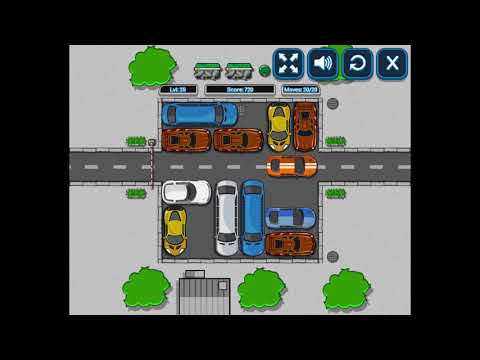
Each puzzle places a highlighted car behind a wall of vehicles. You slide pieces along their lanes to open a route. Movements are silky, collisions are prevented by the grid, and the challenge comes from sequencing. Early stages teach directional constraints, later layouts introduce tighter corridors that punish wasted moves. Solve in fewer moves to chase personal bests and practice pattern recognition. Parking Block rewards careful planning, but it is friendly to quick experimentation too.
Game Modes
- Level progression: a curated path of handcrafted puzzles with steady difficulty growth.
- Move efficiency runs: replay any level and try to beat your best move count.
- Relaxed play: no timers by default, take your time and think through each step.
How to Play
- Identify the target car and the exit.
- Scan for vehicles that can move immediately without blocking future lanes.
- Create a clear corridor by sliding cars along their allowed directions.
- Prioritize unlocking bottlenecks near the exit, then backtrack to widen the path.
- Drive the target car out, then replay to reduce your move count.
Controls
- Desktop: click and drag a vehicle to slide it along its lane. You can also use the mouse wheel or trackpad to scroll the view if needed.
- Mobile or tablet: tap and drag with one finger, release to set the piece.
- Reset or undo: use on-screen buttons when available to retry or step back.
Device Compatibility & Browser Support
Parking Block runs great in modern browsers including Chrome, Edge, Firefox, and Safari on Windows, macOS, Android, and iOS. It is built with HTML5, so there are no plugins required. For the smoothest performance, keep only a few tabs open while you play and close background downloads.
Mobile vs. Desktop Gameplay
On mobile, touch dragging feels natural for quick swipes. On desktop, a larger screen makes it easier to read dense layouts and plan moves. Both are excellent ways to enjoy Parking Block, so pick what suits your session.
Can I Play Offline?
You need an internet connection to load Parking Block on minigamesville.com. After it loads, some browsers may keep assets cached for a short time, but a stable connection is recommended for reliable play and progress saving.
Can I Play Unblocked?
Parking Block is an online browser game that runs right in your tab, which helps it work on many school or office networks. If your network filters block gaming sites, try a different browser or a personal connection. No downloads or sign-ups are required on minigamesville.com.
- Browser: play Parking Block free on minigamesville.com.
- Mobile: there is no official Parking Block app on the stores at this time. Want a mobile take on the genre? Try Parking Jam 3D here:
Tips & Tricks
Beginner Tips
- Work backward from the exit to spot the first true blocker.
- Favor long clearing moves that free multiple lanes at once.
- Avoid shuffling pieces aimlessly, every move adds up.
- Replay early levels to train your eye for common patterns.
Advanced Strategies
- Label bottlenecks mentally and open them in a clean sequence.
- Reserve a temporary parking space for staging pieces while you free the corridor.
- When two paths look viable, simulate the first three moves in your head and pick the branch that creates more freedom.
- Chase optimal clears by eliminating any move that only reverts a previous step.
Features
- 🧠 Smart sliding-block puzzles with clean logic
- 🚗 Satisfying car movement and smooth drag controls
- 📈 Progressive difficulty that respects your time
- ⏱️ No timers by default, think at your pace
- 🔁 Quick restart and replay for better move counts
- 💾 Local progress saving in your browser
- 📱 Plays great on mobile or desktop
- 🎯 Perfect for short, satisfying sessions
Unlockables & Secrets
Parking Block focuses on clean puzzle design. The real unlocks are your improved routes and lower move counts. Try setting personal targets, like solving a level in under 10 moves or finding a different solution path than before.
Cheats & Mods
There are no official cheats for Parking Block. Third-party mods or scripts can harm performance or your device, and they can break the puzzle logic. Stick to built-in features like reset or undo when available, and practice efficient sequencing to master tough levels.
Walkthrough Summary
A reliable approach for many layouts is to clear space near the exit first, then cascade that freedom back toward the start. Free the lane that blocks the target car’s final turn, then widen the corridor in stages. If you get stuck, back up to the last move that reduced freedom and try the other branch.
Scoring, Records & Progression
Parking Block encourages efficiency. Track your best move counts per level and replay to shave off steps. Treat each stage like a speed cube scramble, where the shortest path is the prize.
Why Play Parking Block
It is the perfect blend of quick-hit fun and brain-teasing depth. Levels are bite-size, the rules are simple, and the satisfaction when the exit opens is pure. Whether you are on a lunch break or commuting with a phone in hand, Parking Block delivers a clean puzzle loop you can enjoy anywhere.
Pros & Cons of Parking Block
- Pros: crisp visuals, intuitive drag controls, instant restarts, great on any device, relaxing yet tactical.
- Cons: purists may want harsher move limits, later levels can feel methodical if you prefer action-heavy gameplay.
- Use the latest Chrome, Edge, Firefox, or Safari for best input latency.
- Disable heavy extensions on the game tab to prevent stutter.
- On laptops, plug in or switch off battery saver to keep frame pacing smooth.
- On mobile, close background apps and enable high refresh rate if your device supports it.
- If something feels off, refresh the page to reinitialize input and audio.
Similar games to Parking Block
- Tap It Away — clear blocks to free space, a satisfying one-tap declutter puzzle.
- Sudoblocks — zen block placement with sudoku-style logic.
- Robot Awake — route laser beams to power bots in compact logic stages.
- Mini Train — place pieces to guide a tiny train to the goal.
- Green — minimalist color puzzles with clever rules to discover.
- The Sort Agency — satisfying sorting challenges that reward tidy thinking.
- Parking Fury 3D: Night Thief — a stealthy 3D parking adventure for a change of pace.
FAQ
What is Parking Block?
Parking Block is a sliding car puzzle browser game where you move vehicles to open a path and drive the target car out.
Is Parking Block free to play online?
Yes, you can play Parking Block free on minigamesville.com in your browser with no download.
Does Parking Block work on mobile?
Yes, it plays smoothly on mobile browsers. If you prefer a native app experience, try the suggested mobile alternative linked above.
Can I play Parking Block unblocked at school or work?
Many networks allow it since it runs in-browser. If your network blocks gaming sites, try a different device or a personal connection.
How do I get better at Parking Block?
Practice move planning, open bottlenecks first, and replay levels to cut unnecessary steps.
Does Parking Block have multiple modes?
Parking Block focuses on level-based puzzles with optional move efficiency goals, perfect for short sessions.
Will my progress save?
Progress is saved locally in your browser storage, so clearing cache or switching devices can reset it.
Conclusion
Parking Block takes the best parts of sliding-block design and trims the rest, delivering a crisp, mobile-friendly browser puzzle you can play anywhere. It is relaxing, tactical, and endlessly replayable if you like chasing lower move counts.
Hit Play above to start Parking Block on minigamesville.com, share it with a friend, and see who can unlock the grid in fewer moves. Enjoy your new go-to parking puzzle.

 Loading...
 English
 Shqip
Shqip
 বাংলা
বাংলা
 Български
 简体中文
简体中文
 Hrvatski
 Čeština
 Dansk
Dansk
 Nederlands
 Suomi
Suomi
 Ελληνικά
 हिन्दी
 Magyar
 Bahasa Indonesia
 日本語
日本語
 한국어
한국어
 Lietuvių
 Bahasa Melayu
 Norsk
Norsk
 Polski
 Português do Brasil
 Română
 Slovenčina
 Slovenščina
 Svenska
 ไทย
ไทย
 Türkçe
 Українська
 اردو
اردو
 Tiếng Việt
 isiZulu
 Español
 Français
 Deutsch
 العربية
 Italiano
 فارسی
فارسی
 Русский